Getting the transcript
Reading the captions from YouTube. A video nobody has opened here before takes 10 to 30 seconds; this page fills in on its own.
Getting the transcript
Reading the captions from YouTube. A video nobody has opened here before takes 10 to 30 seconds; this page fills in on its own.
WULFF DEN · @WulffDen
This video has no Most replayed graph yet: YouTube shows one only once a video has enough views. These are the moments viewers replayed most in WULFF DEN's most watched videos.
Most replayed moment at 4:57
4.6x that video's typical replay level
>> Thank you. This Factor really hit the spot. >> So, how did you get the bag back? >> I'm in their POLYCULE NOW. >> HEY! STOP HOGGING THE ARMREST. >> I'M NOT even touching you. I'm going to punch THIS GUY. >> NO, DON'T! MY POLYCULE! >> I FIRST GOT MY HANDS ON THE Thor right when it was launching, maybe even before
Said at 4:51
The graph counts replays. It does not show where viewers stopped watching.
Words
3,176
Runtime
17:27
Speaking pace
182wpm
Reading time
13min
182 words per minute, just over the 181 median of 349 measured videos. That distribution comes from the 349-video hook study.
Opening (first 30 seconds)
What happened? Why aren't handheld so handheld anymore? I love my Steam Deck. I love that I could take my PC games with me, but I would love it more if it fit in my jacket pocket. I don't want to have to carry around a whole backpack just because I want to bring my Steam Deck. I also think that like sitting on the train or in a waiting room with the whole Steam Deck is a bit performative. And that's why I've been loving these little Android handhelds lately,
91 words, the words spoken in the first 30 seconds at 182 words per minute.
Free, no signup. See how the first 30 seconds hold attention, with rewrites.
Sentence shape
| Measure | This transcript |
|---|---|
| Sentences | 224 |
| Average words per sentence | 14.2 |
| Longest sentence | 56 words |
| Questions asked | 10 |
| Sentences containing a number | 24 |
Most used terms
Filler phrases
48 in total: like 32 · kind of 6 · actually 3 · basically 2 · you know 2 · I mean 1 · literally 1 · sort of 1.
A literal whole-word count of the same phrase list the Prepublish browser extension uses, so a phrase inside another word is not counted and a phrase used in its ordinary sense still is. It is a count and not a judgement.
What this transcript is
Every word below is the caption track YouTube publishes for this video, pulled from the video itself and reproduced unchanged. It is not Prepublish's writing, not a summary, and not a re-transcription: it is the video's own published captions. English captions, generated automatically by YouTube, in the video’s original language. Source: the video on YouTube. A channel that would rather this page did not exist can ask for its removal through the contact page, and it is removed.
What happened? Why aren't handheld so handheld anymore? I love my Steam Deck. I love that I could take my PC games with me, but I would love it more if it fit in my jacket pocket. I don't want to have to carry around a whole backpack just because I want to bring my Steam Deck. I also think that like sitting on the train or in a waiting room with the whole Steam Deck is a bit performative. And that's why I've been loving these little Android handhelds lately, the Ein and the Retroids.
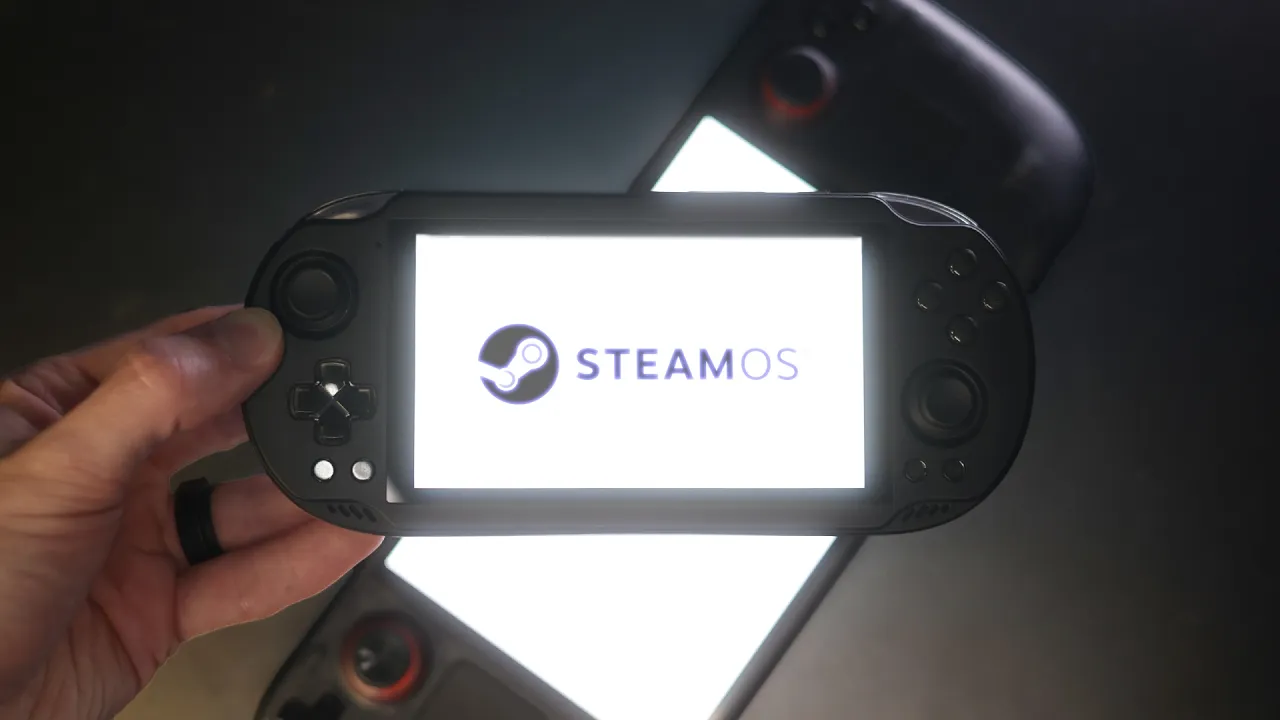
And lately, they've been able to play Steam games with a surprising amount of power, too. These things have already been mini Steam Decks, but now we can take it one step further. We can get rid of Android entirely. It's never been easier to put straight up Steam OS on here. The instructions have just five steps. It took me less than 30 minutes. All you need is a micro SD card, and this sucker really can just be a mini Steam Deck.
This is Armada OS. It takes Steam OS, Fedora Linux, and Rocknick and rolls them all into one, which gives you the closest equivalent to a Valve made device that can actually fit in your pocket. It currently only supports the latest like Snapdragon 8 devices or equivalent, [music] you know, the Ein, the Retroids, the Ionos, the Conquer. It supports the Iron Thor, the one everyone loves, but I opted to put it on my Ein Odin 2 Mini because I love how small and relatively powerful this thing is.
The screen is not as good as I remember it being. The mini LED screen has some bad light fall off at the edges [music] of bright white colors, but it kind of has like a vibe. You know how I use Pro Mist filters and everybody hates it because it makes lights bloom like a little too much? Well, it's like a vi. It's like a vibe. It's a vibe. I opted not to put this on my Ein Thor because Armada OS does not utilize the bottom screen in game mode.
That's more of a Steam OS problem. It just kind of feels like a waste on there. I also did it to my Odin 2 Portal because I wanted to test the difference between installing this OS on a micro SD card versus the internal storage. And the Odin 2 Portal that I have has a lot of internal storage. So, this can be a completely non-destructive install if you want to just put it on a micro SD card. You can go back and forth from Android to Steam OS.
There's really no downside. It seems to have similar compatibility to using GameHub or Game Native in Android. Don't expect this thing to be running miracles. It's still a Snapdragon processor in here. So, you're not going to be playing as powerful games as you would on an actual Steam Deck. Expect your smaller games. This is a mini Steam Deck, which is honestly what I mostly play on my Steam Deck anyway. your hollow knights, your ball X pits, also your sky rims.
Some light 3D stuff will work on here. I've been using these devices a ton to play game demos. Right now, I basically carry one of these around with me at all times to playap. It's been my most anticipated game of the year so far. It's sick. It just came out. >> Yeah, these are all things you can do on Android now. But the real benefits to Steam OS are just that you can boot directly into a nice UI with all your games neatly laid out.
The environment is tailorade for gaming, unlike Android, which is a phone platform. You have a nice performance overlay during games. You have a sidebar to change your settings. You have a much better sleepwake function. It makes me more likely to actually play this thing if I'm out and only have like a little bit to play and might want to have to put it away real quick. Sure, Android has a sleepwake function, too, but not every app does.
I feel like I'm rolling the dice when I put an Android device to sleep while I'm playing a game. It might not wake back up correctly. You also have a full Linux desktop if you really want it to plug in a mouse and click around on this tiny little screen. And this is where I tell you about this video sponsor, Logitech, and the best mouse that I've ever used in my whole entire life. Yeah, it's Logitech this week. Yeah, I can't believe it either.
Everybody be on your best behavior. Don't ruin this for me. This is the Logitech Pro X2 Super Strike. It's widely considered like the best mouse ever for competitive gaming. It has a hidden little compartment here that the wireless dongle can sit in. And we can just pop it right out and into our little handheld. And look at that. We're ready to click on things. Yeah, it can be your nice little compact travel mouse, but really it's meant for competitive gaming.
It's extremely light at just 61 g. The polling rate can go as high as 8,000 hertz, which means it will never miss your lightning fast reactions. Use the GI Hub software to make the Super Strike your own. Set your sensitivity, adjust your grip, set what each button does, change your polling rate, and whatever else you might need. What has everybody going nuts over this mouse is the clicks, which are not actual physical clicks.
It's haptic feedback that feels exactly like a click. If I turn it off, it's not an actual click. But if I turn it on, it's giving you like a haptic feedback. This is supposedly better for getting you the fastest response time possible. They literally reinvented the mouse click to make it feel better. No, don't blame it on the mouse. Check out the Logitech GPro X2 Super Strike at the link in the description below. And maybe you can stop blaming your mouse for keeping your heart stuck in silver.
Oh, okay. I think I got it. Wow. You really really getting better, huh? Oh, we're done. Sorry, I was playing tap. So, to put Steam OS or Armada OS on here, first you're going to need a micro SD card. I wanted a decently sized one. And this is how I learned that Nintendo brand 256 GB micro SD Express cards are actually cheaper than 256 GB regular micro SD cards at Best Buy. That is crazy. They won't do micro SD Express speeds, but I mean, if it's cheaper, why not?
The setup is extremely simple. Read the five steps on the Armada OS website. Although, I'll jump in here and say that one of the steps I wouldn't have known what the hell to do if it wasn't for Retro Game Cors video guide. It was in step three where it says using your devices builtin run script as root tool. How the hell am I supposed to know what the that is? It's in the settings under device settings. By the way, if there's an Armada OS dev watching, why don't you just like put a screenshot or something of the settings there so people know where it is or make that text blue text and link to the part in Retro Games video or something so that we know what the hell to do.
Otherwise, the setup is extremely self-explanatory. It took me pretty much exactly 30 minutes the first time that I did it from butt in the chair to downloading a game in Steam OS. And a lot of that time was just spent looking at loading bars. Honestly, you can then take it one step further and move the Armada OS build from the micro SD card to the internal storage of the device if you really wanted to. You don't have to, but you can.
You can also choose how much space you want to allocate on the internal storage between Android and your Linux Armada OS build. This will unfortunately wipe and reset your Android build. So if you want to leave your Android data untouched, stick to using the micro SD card. There doesn't seem to be a downside to using the micro SD card. I did both because I wanted to see if there were any major differences. These micro SD card slots only seem to operate at UHS1 speeds, I'm pretty sure, which is relatively slow in the SD card world, but this doesn't seem to have any effect whatsoever.
My Odin 2 Mini is running off of the micro SD card, and the Odin 2 Portal is using the internal storage. These two devices have the exact same specs otherwise, so this is an applesto apples comparison. I noticed that the Odin 2 Mini using the micro SD card might have gotten like two or three extra frames on average, but that like doesn't make any sense. I would chalk that up as a fluke. At best, you might notice some slightly faster load times on the internal storage versus the micro SD.
This is most noticeable when you're booting it up, but I didn't really notice anything during game play. This is minor. Micro SD is just way easier to deal with. Unfortunately, you can't just remove the micro SD to switch back to your Android build. You have to open the bootloader and swap over to Android that way, which isn't a huge deal. It's as easy as holding volume down while you're turning on the device. In terms of performance, it's about what you would expect from an Android device running Steam games.
It's not going to just magically conjure up power out of thin air. You can expect your small games, your Ball X pit, your Hollow Knight, those types of games. Expect those to run flawlessly, which we've been able to do for a while now, but it's still kind of amazing that you can even do that. Neon White, a 3D game, ran around a solid 60 frames per second with no issues. Skyrim ran surprisingly well. Bumping it to low settings got me 45 frames per second.
This is, I think, a good example of a game running better on Armada OS versus Android. On Android via GameHub or Game Native, Skyrim has a weird old and broken launcher. It frequently breaks and gets all weird or it plays in like a windowed mode and there's nothing you can do about it. Sometimes it's kind of a crapshoot if it's going to work or not. Here in Armada OS, it's kind of acting just like a Steam Deck because Steam OS's game mode is more or less a locked down environment.
The game is more in focus and is way easier to navigate and start up. And I think this helps in terms of performance, too. Even if it is just slightly more performant, this is also way more of a beautiful game than I remember. Maybe it's just the colors on this screen. Cyberpunk would have been a great benchmark. Doesn't load at all. It crashes every time. That's unfortunate. I'm also able to play Metal Gear Solid 4 with some frame dips and extremely minor graphical glitches.
This is the re-release on Steam, so I'm playing what is essentially a PlayStation 3 game at a fairly consistent 60fps. This is pretty impressive to me. I'm playing this game on my Steam machine. It's nice to know I can continue playing it on here if I really wanted to. In the side menu, you also have performance modes that work here, too. You have eco, balanced, and performance. Honestly, I'm leave it at performance most of the time.
I used eco when I was playing tap, and I was getting some frame dips close to like 50 frames per second instead of 60, but it's fine. That's a game where I might want more battery life than performance. There's also decki controls and armada controls. Here you get to change your effects preset and a whole bunch of other stuff that I don't really quite understand. I did notice some strange quirks like the speakers would sometimes crackle every once in a while, which I guess is not the end of the world.
Also, I noticed that the vibration just when typing things in using the keyboard is like really harsh. Sounds like a car revving up. So, I guess these are sort of driver issues that are deviceed dependent. They might be finicky depending on what hardware you use. For whatever reason, I could not get Hades 2 to load for the life of me, which is very upsetting because this game runs very, very good on Game Native and GameHub in the Android environment.
It also is one of the games that they showcase on the Steam frame. So, we know it can run on ARM. I tried looking it up and no one else can get this to run in Armada either, unless you have an Odin 3, which has a little bit of extra power. I saw some people getting it to run on there, but that's basically it. Sorry, I was incrementing my game. I know this is a hard sell for some people because they just want the most amount of power possible in as small of a form factor as possible.
And that would be really cool, but it would also be really expensive. I would argue that I most of the time don't want or need that much power with me. If I wanted to play a game with that much power, I would just use like my gaming PC, which I already spent a ton of money on. If I'm playing a small indie game like Ball X Pit, it would be nice just to be able to take it with me, that's the perfect game to be picking up for a quick sesh and putting it back down when my name gets called at the doctor's office.
And what I've been playing on it right now is IGTP. It's stands for an incremental game that is also a platformer. It's a mix between Cookie Clicker and Mario Maker and it'sing awesome. You do a run of a little platforming level. Try to get the most optimal time you can. Then a ghost of you completes that level over and over again. So the quicker you do it, the quicker your ghost will do it. So I just do a run, add some clones, and then I put the device down while I go and do something else.
It really is the perfect incremental couch game, and it's perfect for a handheld like this. And of course, cloud saves make it so I don't need to be continuing my playthrough on these devices. I could pick up where I left off on my PC if I wanted to. Another argument for this thing being a great mini Steam Deck, and that's what I'm doing right now. And then I put it down in between takes. Since this is just full-blown Linux, you can put your emulators on Armada OS 2 just like you would on a Steam Deck.
You could add the emulators individually using the desktop mode, or you can just use mu deck to have it automatically do everything just like I did on my Steam Deck many moons ago. And it should play everything up to Nintendo Switch just fine, just like it does on the Android build. I opted not to do this because I already have Android set up with all my emulators and all my games anyway, and performance should be about exactly the same.
So, if I wanted to play my ROMs, I could just boot up Android. And if I wanted to play my Steam library, I could just boot up Steam OS. You could also make a nice launcher in Android so that all your games are laid out all aesthetic like so Instagram will love you. I kind of just like having the default Odin launcher so that I can launch the emulator that I want to use and not the specific game that I want to play. Most of these top-end emulators just work better when you launch the games from inside the emulator.
It handles all the little quirks way easier when you do it this way. I noticed it was updating with FEX. That's the translation layer, I think, that the Steam Frame headset uses to get games to run on that Snapdragon processor. So, this is using the same stuff that the Steam Frame is using. So, as development on that gets better, this will get better, too. I did see today, it was like six hours after it was posted, somebody just took the Steam Frame Steam OS and ported it to this type of Snapdragon chip.
None of the devices were tested. They were all untested. So, I think for now, Armada OS is probably the way to go. But again, as development continues with Steamframe and FEX, this thing will just get better and better. And these devices are becoming more and more powerful. So, compatibility with your games is just going to be better and better. The only hope that I have for the future is Valve should make a little tiny guy just like this.
I'm so sick of how big all of these official PC handhelds have to be. So, what do you guys think about my little mini tiny Steam Deck? Have these devices been on the back burner for you? And does this sell it for you any at all? Or do you have one of these and want to try this out again? It took me less than 30 minutes. Leave it in the comments below. Add me on Twitter. Any and all this other social media garbage. Thank you, Logitech, for sponsoring this video.
Don't forget to check them out on the best mouse that I've ever used [music] in my whole life that I think my wife is stealing from me. I told her I was getting that and she said, "I want that. I'm taking that." So, thank you to the podcast patrons scrolling on the bottom, youtube.com/wolfdenpodcast. Most important thing you can do is subscribe to me if you like these types of videos and share this with a friend, a friend who is on the cusp of getting one of these things.
Maybe you can push him over the edge. Thank you very much. I'm going to keep in incrementing my game now. Thank you. Thank you.
The words are the caption track's own and nothing is reworded or re-transcribed. Paragraph breaks are placed between sentences so the text reads as prose.
Free tools for your own script. No signup, no login.
Paste your draft and see where viewers are likely to drop off, with a rewrite for each weak line.
Paste the first 30 seconds of your own draft for a hook score and rewrites.
Check your draft against YouTube's advertiser-friendly guidelines before you record it.
Read this channel's public videos and transcripts, and download a writing brief for it.