Getting the transcript
Reading the captions from YouTube. A video nobody has opened here before takes 10 to 30 seconds; this page fills in on its own.
Getting the transcript
Reading the captions from YouTube. A video nobody has opened here before takes 10 to 30 seconds; this page fills in on its own.
Web Dev Cody · @WebDevCody
This video has no Most replayed graph yet: YouTube shows one only once a video has enough views. These are the moments viewers replayed most in Web Dev Cody's most watched videos.
Most replayed moment at 1:43
2.7x that video's typical replay level
basically build your containers, and you're going to put those in something called ECR. So, this is like a storage location for your container images, and then ECS can actually connect to that to pull the image to run your service. Now,
Said at 1:38
The graph counts replays. It does not show where viewers stopped watching.
Words
1,901
Runtime
7:31
Speaking pace
253wpm
Reading time
8min
253 words per minute, above the 201 75th percentile of 349 measured videos. That distribution comes from the 349-video hook study.
Opening (first 30 seconds)
I wanted to give you a preview of what agentic development and the metaverse could have been like, but unfortunately Mark Zuckerberg just fell short on delivering that promise. But now that I'm building it, it's going to be successful. So basically, I'm going to walk you through my virtual office where I am managing all of my agents that work on my different projects. And of course, we have a downstairs basement garage with all my Lamborghinis and my Ferraris. But let's just go ahead and walk up the office and I'll show you how my company is kind of working. So inside the office, we have the ability to spin up agents. All right, we have these tables that are sitting around. You can go
127 words, the words spoken in the first 30 seconds at 253 words per minute.
Free, no signup. See how the first 30 seconds hold attention, with rewrites.
Sentence shape
| Measure | This transcript |
|---|---|
| Sentences | 111 |
| Average words per sentence | 17.1 |
| Longest sentence | 51 words |
| Questions asked | 3 |
| Sentences containing a number | 7 |
Most used terms
Filler phrases
52 in total: actually 11 · kind of 9 · basically 8 · like 8 · um 7 · you know 5 · uh 3 · I mean 1.
A literal whole-word count of the same phrase list the Prepublish browser extension uses, so a phrase inside another word is not counted and a phrase used in its ordinary sense still is. It is a count and not a judgement.
What this transcript is
Every word below is the caption track YouTube publishes for this video, pulled from the video itself and reproduced unchanged. It is not Prepublish's writing, not a summary, and not a re-transcription: it is the video's own published captions. English captions, generated automatically by YouTube, in the video’s original language. Source: the video on YouTube. A channel that would rather this page did not exist can ask for its removal through the contact page, and it is removed.
I wanted to give you a preview of what agentic development and the metaverse could have been like, but unfortunately Mark Zuckerberg just fell short on delivering that promise. But now that I'm building it, it's going to be successful. So basically, I'm going to walk you through my virtual office where I am managing all of my agents that work on my different projects. And of course, we have a downstairs basement garage with all my Lamborghinis and my Ferraris.
But let's just go ahead and walk up the office and I'll show you how my company is kind of working. So inside the office, we have the ability to spin up agents. All right, we have these tables that are sitting around. You can go ahead and just click on any of these and you can delegate an agent to do something. So for example, I can just go ahead and say hi. We're going to do this with Claude Code, and I will just go ahead and spin up this nibble agent who will start trying to contact Claude Code, make a session, and I can view this and actually ask it some questions.
So as an example, use the ask tool to ask me my favorite color. Okay, so let's just click out. And when the agent needs input from me, it'll turn red. I can come over to it and I can actually click into this and give it a response. Let's just say red. We also got a dog called Scout. We can just go ahead and pet him real quick, make him happy. So here is where we basically spin up the agents. And of course, when you're done with the agent, we don't have the money to keep them lying around.
So we're actually going to have to fire this agent when he's done doing his work, and you'll see that he gets a cardboard box, packs his things up, and unfortunately has to go home. But luckily, we have an infinite supply of agents. I can just go ahead and spin up others whenever I want. So some other cool things we have in this prototype is this is actually all multiplayer. So I can run this on a virtual machine somewhere and every one of my team could potentially connect to view this same virtual office.
And they can spin up their own agents. If someone I'm working with goes off to lunch, I can come through and take care of any of his agents that might be running. And then also, we have the ability to manage pull requests and GitHub issues. So I'm going to go switch to another project. Let's go in the elevator so we can switch to a different project here. I'll I'll back to agent office. And then we are going to find the pull request board in the issues board.
So the issue board is hooked into GitHub. So if I click on the issues board, these are all the same GitHub issues that are on GitHub. I can go through here, click on any of these, and I can kick off an agent to start doing the work on it, or maybe do like a follow-up uh, you know, review on it, or just leave a comment on it or something. We also have the ability to talk directly to a GitHub issues agent. So if you don't want to deal with a board, you just want a new GitHub issue, you can just click on him and say, "Hey." I'm going to say, "Create a testing GitHub issue." Let's just send that over, and at some point we should hopefully see testing show up here.
We also got the pull request. So again, an agent can help us with merging and fixing pull requests, but we're going to go ahead and look at the board. We have four that are currently in review, and I could go ahead and basically kick off any of these agents to go try to fix the conflicts with this pull request and merge it. I do think I have an agent already running on that, so I'm not going to kick that one off. And then of course, when the agent merges his pull request, it's going to play this gong.
So that everyone who's in the server can actually hear that the agent finished. So this one does need a little bit of feedback. Let's just go ahead and help it out. Um, yeah, let's just go ahead and do that. Just need a little bit of assistance there of how to actually build out this product. Some other cool things, we have a whiteboard here, and we can actually draw live on this whiteboard. So I'm going to go and just like delete some stuff here, and then I'm going to draw maybe a smiley face.
So I'll do like some eyes. Uh, let's like do this, and do a rectangle here. And now I want to close out of this Excalidraw whiteboard, you'll see that canvas basically render live what I just drew. So anyone who's in the server kind of talking about design could potentially use this whiteboard together. We also have the ability to share your screen. So over here, if I click on this, I can actually share my entire screen.
And I will just go ahead and share my OBS, and you will see that I can now share the desktop of my computer, and everyone who's in the server can basically watch, and actually use voice over IP. I do have the ability to use voice, so up here at the top, join voice, it's going to ask you for permission, and then you can talk to the people who are in your virtual office as well. We also have the ability to play some music.
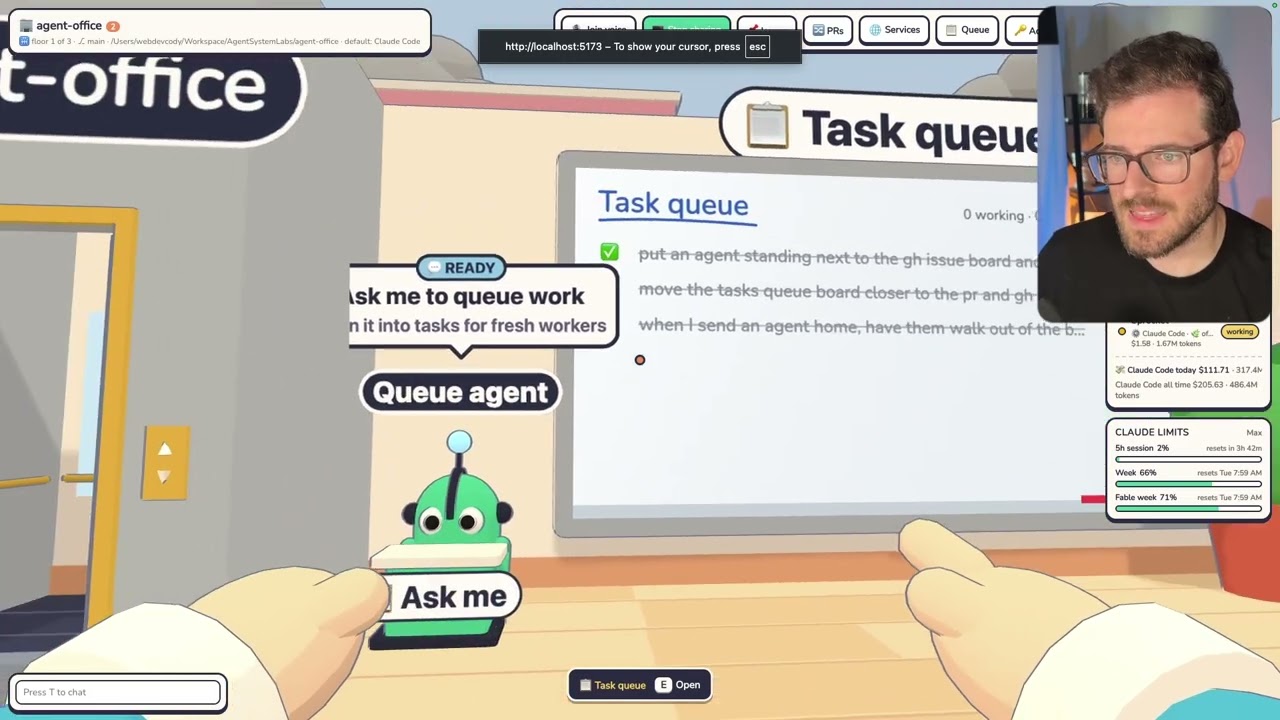
So, we got this late commit song. Let's go and play this real quick. Now, the very last thing I'll show is we have this task queue. So, if you do have some random work that needs to be done, instead of having to go and mess with GitHub issues and pull requests, you can just go to the task queue. You can just kick off a random one-off task or a bug fix. It'll automatically create the pull request. It'll work on it in the work tree, and then the agent will hopefully try to uh get that all finished for you.
But, you can also just talk directly to the queue agent who can do this stuff for you. So, if you have something that you need to get fixed, throw it into the queue agent, he'll add it to the task queue, and then also you'll have an agent spin up to start doing the work. What else can we demo? We have the ability to put pictures on the wall. So, if you have a picture online that you find, you can actually just put this anywhere in your wall.
So, you have a motivational picture that all your agents can look at every day while they're doing work. I'm going to go upstairs to my office, so I have a better view of what my agents are doing. I think it is good to be able to micromanage your agents from up here. Sometimes you just want to be separated from your agents and just let them do the work instead of, you know, breathing over their shoulder and looking at what they're doing.
So, in the meantime, you can sit down and play a little bit of Minesweeper directly in your office. So, let's just see if we can kind of get this game working real quick. But, you know, something to pass the time as your agents are working. Now, all these agents are on this particular floor, and every floor of my office is scoped to a particular project. So, in this case, we are on the agent office. So, you can see here agent office is the level we're on, but we're going to go up to another I'm going to go to my Survive the Night FPS game.
And inside of this project, we do have some agents that are already jumping around, and we have an application running. So, if I go to the Survive the Night board, I can open up and start experimenting with a work tree that one of my agents has spun up. So, this is a 3D game that I asked Opus to build. Um it's a survival zombie game. Basically, there's a giant map you have to walk around. You have an inventory system where you can craft and equip weapons.
Um I'm still trying to build this out, but basically I took my Survive the Night game that I had in 2D and I told Opus to rebuild it in 3D, and this is what it basically built up overnight from one prompt, which is a pretty amazing in my opinion. Um but I'll make more videos about this if I continue to iterate on it. Let's go back to my agent office application, and I'm trying to remember if there's anything else I need to talk about.
Now, I don't recommend smoking, but this patio does have the ability to, you know, do a little smoke break if that's something that's um, you know, necessary for you to a little break from all this agent micromanaging. But you can just go ahead and sub that out, and we're going to go back inside and see if there's any more features I should probably talk about. All right, so that's all I wanted to share with you. I will say that I think I'm going to start using this as my primary tool to manage these agents.
I mean, I've been building out this Nebula 2E application for a while now, and I'm just kind of tired of this left side navigation that every single agent decoding tool is is using. I just don't think this is the best user experience. Is it cool? Yeah, but is this cooler? Absolutely. I think being able to manage your agents in this 3D environment, I do kind of wish the metaverse took off. We are 3D visual creatures, and so if you can actually do work in a 3D environment, I think it's a little bit easier to to manage in my opinion.
Anyway, that's all I wanted to share with you all. I thought this is a pretty cool prototype. Again, this is like 1 day of Opus 5.5 building out this entire application, and I was pretty impressed with this. And I also feel like this is a more enjoyable way to do agent coding. Um it kind of brings back the joy of this career instead of looking at a flat screen all day and watching these agents run. It's kind of nice having like a 3D environment that I can kind of customize.
And maybe soon I'll add in the ability to customize this this world a little bit better. Um but yeah, that's kind of what we have going on right now. And if you guys enjoy, be sure to go star the repo. Have a good day and happy coding.
The words are the caption track's own and nothing is reworded or re-transcribed. Paragraph breaks are placed between sentences so the text reads as prose.
Free tools for your own script. No signup, no login.
Paste your draft and see where viewers are likely to drop off, with a rewrite for each weak line.
Paste the first 30 seconds of your own draft for a hook score and rewrites.
Check your draft against YouTube's advertiser-friendly guidelines before you record it.
Read this channel's public videos and transcripts, and download a writing brief for it.