Getting the transcript
Reading the captions from YouTube. A video nobody has opened here before takes 10 to 30 seconds; this page fills in on its own.
Getting the transcript
Reading the captions from YouTube. A video nobody has opened here before takes 10 to 30 seconds; this page fills in on its own.
Alex Ziskind · @AZisk
Words
4,450
Runtime
26:33
Speaking pace
168wpm
Reading time
19min
168 words per minute, between the 160 25th percentile and the 181 median of 349 measured videos. That distribution comes from the 349-video hook study.
Opening (first 30 seconds)
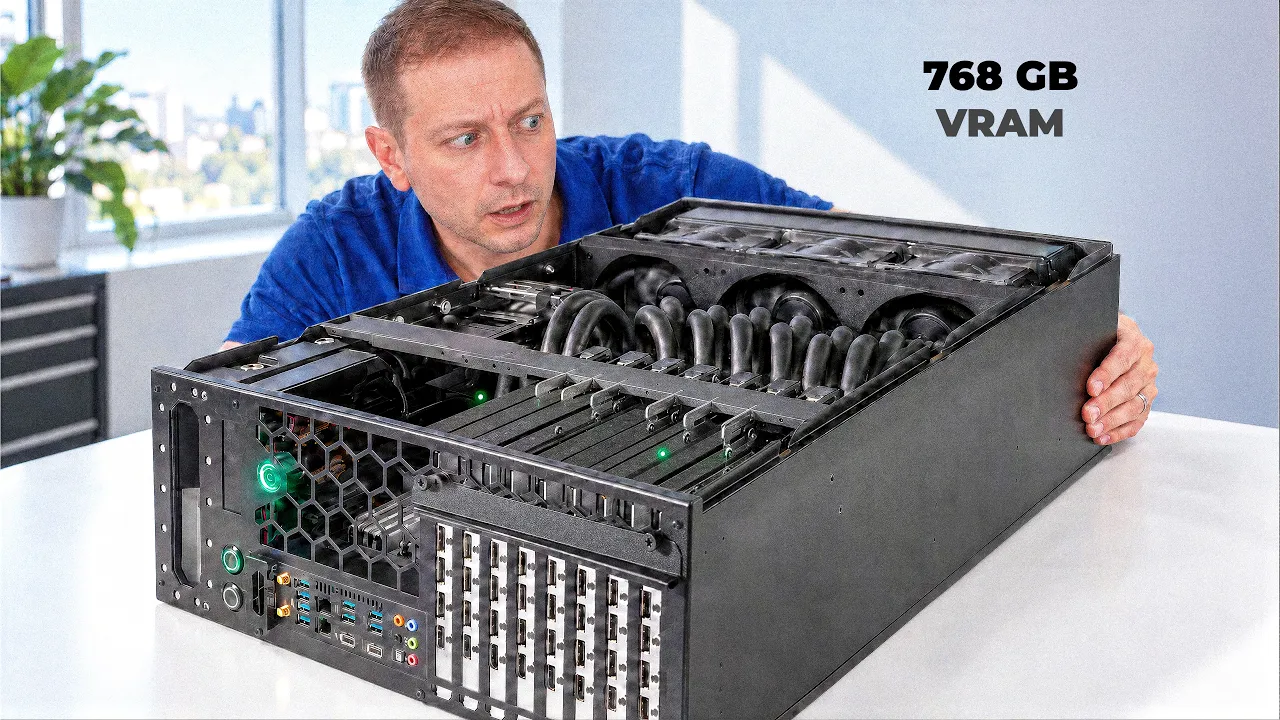
So, I recently built this machine with four RTX Pro 6000s, but who needs four when you can have eight? This is definitely sold last week. Right before I dropped the box on my face, I got something new. Oh, yeah. This is the Camino Grando, and it's 768 GB of VRAM all in one box. Now, the box is not that much bigger than the other box. Actually, it's quite small for having eight of these things in here, but it's heavy. This
84 words, the words spoken in the first 30 seconds at 168 words per minute.
Free, no signup. See how the first 30 seconds hold attention, with rewrites.
Sentence shape
| Measure | This transcript |
|---|---|
| Sentences | 457 |
| Average words per sentence | 9.7 |
| Longest sentence | 37 words |
| Questions asked | 26 |
| Sentences containing a number | 154 |
Most used terms
Filler phrases
46 in total: like 12 · actually 10 · kind of 6 · right? 5 · uh 5 · basically 4 · I mean 1 · literally 1 · sort of 1 · you know 1.
A literal whole-word count of the same phrase list the Prepublish browser extension uses, so a phrase inside another word is not counted and a phrase used in its ordinary sense still is. It is a count and not a judgement.
What this transcript is
Every word below is the caption track YouTube publishes for this video, pulled from the video itself and reproduced unchanged. It is not Prepublish's writing, not a summary, and not a re-transcription: it is the video's own published captions. English captions, generated automatically by YouTube, in the video’s original language. Source: the video on YouTube. A channel that would rather this page did not exist can ask for its removal through the contact page, and it is removed.
No Script X-ray for this video: YouTube shows a Most replayed graph only once a video has enough views.
So, I recently built this machine with four RTX Pro 6000s, but who needs four when you can have eight? This is definitely sold last week. Right before I dropped the box on my face, I got something new. Oh, yeah. This is the Camino Grando, and it's 768 GB of VRAM all in one box. Now, the box is not that much bigger than the other box. Actually, it's quite small for having eight of these things in here, but it's heavy.
This thing weighs almost as much as me. Eight RTX Pro 6000s are stacked in here. And yeah, they're close together. That's because this whole thing is liquid cooled. A little secret, I've actually been testing this thing for a few months. I was so excited about this thing. And there are a few things that I'd like to point out that are not great besides the obvious amazing thing that it's going to be super fast. And of course, it's going to hold gigantic models and run them all quickly.
But for whom? Who needs something like this? Sure, one developer with a dozen coding agents could use it all at once or a whole team of developers can use it in the office at the same time. For example, a 400 GBTE LLM with over 400,000 token context window. Yeah, I ran that all that one box, no cloud. So, of course, I had to put it through its paces. [music] So, here's the thing. Everybody talks about running local LLMs and usually that means one person, one laptop, one model, you get 30, 40 tokens per second and you're happy, right?
But that's not how developers work anymore. That was a year ago and now it's completely different. Even if you're solo, you're not running one chat window. You got a coding agent on this repo, you got another one writing tests over there and another one reviewing and every one of them sends 50,000 tokens. not your prompt, but the whole context because yeah, you need to include all that. That's a team's worth of load from one person.
Uh, I probably should rephrase that next time. And if you're actually a team, you multiply that by 10. Today, I'm looking at the Camino Grando. Camino has been around for a while, and their specialty is to build these liquid cool GPU workstations and servers. I did not buy this one. They let me borrow it for a little bit. And at current prices, just the GPUs alone are about 15 grand a piece and there's eight of them.
So yeah, you better put these to good use. This thing comes as a 4 unitit chassis. You can rack mount it or you can desktop mount it, which is what I did. And it's 121 lbs just the machine, but it came in a big box. And for insurance purposes, I did not carry it alone. I had help. Right inside, we got a single AMD epic 9474F, 48 cores, 96 threads. It's an epic CPU. What can I say? 512 gigs of DDR5 is in there, too, which is an insane amount of RAM right now.
I understand. But then there's also the reason we're all here, eight Nvidia RTX Pro 6000 Blackwell Server Edition. Each one has 96 GB of VRAM. That's 768 GB of VRAM total. And did I try to run GLM 5.2 on it? Yes, I did. Did it succeed? Sort of. Now, for scale, the RTX 5090 has 32 gigs of VRAM. So, this is like 24 50s worth of memory in one box. That's a good title for this video. How do you manage to fit eight of these in a 4unit box when each one is a two slot card?
You can take that cooler off. Every GPU has a custom copper water block on it. It covers the die, the memory, and the VRM. And that turns the two slot card into just a single slot. Every pair of cards has its own little manifold. And the fittings are dripless quick disconnects, color-coded red and blue, so you can pull one GPU out without draining the loop. And the whole thing is one shared loop for CPUs and GPUs with a 450ml reservoir with pumps built into it.
Now, you may be wondering what it takes to power something like this. Yeah, 6 1/2 kW. That's like having four space heaters running all plugged into the same wall and it's not going to work. You need something special for that. Now, the Grondo comes with four PSUs and each one of them has a regular standard plug. So, you can run it into different outlets at the same time. They all combine the power, but make sure they're on different circuits.
Now, here's one thing that people often overlook with GPUs, with multiple GPUs, is PCIe lanes. This is why we need the Thread Ripper or the Epic. The Epic has 128 lanes. So each GPU gets a certain set of lanes, 16 to be precise, or at least most of them. Seven of them get 16 lanes and one of them gets eight lanes. Now, because GPUs are using up most of the lanes, you only have two M.2 slots, so you have to use them wisely.
And I I did run into issues where I had to swap out models because I ran out of space. There's also no Envy Link, so all these cards have to talk to each other via PCIe. There's four hot swappable 200 watt power supplies. That's 8 kW of capacity total. You probably don't want to use all eight. Yeah, it's going to destroy your stuff. 8 RTX Pro 6000 running at their full 600 watt potential. That's a total of 4,800 watts just in GPUs.
Now, I don't have a 8 kW circuit in here. So, I had two PSUs plugged into a 240 volt 20 amp circuit, one into a regular 120 volt 15 amp outlet, and another one in a Jackaryi battery. Yeah, it's on a jackeri. Hey, I'm only human. Okay, now just a quick bit of housekeeping. I ran the GPUs capped at 300 watts each instead of the default 600. Don't leave yet. Don't leave. I'll tell you why it worked fine. Partly because of my wiring situation. partly because when I pushed it at 600, the machine actually dropped on me a couple times overnight while I was doing my long runs.
You're probably thinking, half the power, half the speed, right? Well, that turned out to be one of the more interesting finds in this project. Whenever I'm working away from home, I end up connecting to networks I basically know nothing about. A network I completely trust. Not really. So, before I start working, I connect to Surf Shark. My terminal sessions, repo traffic, and container downloads all travel through an AES 256 encrypted tunnel, and Clean Web blocks a lot of the tracking and advertising junk that I don't want.
There's also an independently audited no logs policy. Plus, RAM only servers that get wiped every time they restart. And with the amount of hardware I have and I travel with, unlimited devices is a pretty big deal. It covers my MacBook, my phone, and pretty much any other device I have in my backpack that connects to the internet. And when I'm checking a server or sshing back to the office, that extra layer makes a lot of sense.
So head over to surfshark.com/alexiscin for four extra months free. And if it's not for you, there's a 30-day money back guarantee. Protect your connection. Get your work done. Now, back to the video. Let's talk about noise. The Camino says 39 to 70 dB depending on which fans you get because you can customize that. There's a 6200 RPM version and a 3,000 RPM version. But let me tell you this, you're not going to have this on your desk next to you.
Okay, it calms down after a little bit. >> Even at its quietest setting, under full AGPU load, it gets pretty loud. Yeah, it could get pretty loud if you're sitting next to it. I'd move away a little bit more. Maybe even more. Can you still hear it? Yeah. You need to be far away from it. Now, the cooling is a different story. The hottest GPU I saw was 62 Celsius and the CPU peaked at 65. So, the liquid cooling here is not a gimmick.
That's the reason this box exists. It's really good and efficient. [music] All right, let's go over some model results. Ubuntu 24.04, Nvidia Open Driver 610, CUDA 13, and VLM Nightly. I kept it updated as I was doing my testing. And we're using Tensor Parallelism across all eight GPUs. There's GLM 5.2 right on top. 433 GB of weights. And then a few other new ones came out, so I had to do those. Here's a list of five models I ran mostly in NVFP4 format, which is the 4-bit format, floating point that Blackwell supports.
It's what it was built for. The big boy GLM 5.2. This one was served with 49,600 token context window. Quen 3 235B. Getting a little bit long in the tooth that model, but it's pretty big. It's a mixture of experts model. 22 billion parameters active. 144 GB on disk. This size right here, 144 to about 185 for GLM Flash 5.3. This is kind of like the sweet spot for this type of machine. Sure, it can run bigger models, but then you're going to do context.
You're going to have multiple sessions, multiple agents hitting it at the same time, so you want to probably stick around here. GLM 5.2 loads in about 4 1/2 minutes and lands at 738 GB of the 784 available. That's about 95% of the VRAM on this machine just gone for one model. But it fits. That's the whole point. There's basically no other single box you can put on a desk that does this. There's a DJX station, which I recently did a video on.
That one has 252 GB of high bandwidth memory, which is way faster than this memory, but it doesn't have a total capacity to hold this model all in VRAM. By the way, the DJX Station is also really good at the smaller models. And I want to compare how the smaller models act on this machine versus the DJX station. Stay tuned for that. [music] Let's start where most of developers live. One developer, one agent. I know, I know you're using more than that now, but let's start at the baseline. 2048 token prompt, 128 tokens out.
On a single RTX Pro 6000, a 30 billion parameter class model is around 100 tokens per second. So, what happens when you spread big models across eight cards over PCIe? Ah, GLM 5.2 48 tokens per second generation. Okay, that's a 433 gig model doing 48. That's pretty good. Not blazing, but it's fast enough. We'll come back to that. Quen 3 235B 85. Wow. Okay. Now, here are some of the more modern models. Deepseek v4 flash 102 tokens per second.
GLM 5.3 104 and Quen 3.8 wins this one. 126 tokens per second. Quen 3.8 flash next by the way. All right. Quen 4 architecture. Boom. Oh, if you don't know what I'm talking about, Quen 3.8 models that came out earlier are actually Quen 3 model architecture or 3.8 and Quen 3.8 Flash. Next has Quen 4 architecture. Don't ask me why. I don't know why they did that. Okay. The other number you should be interested in prompt processing because this number matters a lot especially when you're using agents in a code editor.
For example, GLM 5.2 about 2200 tokens per second. Quen 3235B we're up a lot to 4779 tokens per second. GLM 5.3 Flash 8,300. Deepseek V4 flash 8700 and Quen 3.8 Flash. Next, holy cow 12,600. That's fast. Now, here's what it looks like in practice for a single user for time to first token on a 2,00 token prompt. A quarter of a second on flash next up to almost a second for GLM 5.2 and everything else is in between there.
When we look back at that 12,700 tokens per second of prompt processing, that means a 2,00 token prompt is basically instant. Now, I gave it a 128,000 token prompt. That's basically a whole codebase. a small code base on a Mac, on a mini PC, or pretty much anything else I've tested. A 128,000 token prompt is kind of a let's go make coffee situation. [snorts] >> Oh, okay. Coffee can wait. I'm still waiting for the M5 Ultras, which are about to come out.
That might change things a little bit, but on everything older, you're going to be waiting minutes. [music] As the prompt length increases, your time to first token also increases, sometimes quite a bit. Gwen 3.8 8 flash. Next, we're at 14 1/2 seconds to first token at 128,000 [music] tokens. For GLM 5.3 flash, we're at about 18 and 12. Deepseek V4 flash, we're at 26. And in GLM 5.2, wo, 50 seconds. That's the big boy, right?
So, yeah, to be expected. Still though, under a minute for the biggest model and about 15 seconds for the fastest one. Quen 3 235B didn't make it that far. We only got 32 and uh then it kind of crashed on me for the rest of the times. Sorry. So this is what eight GPUs earning their keep looks like because prompt processing that's the first stage of inference before token generation happens. This is all computebound. So everything happens on the GPU chip.
But then the second stage is token generation. So what happens to generation speed once all that context is sitting in memory? Huh? Every line is pretty much flat here, huh? Nothing happens. Flash Next is still generating at about 120 to 122 tokens per second even at 128,000 token context. GLM 5.2 pretty steady around what is that 40 50 none of them slow down. That's pretty incredible. Now, quick aside here because this matters to agents.
I'm using VLM here to serve the models and VLM has prefix caching. If your conversation has about 16,000 tokens in it and you send it another message without caching, GLM 5.2 takes 5.9 seconds to first token. And with caching, 0.83 seconds, 7 times faster. And you kind of see the same pattern all throughout. You'll say, "Alex, that's obvious. Turn on caching, right?" Well, especially with Agentic Flows, you want to have that option on.
Okay, remember the power cap? I ran the same test at 300 watts and then 600 watts. And you said 300 is going to be slower than 600. Well, actually, I'm the one that said it, but you were thinking it, weren't you? GLM 5.2 48 tokens per second at 300 watts. Quen 3235b 85. GLM 5.2, this is 32 users now, by the way. We got 111 tokens per second at 300 watts. And Quen 3235B 64 users 254 tokens per second. What does this look like at 600 watts?
Boom. It's a wash. I wouldn't even call that close to being different. Really? Well, actually 254 and 252. Yeah, I know. Okay, calm down. It's close enough. And look at the actual GPU power draw. At 300 watt caps, the eight GPU together pull about 1,550 watts during inference. This is for GLM 5.2. >> That's just one of the plugs and it's drawing 126 watts idle. >> And at 600, they pull about 1,700 W per card. The peak I ever saw was 268 watts, which means that these cards are memory bandwidth bound during inference. and they're talking to each other over PCIe, so they never get anywhere near the 600 watt limit.
Doubling the power limit bought me nothing more than heat and a less stable box. Which brings me to a question that I've had for a while. The workstation edition, which has 600 watt cap versus the Max Q edition, and that's going to be another video, I think. So, stay tuned for that. Make sure you subscribe. By the way, just sitting there with a model loaded and nothing happening, the GPUs are pulling about 700 watts idle. just sitting there.
[snorts] It's doing nothing expensively. So, make sure you pay the power bill. Don't get me wrong, this is not magic. Every time those AGPUs sync up, they go over PCIe and you feel it. It's not Envy Link. I would love to test some Envy Link on this channel. So, if you're listening and you have some of those laying around, let me know. Get in touch. A100s, anyone? H200s, Quen 3 235B on four GPUs with tensor parallel 4 did 58 tokens per second in an earlier test.
I did on all eight GPUs TP8 it did 37. So slower more GPUs slower because of the all reduce over PCIe costs more [music] than extra compute gives you. There's the balance that you need to maintain and you need to tweak it. So for a smaller model that would fit on four cards, not all eight, you would actually probably better off running two copies on four cards each and serve twice the people, not one copy on eight. GLM 5.2 at 48 tokens per second is with the plain official recipe.
There's no spec decoding here. If you're curious about speculative decoding, I made a separate video on that. I'll link to it down below. And with MTP turned on, I got about 100 tokens per second in earlier testing. But yeah, that config was a little bit fussier to make. Now, the ecosystem is still catching up to these GPUs. These are still considered pretty new, even though they've been around for now almost 2 years in some form or another.
For example, GLM 5.3 Flash would not start on any stock VLM image. I tried six different configurations, got the same kernel error every time because the model uses an attention variant the Blackwell workstation kernel doesn't handle yet. It's too new. So, once VLM upstreams it and supports it, you might get slightly different numbers. It may be better even. All right, let's try this out. This is going to be nuts. All four of these machines are going to ping the Grandondo, which is obviously not in this room, but you might be able to hear it.
Yeah, it's spinning up. This is Maya. She's doing a test suite for orders API. This is Ravi. He's working on a metrics dashboard. Lena is hardening the inventory report script. Yeah, I didn't write this. Okay. But it's still a test. And Tom over there. [laughter] Tom containerizing the Q worker. Yeah. So, they're all busy. Okay. I just That's the whole point here. I need to keep them busy. [laughter] All right. Now, we're cooking.
Each one of these is doing about a bunch. A bunch. Whatever the agent needs. Each one of these launched multiple agents and sub agents all pointing at the grand all at the same time. Some of these require permission. Let's do always. Boom. And [music] confirm. He must be doing something dangerous there. Maya or Lena. This is showing the utilization and the VRAMm usage on each of the GPUs running on the Grando. So, we're 100% utilization, jumping up to about 185 to 190 watts per GPU and 90 out of 96 GB used on each of those RTX Pro 6000s.
And this is running DeepSync V4 Flash. It's going pretty fast. It's going decently fast. And all these agents and sub agents are all getting their share. It's plenty. We're gonna go with 32 agents on each machine to start with. And boom. Three, two, one, and go. [laughter] Woo. That's spinning up. You might be able to hear it from the other room. Nice. So, we got a total of 128 concurrent agents. Each one has 32. And it's chugging away about 3,000 tokens per second.
All right, let's stop that. Let's go to 128 agents. per machine. Oh my gosh, this is going to be crazy. Launch all. Oh boy, it's doing it. 512 concurrent agents. Wow. Utilization is about the same. 100%. It better be. Finally. Let's do 256. And that's 256 agents for Maya, Ravi, Lena, and Tom. The four ninjas over here. Let's go. Launch all. Three, two, one. Boom. Well, [laughter] it's not liking it. It's definitely not liking it.
Oh boy. It's trying. It's trying. 1,000 concurrent agents. Hey, it did it. We're at 6,000 to 7,000 tokens per second [laughter] and it's actually doing it. It had to spin up. Wow. KV cash 41% and zero errors. Time to first token is pretty high there. And it's not super happy, but it's completing the work. Since I've been talking here, we we've done over 630,000 tokens total. Not bad. Not bad. Job well done, humans. You can all go home.
Bye, Maya. I'll miss you. >> [music] >> So I ran 1 2 4 8 16 32 64 [music] concurrent users against all five models. Same 448 token prompt. No queue and every user actually in flight at the same time. Quen 3.8 flash. Next one user gets 126 tokens per second. And as we add more users, the total throughput goes up because we get more tokens per second generated totally by the machine. But but the number of tokens per second per user goes down.
So with four users we get 90. Eight users 82. And by the way, this is either eight users or it could be one developer running eight agents in parallel. So here we've got 82 tokens per second for all eight of your agents, which is still pretty good. That's faster per agent than most people get from one agent in a cloud API. 16 users, 61, 32 users, 37, and 64 users. We're down to 20.6. Not amazing down there. Let's take a look at these other models here.
And you can see where we stand. Quen 3.8 being the fastest, of course. GLM 5.3 Flash and Deepc4 Flash are about the same. Here are the numbers for 1. Here are the numbers for 4 [music] 8 and then ridiculous 64. Are you running 64 agents at the same time? Tell the truth. Come on. What's the most number of agents you ran at the same time? Put it down in the comments. And the machine is putting out 530 tokens per second aggregate at that point with a peak decode or token generation burst up to 2,880.
Here are the numbers for one user, four users, eight users, and finally we got 64 users. There's that 530 from Quen 3.8 flash. Next, wo time to first token looks uh pretty interesting, right? Especially for GLM 5.2 there. Time to first token is that wait before anything at all shows up. At eight users, we're at about a second and a half for all three Flash models. 5.5 seconds for GLM 5.2. At 16, we're at 2 1/2 seconds and almost 10 seconds for GLM 5.2.
And at 64, you know, we're getting to be in a place where you might not want to be, especially with GLM 5.2. Waiting 33 seconds for time to first open. GH, I'm sorry you have to go through that. We're so impatient these days, aren't we? This thing is literally writing our stuff for us. And come on, hurry up. Task masters. Thanks for staying through the whole video, by the way. And thanks to the members of the channel.
I appreciate you all. Short version, with the right models, 16 developers on coding agents or one developer with 16 agents. Every one of these models is getting 60 tokens per second with a 2 and 1/2 second wait time from one box just sitting hopefully in another room. And for reference, storage review, which had the exact same machine as me. It got shipped to me from them. They did a write up on this. They ran Claude Code sessions against Miniax on the same machine, and they got 39 tokens per second per user at eight sessions, which is about what you get from Claude Opus through the API.
So, would I buy one of these? Well, I mean, uh, I can't, but here's how I think of it. If you're a solo developer, this is the machine where you stop thinking about the model as a thing you wait for. Also, if you're a solo developer buying one of these, you better be making some decent money off of your gigs or renting it out or something. The main target audience here is obviously going to be businesses, small businesses, medium businesses, where there's teams of people working off of these things.
Eight agents at 80 tokens per second each. A whole code base in the prompt in 14 seconds. It's kind of overkill for one person if you ask me, but it's one of two boxes that I've recently tested where I don't feel like I'm limited by how many agents I could run. And if you're one person that builds like a team of agents, hey, it's not that crazy. The other thing you should think about is this is really kind of new hardware still.
[music] So, you're going to need to get comfortable with nightly VLM builds. Maybe getting your hands a little bit dirty with the behindthe-scenes activities or if you just want to stand it up and run it. The recipes are out there. Nvidia has a bunch of recipes on their site. VLM has recipes which I've been using as well. Pretty [music] handy. They don't always list the exact thing that you have running. For example, uh here is a recipe for RTX Pro 6000, but four of them.
So, you just need to modify it to your own size. For example, tensor parallel size, you'd set that to eight. Or if it's a small enough model, you can run a couple of instances of it. Like I mentioned earlier, I recently did that build with four RTX Pro [music] 6000s, and you can watch that right over here next. Thanks for watching, and I'll see you next time.
The words are the caption track's own and nothing is reworded or re-transcribed. Paragraph breaks are placed between sentences so the text reads as prose.
Free tools for your own script. No signup, no login.
Paste your draft and see where viewers are likely to drop off, with a rewrite for each weak line.
Paste the first 30 seconds of your own draft for a hook score and rewrites.
Check your draft against YouTube's advertiser-friendly guidelines before you record it.
Read this channel's public videos and transcripts, and download a writing brief for it.