Getting the transcript
Reading the captions from YouTube. A video nobody has opened here before takes 10 to 30 seconds; this page fills in on its own.
Getting the transcript
Reading the captions from YouTube. A video nobody has opened here before takes 10 to 30 seconds; this page fills in on its own.
TradingBox Pro · @TradingBox_pro
Words
564
Runtime
3:38
Speaking pace
155wpm
Reading time
2min
155 words per minute, below the 160 25th percentile of 349 measured videos. That distribution comes from the 349-video hook study.
Opening (first 30 seconds)
That is now set up and ready for trade. Now, price currently is right around 50% of this zone, right at this blue level here. This isn't somewhere where we need to open a trade just yet. However, if price starts to get closer and it starts to come down into this area and actually get inside of this green box, then what we're going to want to do is open a trade. In order to open a
78 words, the words spoken in the first 30 seconds at 155 words per minute.
Free, no signup. See how the first 30 seconds hold attention, with rewrites.
Sentence shape
| Measure | This transcript |
|---|---|
| Sentences | 33 |
| Average words per sentence | 17.1 |
| Longest sentence | 36 words |
| Questions asked | 0 |
| Sentences containing a number | 1 |
Most used terms
Filler phrases
3 in total: actually 2 · you know 1.
A literal whole-word count of the same phrase list the Prepublish browser extension uses, so a phrase inside another word is not counted and a phrase used in its ordinary sense still is. It is a count and not a judgement.
What this transcript is
Every word below is the caption track YouTube publishes for this video, pulled from the video itself and reproduced unchanged. It is not Prepublish's writing, not a summary, and not a re-transcription: it is the video's own published captions. English captions, generated automatically by YouTube, in the video’s original language. Source: the video on YouTube. A channel that would rather this page did not exist can ask for its removal through the contact page, and it is removed.
No Script X-ray for this video: YouTube shows a Most replayed graph only once a video has enough views.
That is now set up and ready for trade. Now, price currently is right around 50% of this zone, right at this blue level here. This isn't somewhere where we need to open a trade just yet. However, if price starts to get closer and it starts to come down into this area and actually get inside of this green box, then what we're going to want to do is open a trade. In order to open a trade, we're going to hover over and click this buy button.
If we look at the sell, the sell would be the same thing. We're going to line up the center on the heavy dashed and dotted red line. We're going to drag the stop loss to the stop loss dotted parameter. All right, and if we wanted to open a trade, we're going to click sell. So, the sell is right here in the middle of this box. And if we go to the buy, likewise, the buy button is right here in the middle of this box. Now, the we're going to get three lines that pop up after we push on that button.
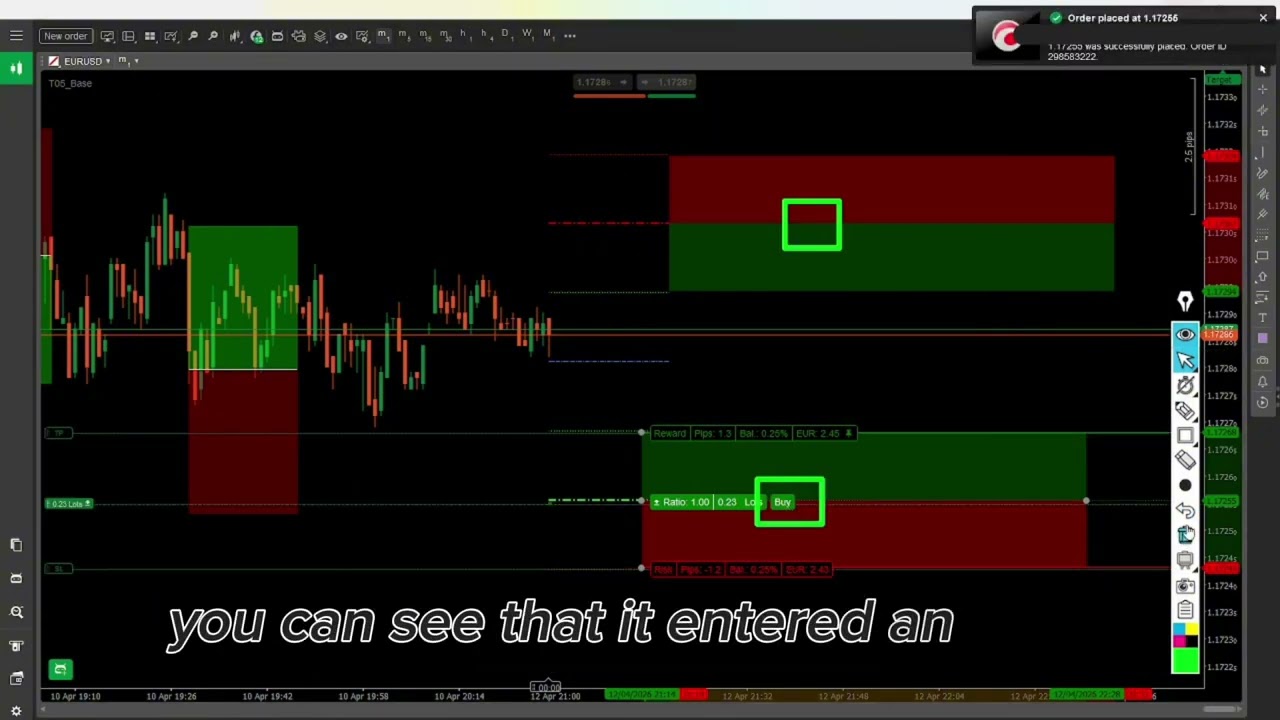
So, I'm going to go ahead and click on that button. You can see that it entered an order and what it has done is it has dropped three lines on our chart. So, it has automatically placed our take profit level as a limit order, our stop loss as a limit order, and the entry. Now, this does not mean because they're limit orders, a limit order means that it will create the order once price comes and either touches this level or crosses over this center line.
Similarly, if we go up to the sell side, we're going to click on the sell button, and that will set that up. Now, I can take and move this buy sell box this risk reward tool and I can move it off to the right side just a little bit. I don't have to it's not attached to the screen. Okay, so I can do the same thing here. I'm going to make this a little bit smaller. The length has nothing doesn't have any effect on the risk reward tool.
Now, the same way that I pointed out that the indicator is showing us these lines to the right. If I click this just as an example, if I show you where this vertical line is, okay, we don't have to consider that back here. You can see that price is at this entry level to create a sell. That has nothing to do with the real-time market. The market is only going to open these orders if and when price actually comes and touches this level or comes and touches this level right here.
All right. So, we don't have to worry about anything that has happened in the past. Now, you're going to know that you did it correctly because when the price does come down and touch, you'll see that a color indicator prints. Printing means that it simply displays a new indication on the screen. So, it's going to print this exact size of the risk reward itself. So, when it comes down and it opens that, you're going to see this new color pop up that will let you know that that was correct.
The words are the caption track's own and nothing is reworded or re-transcribed. Paragraph breaks are placed between sentences so the text reads as prose.
Free tools for your own script. No signup, no login.
Paste your draft and see where viewers are likely to drop off, with a rewrite for each weak line.
Paste the first 30 seconds of your own draft for a hook score and rewrites.
Check your draft against YouTube's advertiser-friendly guidelines before you record it.
Read this channel's public videos and transcripts, and download a writing brief for it.