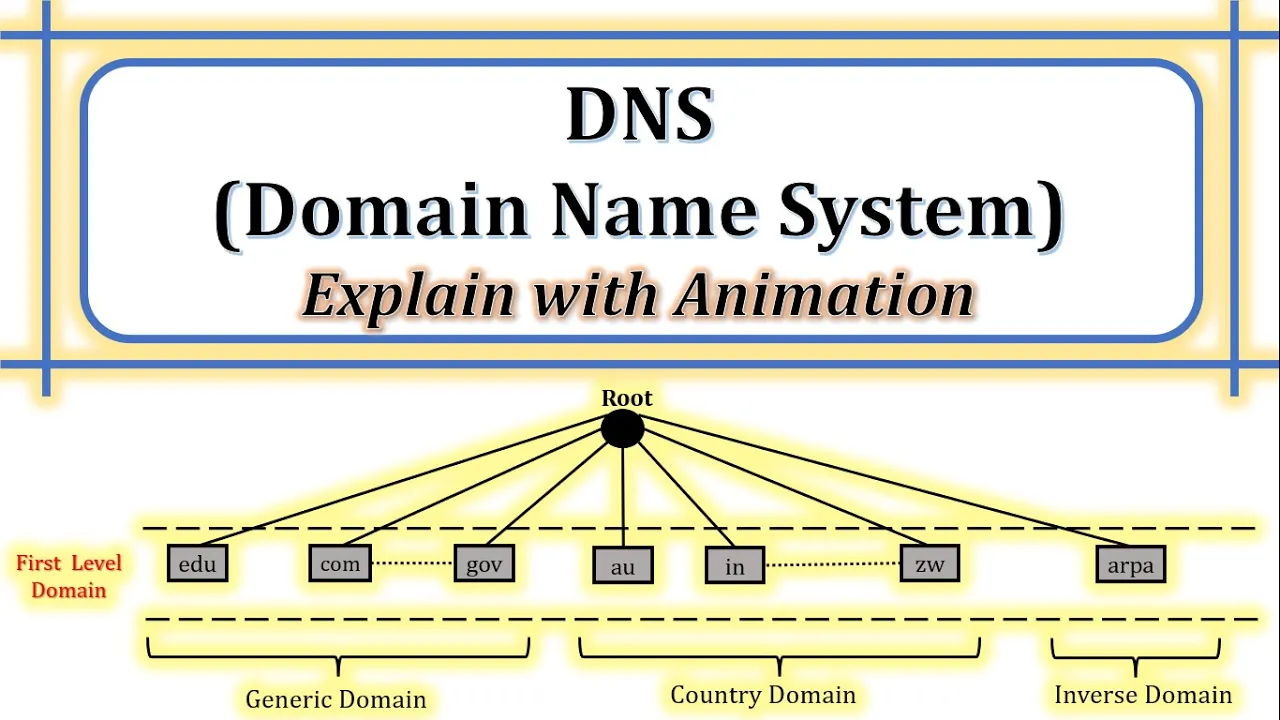
DNS | What is DNS | How does DNS work | Components of DNS | Purpose of DNS | Explain with animation transcript
Chirag Bhalodia · @ChiragBhalodia
Words
4,844
Runtime
28:35
Speaking pace
169wpm
Reading time
20min
169 words per minute, between the 160 25th percentile and the 181 median of 349 measured videos. That distribution comes from the 349-video hook study.
Opening (first 30 seconds)
[Music] hello friends welcome back to my channel myself chirag in this video i am going to discuss about dns domain name system topic of computer network let's see outline of this video the first topic is introduction of dns the next is components of dns in which i have covered domain name namespace name server and name resolver and the last topic is working of dns so before start this video let's subscribe me on youtube chirag balodia follow my blog edu resources follow
85 words, the words spoken in the first 30 seconds at 169 words per minute.
Sentence shape
| Measure | This transcript |
|---|---|
| Sentences | 2 |
| Average words per sentence | 2422.0 |
| Longest sentence | 3,163 words |
| Questions asked | 0 |
| Sentences containing a number | 2 |
Most used terms
- domain224
- server106
- name87
- level84
- dns78
- level domain74
- root59
- address54
- dot52
- website52
- top50
- top level50
Filler phrases
14 in total: like 9 · kind of 4 · actually 1.
A literal whole-word count of the same phrase list the Prepublish browser extension uses, so a phrase inside another word is not counted and a phrase used in its ordinary sense still is. It is a count and not a judgement.
What this transcript is
Every word below is the caption track YouTube publishes for this video, pulled from the video itself and reproduced unchanged. It is not Prepublish's writing, not a summary, and not a re-transcription: it is the video's own published captions. English captions, generated automatically by YouTube, in the video’s original language. Source: the video on YouTube. A channel that would rather this page did not exist can ask for its removal through the contact page, and it is removed.
Transcript
[Music] hello friends welcome back to my channel myself chirag in this video i am going to discuss about dns domain name system topic of computer network let's see outline of this video the first topic is introduction of dns the next is components of dns in which i have covered domain name namespace name server and name resolver and the last topic is working of dns so before start this video let's subscribe me on youtube chirag balodia follow my blog edu resources follow me on instagram and on fb all the video materials are available on my blog edu resources all the links are given in description let's start with introduction of dns dns stands for domain name system next what is domain name domain or domain name is the location of website we all know that the web pages of particular website is stored into the web server and web server is located into the particular domain so domain or domain name is the location of website next what is dns so before discuss about the dns i will give you one non-technical example to understand the dns we all know about telephone directory using the telephone directory we can find the number from the name and name from the number so now we can say the dns is the directory of internet using the dns connecting the web browsers with web servers it means user can access the website from the web servers through the dns so how can user access the website from the web server using the dns so i will discuss this topic in the working of dns next purpose of dns so before discuss about the purpose of dns let's take one non-technical example to understand the purpose of dns if someone asking to you to remember the 50 mobile number instead of their name but we all know that human brain can store the limited numbers but instead of numbers we can remember the as many as person name so as we know that we are store the number with particular person name so on the same way someone asks you to open the google and facebook using the ip address so our brain can remember the limited number of ip address so we are accessing all the website using the website name instead of ip address because human brain can remember the maximum website names instead of ip address so the purpose of dns is mapping ip address to the naming and naming to the ip address so it is the same as telephone directory next dns uses port number 53 so the process of dns using the port number 53 with udp protocol and with tcp protocol but in the working of dns udp protocol is the default protocol because in dns immediate response is required to the user so udp is faster in compared to tcp so udp is the default protocol of dns so here there are two question in my mind the first question is why does dns use udp instead of tcp the another question is in which case dns uses the tcp instead of udp so write your answers in the comment section next components of dns dns includes the following components the first component is domain name the second one is namespace the third one is name server and the fourth one is name resolver now discuss all the components in detail one by one first component of dns is domain name domain or domain name means location of website we all know that webpages of our website is stored on particular server and server is connected with particular domain so domain or domain name means location of website next domain name is divided into main three different categories in the internet now see in this diagram the first domain name is generic domain the second one is country domain and the third one is inverse domain so these three are the main domain of the dns in the internet all the domain and subdomain in the internet is connected with any one of this domain next each node in the tree defines a domain now see in this diagram this is the tree structure root is the parent node generic domain country domain and inverse domain is the child node of the tree so these three are the first child nodes so it is called the top level domain in the dns each domain is an index to the domain name space database we have already discussed all the domain and sub domain in the internet is connected with any one of this three domain let's discuss these three domain one by one in the detail with example the first domain is generic domain the three character domains are called the generic domains but nowadays two character and four character domains are also available in the generic domain next generic domain labels are as follow now see this table to understand the generic domain levels first one is dot com for the commercial organization the second one is dot edu for the educational organization the third one is dot gov for the government organization the fourth one is dot int it means the international organization the fifth one is dot mil it's used for the military group the next one is dot net it is used for the network support centers and the next one is dot org it is used for the non-profit organizations so here there are the sum of example of the generic domains also many more generic domains are available in the dns and we all know that our website is ended with this particular labels if this kind of label is present in our website it means our website is belongs to the generic domain let's take one example to understand the generic domain in the detail for example i am accessing one website eduresources1.com so how can i access this website now understand with restructure of the dns in the dns tree structure we all know that the first node is root node root node is connected with three different domains generic domain country domain and inverse domain so here we discuss about the generic domain only so root node is connected with the different generic domains like edu dot com dot gov dot mil dot net so this all the domain are connected with the root node is called as the top level domain so here in our example our website is connected with dot com domain it means our website is belongs to the generic domain so our website top level domain is dot com all the top level domains are connected with respected sub domains that is called second level domain so in this example our url is eduresources1.com here.com is the top level domain and eduresources1 is the second level domain so it means our url is written in the inverse dns tree structure now see in this diagram eduresources1.com so this is the example of generic domain next domain is country domain the two character domains are called the country domains here i have show the sum of the example of the country domains now in this third column this is the country name and this is the label of the country domains like austria it means dot at australia it means dot a u like india is dot in israel dot il so here these are the some example of the country domains in country domain all the country names label are two characters let's take one example to understand the country domain in the detail for example there is one web url bcci dot in so let's understand how it belongs to the country domain so first of all there is a root node in the dns tree root node is connected with the main three domains generic domain country domain and inverse domain here we are discussing about the country domain so here root node is connected with some of the country domains so this all our country domain is the top level domain in the dns these all top level domains are connected with the respected subdomain it is called the second level domain so here in our example top level domain is dot in so now see in this diagram dot in is the connected with the root node because dot in is the top level domain now second level domain is bcci so it means our website is bcci dot in so now see in this diagram bcci dot in is the connected with the root node so now you can see over here in this diagram web url is written in the inverse tree domain structure next domain name is inverse domain the purpose of inverse domain is mapping an ip address to a website name so let us take one example to understand the inverse domain there is one user user want to access a website through the ip address so first of all user will send this ip address to the root server so root server check the ip address in the list of ip addresses but root server can not map this ip address to the website name so root server send this query to the inverse domain so this query is called a pointer query or an inverse query so how inverse domain evaluate this query so we all know that in dns root node is connected with three main domain the first one is generic domain the second one is country domain and the third one is inverse domain so here we are discussing the inverse domain in inverse domain the top level domain is rpa so root node is directly connected with the arpa domain the arpa is connected with the second level domain in the inverse domain is in address meaning the in address is inverse the address so rest of the node defines the ip address 132.35.50.120. so ip address is written in the inverse dns tree structure 120 dash in address dash arpa so inverse domain evaluate that ip address and map with the website name for example this ip address is mapped with the web url edu resources eduresources1.com so now inverse domain pass that url to the root server because in this web url the top level domain is dot com it means the website is belongs to the generic domain so now see this diagram here generic domain and inverse domain both are connected through the root node so inverse domain cannot send url directly to the generic domain now root server pass this url to the dot com top level domain top level domain check the second level domain edu resources 1 it means the web server of that website so after that web server send requested page to the user and the website will display on the user's web browser so this is the actually working of inverse domain what i have explained here in inverse domain is written over here you can read from this slide also next component is name space there are two types of name space the first one is flat name space and the second one is hierarchical name spaces in flat name space all the nodes are directly connected to the root node so there is no structure in the flat name space in hierarchical name spaces all the nodes are connected with different partitions like top level domain second level domain third level domain so now discuss both the num spaces one by one the first one is flat name spaces in flat name spaces all the domain name connected with only root server it creates a flat name species and all the remaining nodes are directly connected to the root node so that is called the flat name space next there is no structure in the flat name spaces because all the nodes are connected to the root node for example new node is added in the internet it is directly connected to the root node next flatname species is not supported in a large number of pieces in the internet nowadays in internet there are millions of pcs are connected with each other through the dns so whenever large number of pcs in the internet at that time flat name spaces are not working next in flat name space central authority is overloaded so we have already discussed about that all the nodes in the internet is connected with the root node so whenever new node is added into the internet it is directly connected with the root node so central authority is overloaded in flat namespace there is no further division of the different domains like generic domain country domain and inverse domain because all the nodes are present in the top level domain to work on the limitation of the flat name space hierarchical namespaces is used so in hierarchical namespace provide a flexible naming structure now see in this diagram root node is connected with the different nodes in the internet the nodes that are directly connected to the root node in the hierarchical name spaces it is called the top level domain next the name species is partitioned at the top level domain next the top level domains are divided into the three areas the first one is generic domain the second one is country domain and the third one is inverse domain now top level domain is further divided into the second level domain so this diagram shows the hierarchical name space in the dns for example our website is eduresources1.com in hierarchical namespace root node can easily find the website because root node check the top level domain in the website url so in our example the website url top level domain is dot com it means our website is belongs to the generic domain and the second level domain is edu resources 1 so web url is written in the inverse dns tree structure eduresources1.com the same as another example is the country domain xyz dot au so in this url root note check the top level domain so here top level domain is dot au so it means dot au is belongs to the country domain and the second level domain is x y z so our web url is x y z dot a u so using the hierarchical name spaces in the internet dns can easily map the web url with the ip address with the immediate response to the user next component of dns is dns name server so first of all what is name server a dns name server is a server that store the dns records so name server is also known as the phone book of internet next which kind of records has been stored in name server name server store address record name server record and the mail exchanger record and also store the many more records next what is the purpose of nam server so name server help to connect urls with the ip address of the web servers next server has some authority and also responsible for the operation which is performed in the dns next figure shows the hierarchy of the name server so in this figure root server is connected with the top level domain arpa server dot in server and dot com server so here dot in and dot com top level domain is connected with the some secondary level domain for example i want to access a one website eduresources1.com so in this website url edu resources1 is the second level domain which is connected with the topleveldomain.com so our web url is connected in a inverse dns tree structure now see in this diagram due resources and which is connected with the dot com server next what is zone whenever server creates a database it is known as zone sometimes root server gives the authority to the zone let's take one example to understand the zone so we all know that root server is connected with the top level domain so here root node is connected with the top level domain edu so top level domain is connected with the sum second level domain and the second level domain is connected with the third level domain so in this tree structure all the second and third level domain is connected with the top level domain edu so that is called one domain and we all know that edu is belongs to the generic domain so the circle shows one of the generic domain which is connected with the root node so there is one question when the domain and zone are same and when the domain and zone are different so let's understand this scenario the domain and zone are same and the domain and zone are different through this diagram when domain does not divide into the sub domain at that time domain and john are the same now see in this diagram for example state is one of the domain and all the nodes connected with the state domain which is not considered as the sub domain so it means state is not divided into the sub domain so it is called the zone and domain both are the same when domain is divided into the sub domain and part of authority of other servers so at that time domain and john are the different so now see in this diagram here edu is the zone because edu is divided into the sub domain like here state is the sub domain of edu so as per our condition domain is divided into the sub domain so it means the domain and zone are the different and also root server give the authority to the zone edu so this is the difference between domain and zone for example i have one url state.edu here state is the zone and domain and edu is the zone or the top level domain next what is root server if any node consists of the full tree it is called the root node so the definition of root server is if zone consists of the full tree then zone server is called the root server now see in this diagram here edu is the root server because any of the node which is entered into this particular domain which is anyhow connected with that root server it means connected with the edu so for this domain edu is the root server next how many types of server in dns so there are two types of server the first one is primary server and another one is secondary server so let's discuss both the servers primary server means it keeps a file about the zone for which it is the responsible and have the authority so now see in this diagram here edu is the primary server because it keeps a file about the zone server if any of the node which is connected in this domain is directly or indirectly connected with the edu edu is update the database so here edu is the primary server next secondary server means it loads all the information from the primary server so here state is the secondary server so whenever state want to communicate with the connected node at that time all the information will be load from the edu server so here state is the secondary server and edu is the primary server next primary server performs operation on the zone file like create update and maintain so we have already discussed about that if any of the node is entered into that domain the primary server update the database next secondary server can not perform any operation on the zone file because secondary server has no authority and whenever secondary server wants the information at that time it loads all the information from the primary server so this is the primary server and secondary server inside the dns name server next component is name resolver so before discuss about the name resolver there is one question which kind of architecture is used in dns there is client server architecture is used in the dns next what is name resolver name resolver is one kind of client software when host needs to mapping domain name to ip address and ip address to the domain name at that time name resolver is used next how many types of name resolver there are two types of name resolver the first one is mapping a domain name to an address and the second one is mapping an address to a domain name so there are two different method are used for the name resolver the first one is the recursive method and the second one is iterative method so now first we discuss the types of name resolver and then discuss recursive and iterative method so let us understand the types of name resolver the first type is mapping a domain name to an ip address so let us take one example to understand the first type mapping a domain name to an ip address for example there is one user user want to access one website the website url is www.eduresources1.com so client browser pass this url to the dns resolver dns resolver pass this url to the dns server dns server map this url with the ip address of that web server and pass that ip address to the dns resolver then dns resolver pass this ip address to the user's browser so now user's browser accessed that website through that ip address we all know that there are three types of domain are connected to the dns root node the first one is generic domain the second one is country domain and the third one is inverse domain so in this mapping technique dns server map domain name to an ip address either generic domain or country domain next types of the name resolver is mapping an ip address to a domain name so let us take one example to understand this mapping technique for example there is one user user want to access a website through the ip address so first of all user's browser sent that ip address to the dns resolver dns resolver send this ip address to the dns server so dns mapped that ip address with particular web server and pass this web server name to the dns resolver and dns resolver pass this web server name to the user's browser so now user's browser is connect to that particular web server and the website is open at the user's browser so in this mapping technique dns server use invoice domain so using the inverse domain ip address is mapped with the domain name now let's discuss recursive and iterative method one by one so first of all i will discuss recursive method let's take one example to understand the recursive method there is one user user is accessing a website amazon.in so after some time user want to access another website eduresources1.com but user cannot directly access that website so users send a request to the web server which is currently accessing by the user so here user currently accessing the amazon dot in web server so amazon dot in web server is trying to evaluate that query but this query is not resolved by the amazon dot in web server so this web server pass this query to the upper level authority here upper level authority is the top level domain dot in so top level domain try to evaluate that query but it cannot be evaluated by the top level domain so top level domain dot in pass this query to the upper level authority root node so first of all root node check the top level domain in the url so here top level domain is dot com so root node pass this query to the dot com top level domain so top level domain check the second level domain in that web url the second level domain is edu resources one so top level domain pass this query to the second level domain edu resources one when the query is finally resolved the response travel back until it finally reaches the requesting client and now client can access that website eduresources1.com so this is called the recursive method now what i have discussed in the recursive method you can read from this slide the next method is iterative method let us take one example to understand the iterative method there is one user user is currently accessing the website amazon.in it means user is connected with the web server amazon.in so after some time user want to access another website eduresources1.com but user cannot access that website directly if the client does not ask for a recursive answer the mapping can be done iteratively so client send a request to the currently accessing web server so here currently accessing web server is the amazon dot in so here amazon dot in web server can not evaluate the query so amazon dot in web server provides the ip address of the upper level authority to the client or user so user pass this query to the upper level authority here upper level authority is the top level domain dot in so again top level domain dot in cannot evaluate that query and provide the upper level authority ip address to the client so now client send a query to the root node so root node check the url and find the top level domain here top level domain is dot com so root server provide the ip address of the top level domain dot com so root server provide the ip address of the top level domain dot com to the user so now user has the ip address of the top level domain so user pass this query to the topleveldomain.com so here topleveldomain.com check the second level domain so here second level domain is edu resources one so top level domain provide the ip address of that web server or we can say second level domain to the user so now user send a request to that ip address eduresources1.com so now user send a request to that web server ip address so that web server provide the requested file to the user and user can access the website eduresources1.com so this is called the iterative method so what i have discussed over here is written in this slide you can read from this slide next working of dns let us take one example to understand the working of dns there is one user user want to access a website www.eduresources1.com so first of all user enters the url into the web browser web browser sends this url to the dns resolver the purpose of dns resolver is mapping website name to ip address and ip address to website name now dns resolver send this url to the root server root server is connected with three main domains generic domain country domain and inverse domain so here we all know that the purpose of inverse domain is mapping ip address to the domain name but in this example dns resolver sent the website name to the dns root server so here root server will not contact to the inverse domain so root server has two options generic domain and country domain so here in our example the top level domain is dot com so here dot com is three character domain name it means root server will contact to the generic domain because topleveldomain.com is belongs to the generic domain so now dns root server pass this url to the topleveldomain.com now top level domain check the second level domain here our second level domain is eduresources1 for example our second level domain is registered to the google.com server so top level domain pass this url to the second level domain google name server so now google name server check this url and find the corresponding ip address of that registered website and pass this ip address to the dns resolver and dns resolver will pass this ip address to the user's web browser so now user's browser search this ip address on the internet and connect to the web server eduresources1.com and then web server accept eduresources1.com request from the user's browser now web server send users requested page to the user's browser and that requested page is displayed in the user's browser so this is the working of dns so if you have any query you can ask me in comment section if you like this video please hit the like button and share with others thank you for watching this video [Applause] you
The words are the caption track's own and nothing is reworded or re-transcribed. Paragraph breaks are placed between sentences so the text reads as prose.
Use this transcript
Three free tools that work on the material around a video like this one. No signup, no login.
Hook Analyzer
Paste the first 30 seconds of your own draft for a hook score and rewrites.
Policy Pre-Flight
Check your draft against YouTube's advertiser-friendly guidelines before you record it.
Channel Skill Generator
Read this channel's public videos and transcripts, and download a writing brief for it.