Getting the transcript
Reading the captions from YouTube. A video nobody has opened here before takes 10 to 30 seconds; this page fills in on its own.
Getting the transcript
Reading the captions from YouTube. A video nobody has opened here before takes 10 to 30 seconds; this page fills in on its own.
BTODtv · @btodtv
Where viewers went back to watch this video again, from YouTube's public Most replayed graph, lined up with what was said at that moment.
Most replayed moment #1
19:404.6x the video's typical replay level
supporting large ultrawide monitors without issue. Other than a fairly basic clamp mount system, this is a solid value and is hard not to bump into that S tier category based on all of the features for the price. So, we're going for it. S tier under 100 bucks, guys. The Mount-It single monitor arm retails
Said at 19:32
Most replayed moment #2
18:474.1x the video's typical replay level
bracket is kind of flimsy here. Now, while this system isn't ranked super high, it's definitely better quality than the D and F tier options and will work well for those who just want functionality. C tier. The Huanuo Titan Lift is the least expensive heavy duty monitor arm that I've tested that features construction
Said at 18:40
Most replayed moment #3
14:384.1x the video's typical replay level
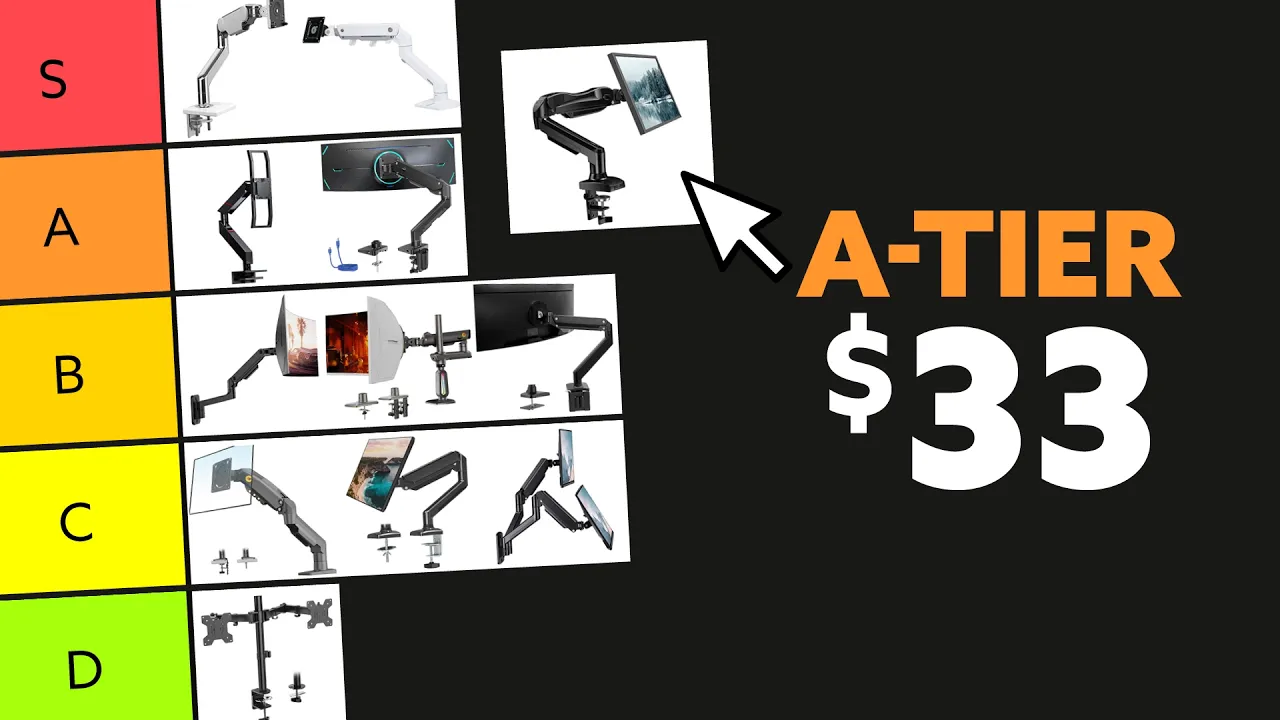
out the capacity over a long period of time. Now, with the improvements to the components on here, some of the construction of the materials, and that 5-year warranty with such a high rating, I'm actually going to give this low-cost unit an A tier rating, which is crazy, but it deserves it. Similar to the standard
Said at 14:32
The graph counts replays. It does not show where viewers stopped watching.
Words
4,713
Runtime
21:51
Speaking pace
216wpm
Reading time
20min
216 words per minute, above the 201 75th percentile of 349 measured videos. That distribution comes from the 349-video hook study.
Opening (first 30 seconds)
I've used and sold monitor arms for over 20 years. They provide a ton of benefits for comfort and function while working, gaming, or just kicking back at your desk. I'm Greg Knighton, president of BTOD.com. We're an office furniture retailer based in Wisconsin. In this tier list, I'll rank 20 of the most popular monitor arms I've personally tested to help you narrow down which is best for you. Now, if you want to follow along with our monitor arm PDF cheat sheet, the link is down in the description. Let's jump into it. The Magnus HD is Secret Lab's premium heavy-duty monitor arm. Retailing around $329
108 words, the words spoken in the first 30 seconds at 216 words per minute.
Free, no signup. See how the first 30 seconds hold attention, with rewrites.
What this transcript is
Every word below is the caption track YouTube publishes for this video, pulled from the video itself and reproduced unchanged. It is not Prepublish's writing, not a summary, and not a re-transcription: it is the video's own published captions. English captions, generated automatically by YouTube, in the video’s original language. Source: the video on YouTube. A channel that would rather this page did not exist can ask for its removal through the contact page, and it is removed.
I've used and sold monitor arms for over 20 years. They provide a ton of benefits for comfort and function while working, gaming, or just kicking back at your desk. I'm Greg Knighton, president of BTOD.com. We're an office furniture retailer based in Wisconsin. In this tier list, I'll rank 20 of the most popular monitor arms I've personally tested to help you narrow down which is best for you. Now, if you want to follow along with our monitor arm PDF cheat sheet, the link is down in the description.
Let's jump into it. The Magnus HD is Secret Lab's premium heavy-duty monitor arm. Retailing around $329 up to $349, it's about the same price as the Ergotron, but offers half the warranty period at 5 years. Now, the Magnus monitor arm is well done aesthetically speaking, and the fit and finish throughout is definitely similar to the other high-end brands. It uses mostly aluminum for the construction of the arm. With a weight capacity range from about 17.6 lb up to a max of 35.2, it can hold monitors that are 34 in up to 57 in.
The cable management system utilizes magnets for quick attachment. Now, this is definitely unique as I haven't seen this on any other monitor arm today. Overall, I'm impressed with the construction of the Magnus HD, and I like the idea of the bar system to adjust the monitor versus grabbing the sides of the actual monitor. To hit that coveted S tier at this price though, I would like to have a bit higher weight capacity and a warranty matching the other premium brands.
For those reasons, I'll put it in a high A tier. The Vivo premium HD spring arm is one of the least expensive options I've tested that's designed for heavy monitors like the Samsung G9 or a TV as a monitor. When I first reviewed it in 2022, it was between about $119 and $139, but now it's only $99. Now, per their recommendation, it's best for monitors up to 49 in wide with a max weight of 33 lb. The Vivo premium comes with a 3-year warranty, which is above average for many of the arms I've tested under that $100 price point. in the Vivo is also better than your typical entry-level products that I've tested as well, including other Vivo branded arms.
Now, Vivo premium HD is made from mostly aluminum and steel throughout. This includes the head design that mounts the monitor to the actual arm. It also features a quick connect system to easily attach your monitor to the arm system. The Vivo HD includes cable management that's very functional. I don't necessarily love that that part is clear on it when the rest of the arm is black, but it works well. It also includes both a grommet and C-clamp mount, which is well designed and also quite heavy-duty.
While I wouldn't say the Vivo arm is the most beautiful I've tested, it's quite functional and heavy-duty enough that I would be more than comfortable to leave my expensive monitor attached to it. It may have hit the A tier with a heavier weight capacity, but it's still a solid high B tier. The North Bayou single mount is another very popular option from the entry level of monitor arms. With over 22,000 reviews and an average score of 4.6 out of five, it's actually bumped up 5,000 reviews in the last few years since I first reviewed it, and it's increased from a 4.5 to 4.6 stars.
With so many reviews, that says a lot about it for sure. Now, at a retail price of $29, a lot of that interest likely comes from it just being an affordable option for most people. It's actually about $10 less now than it was back in 2022 as well. The arm works well though and is designed to support standard-size monitors from 17 to 30 in max size. The 19.8 max weight capacity is what you'd typically find for monitor arms like this as well.
Now, the North Bayou features a cable management system that's a bit flimsy on top, but like the arm, it just works. The monitor mount portion of the arm is also quite a bit beefier from the basic arms I've tested. Now, if you're looking to add a monitor arm for cheap, this can definitely be a good option. It comes standard with a 1-year warranty for a well-known brand in the space, I'm going to give it a C tier. The Ergotron line of monitor arms is very solid.
In my previous list, I actually knocked the HX series a bit for a couple of things that probably don't matter to most. Now, this arm, the HX single from Ergotron, is an absolute beast. The price has actually dropped since my previous tier list as well from about $400 down to 327. Now, compared to the Human Scale M10, another premium model that's in this list later on, it feels closer to an industrial strength than built for an office type of arm.
The fit and finish are definitely well done throughout with a matte finish that has some light texture to it. The aluminum components are premium and likely part of the reason why this arm costs what it does. It doesn't have an issue holding up to a 49-in ultra-wide monitor, but the spring on the head of the mount is so strong that it actually tips my 42-in OLED up and doesn't work well for lighter weight monitors like that even if they're large.
The head of the mount is a quick release with two set screws to mount permanently. Now, this makes setting the monitor on the arm much easier. This part of the arm is definitely overbuilt like the rest of the arm. The Ergotron HX comes standard with a 10-year warranty and similar to Human Scale for about 40% less the money though. Now, my only real complaint is the cable management system that's made from cheap Velcro ties.
That definitely feels incomplete for something at this price point. Otherwise, it's near perfect. I'm going S tier. Still not sure which monitor arm to buy? Check out our monitor arm cheat sheet link down in the description. The Wali dual monitor arm is one of the more basic arms that you can currently buy. These typically retail anywhere from about $25 to $32 and includes a standard C-clamp and grommet mount option.
And for their recommendation, you can fit dual 27-in monitors that weigh up to 22 lb each. This system includes a removable VESA mounting adapter that allows you to easily attach to your monitor before attaching it to the arm. These brackets are very thin steel and can easily be bent, so I wouldn't bet on them to support expensive monitors. There is some additional cable management included for both horizontal cables and vertical as well.
The base itself is cheap though like the rest of the arm. The threaded plate for the clamp is somewhat thin with limited threads for the bolt to hold well for long periods, and there's definitely some concern here it will loosen over time. Looking closer at the construction of the pivot points on the head and the arm which within each extension, quite a few cheaper plastic components are definitely used here versus metal, and this is just another way to for them to save cost.
Now, of course, this could lead to issues down the line, but sticking to more of a conservative monitor weight should help. This arm is functional, and if you're a set-it-and-forget-it type on a tight budget, it could work. I'm going D tier. The Monoprice HD spring arm is another good option for those needing something beefier to support ultra-wide screen monitors. They're currently recommended for using exclusively with 32 to 49-in ultra-wides that weigh up to just under 40 lb.
Now, it currently retails around $119, but is on sale closer to that 104 to 109 typically. The Monoprice HD includes a full 1-year warranty for the entire arm. The mount comes standard again with a C-clamp and grommet mount option much like most of the arms here in the list. The base that rests on the desk surface is absolutely massive and built into the lower vertical portion of the arm. Everything about this arm is heavier duty than all entry-level products in this list.
There shouldn't be much of a concern that it will stand the test of time with a heavy monitor. If you're looking for a heavy-duty arm that comes with a ton of height adjustment range, the Monoprice has a ton of it. While the Monoprice arm feels heavy-duty, it is a bit too bulky for my personal taste. The bottom portion of the arm is so significant that it really stands out for more of a minimalist style desk surface.
With a slightly heavier capacity, more aluminum than similarly priced aluminum alternatives, it definitely gets a bump for me, but with that short 1-year period of warranty, it knocks it down a bit, B tier. The W HD single spring monitor arm is the least expensive heavy-duty monitor arm I've tested to date. While it normally retails around $99, it's on sale frequently for as little as $59, which is absolutely crazy. Even with such a low price point, W is willing to offer a full 5-year warranty on this monitor arm, which is absolutely crazy considering that arms that sell for 6X have a similar warranty.
The weight capacity for the HD is up to 35 lb, which isn't the heaviest capacity for a heavy-duty arm, but for the price again, this is a super solid number. It supports up to 49-in ultra-wide screen monitors as well without issue. Stability is really good with this arm, and moving around the Samsung G9 ultra-wide is definitely not an issue. The matte gray finish is consistent, and it feels like it's definitely well built.
The cable management on this arm might be one of the few drawbacks, but with that upper portion using a screw to hold in place, it can be a bit more cumbersome than maybe some alternatives. But for $59, this is easily an A tier for the price and the specs. The RA Hover Series II single spring gas monitor arm is the most modular and expandable arm that we've tested, but it isn't cheap starting at $254 for a single arm.
The standard arm comes with a 4-in tall post, but is also available in 11-in and 19-in tall options as well. Should you decide to add more monitor arms to the system, you can easily attach that to the 11-in or 19-in post options. Now, this arm is designed to work with most monitors up to 32 in with a max weight capacity of 19.8 lb. Like most arms, the Hover Series II comes with both a clamp and grommet mount option. The grommet mount option is one of the few to include a hole in the actual base of the mount to easily pass wires through the grommet hole.
This sounds like it should be obvious, but most brands I've tested actually don't include this and require you to run those wires off the back of your desk, which doesn't have as complete of a look. The RA Hover spring is made from steel, aluminum, and plastic. The alternative basic option is made from mostly aluminum and steel. The Hover Series comes with a standard 5-year warranty. Now, the fit and the finish on the arm is what you'd expect from a higher tier arm.
The monitor mount features a quick disconnect system that has zero restrictions on how it clicks into the next portion of the arm. The arm also includes built-in cable management that's easy to use and holds wires in place. Now, this is a little bit expensive, and it doesn't have that 10-year warranty like some of the other premium options, so I'll go with an A tier. The Ergo Focus normally retails around $29.99, but it was only $20.99 when I purchased it.
With close to 500 reviews and an average score of 4.4 out of five stars, it has solid ratings for such a low price. It's currently available in both black or white and also includes a grommet and C-clamp mounting option. Between both colors, it is sold 200 plus in the past month, which isn't a significant number compared to the others tested. The Ergo Focus holds up to a 32-in monitor from 4.4 lb all the way to 19.8 lb max.
The 75 by 75 mm and 100 by 100 mm VESA mount is standard for all of the arms tested in this video. The base of the Ergo Focus is made from aluminum, while the rest of the arm is made from mostly steel or plastic components. The majority of the tilt and swivel components are made from molded plastic parts. It does feature a lower and upper cable management system. While the upper is large enough to hold two wires, the lower cable management is fairly small.
Now, this is the least expensive monitor arm that I tested here, but even so, it does include a gas spring mechanism for easy height adjustment. Overall, this will be a significant upgrade over basic post mounts, and the stability is actually pretty good. But, all of the other options in this video are definitely going to be nicer. The Vivo single monitor arm is another very basic monitor arm system. It's designed to hold a single monitor that is from 13 up to 38 in with a max weight capacity of 22 lb.
The standard pole for the Vivo is 16 in, but they do have a massive 39 in tall option that I've not tested. Now, to be honest, I'd be a bit concerned about mounting anything near max weight on that long spindly post mount. The Vivo comes with a C-clamp and a grommet mount option, which is great for any future changes you have with mounting. Now, the arm itself is made of mostly thin gauge steel with the exception of the clamp that is actually now a heavier duty than the arm, but not even close to the more expensive options.
It is clear that the Vivo arm serves a purpose and is one of the most frequently purchased entry-level monitor arms with nearly 20,000 reviews on Amazon. According to the listing, more than 2,000 people have entrusted this arm with their monitor in just the last month alone. Now, if you're looking for a cheaper entry-level option, this could definitely be it. Long-term, I'm not sure how well this would hold up if you're pushing the weight capacity limits, but for only $35, it definitely works, and Vivo even supports it with a 3-year warranty.
Because of the warranty and honestly how basic it is, I'll give it a low C tier. The AVLT HD mount is in a bit of a precarious spot, costing quite a bit more than alternative brands that are in that similar quality range. Overall, I would say this mount looks better than other lower cost HD options. The good news is that the price has come down quite a bit actually from 2022 when we first received it, which was about $249 down to $189 right now.
The weight capacity, on the other hand, could be a spot where some would see the benefits here outweighing the actual cost difference between lower cost alternatives. With a weight capacity of 50.7 lb, the AVLT is perfect if you're trying to use a TV as a monitor. It also comes standard with four mount options: 75 by 75 mm, 100 by 100, 200 by 100, and 200 by 200. The other arms that we've tested in this list only come with a 75 by 75 or 100 by 100, which are more exclusively used with actual monitors versus TVs.
Now, this is the only arm in the list that comes standard with two USB 3.0 extension cables and two auxiliary ports to connect to your PC. While this might be a nice feature to have, I'm not sure people would use it enough to justify the extra cost with adding them to the arm. While I wish they had a quick connect release for the monitor, my assumption here is that having a really high weight capacity prevented them from doing so.
Overall, though, this is a solid option for anyone needing that heavier weight capacity. The AVLT carries a 3-year warranty, which is much better than the short 1-year warranty we see on some models. Overall, with the higher price tag, it's definitely hard to kind of push this one up for value, but with the heavy capacity and solid warranty, it's going to make it a high B tier. The ErGear's Wing Wall Mount monitor retails for around $69 on Amazon and packs quite a punch for that price point.
It's rated for up to 44 lb and will hold monitors that are from 17 to 49-in ultrawides. So, if you're looking for a solid wall mount option, this is definitely it. Made from mostly aluminum, it gives that vibe of Ergotron, although not quite as heavy duty as their HX series. Oddly enough, for a fraction of the price, it actually offers better cable management though than the entire Ergotron lineup. If stability is a big concern, then a wall mount is definitely, without question, the most stable option.
Removing it from the desk will eliminate that opportunity for vibration and movement that will transfer from the desk through the monitor arm. Now, the only reason I didn't personally bump this up is that shorter warranty period with only 1 year. It's definitely a high B tier, just not quite an A tier. The Huanuo single mount is a very popular arm that's commonly found on Amazon. It typically retails around $33 up to a $49 price point and now boasts more than 15,000 reviews and has maintained its 4.6 out of five-star rating since we first received these in.
The Huanuo single spring comes with a 5-year warranty and has improved the arm in a few areas. The pivot and tilt components have been beefed up since my previous review. They've also upgraded some of the components to include aluminum versus plastic on the construction side. Now, it's designed to support monitors that are still 17 to 32-in with a max weight capacity up to 14.3 lb. Because they've kept their weight capacity around that 14-lb mark, I wouldn't be too worried about maxing out the capacity over a long period of time.
Now, with the improvements to the components on here, some of the construction of the materials, and that 5-year warranty with such a high rating, I'm actually going to give this low-cost unit an A tier rating, which is crazy, but it deserves it. Similar to the standard height LX, the Ergotron LX dual stacking arm is one of the better-built arms available today. Starting at just about $199 for the single and over 400 for the dual stacking setup.
The biggest difference between the LX and LX stacking arm is just how tall the post is and how many monitor arms can be attached. Because of the pole height, Ergotron has the option for one, two, three, or four monitors, but the recommendation here is monitors up to 40 in max, weighing up to 22 lb each. Now, the only issue with that is that the recommended weight capacity is a sliding scale for each monitor. So, stacking two monitors isn't going to be for everyone, but if you're looking for this type of solution, I've been impressed so far.
The Ergotron LX has a nice durable finish on it and feels heavy duty. Like the HX, it comes with a full 10-year warranty. Now, I really wish that they would try harder on cable management or a lack thereof. For this price point, you definitely would expect more than just zip ties and hooks to the upper tier. Still though, this is a premium arm with a premium warranty. I'm going S tier. The North Bayou extra height gaming monitor arm is the only gaming specific monitor arm in my tier list.
It retails around $119, but there have been a couple coupons available now bringing it down to about 94 for quite a while. Now, this arm is a beast. It comes with a full unboxing experience, too, which I thought was kind of impressive considering it's under a $100 price point right now with those discounts. It also ensures that everything is well packed and in perfect shape when that arm arrives. It's designed to easily support monitors from 32 in all the way up to 60-in ultrawides with a max weight capacity of 44 lb.
Now, if you like having the option for some RGB lighting, there are 14 different modes. Some of them are, well, pretty aggressive, but there are definitely some solid normal color options as well for more of a modest glow. The tension adjustment on this arm is easy to change, and that is definitely appreciated when adjusting to support a massive monitor. I hate to knock this for aesthetics, and obviously, you can decide that that's important for yourself, but I don't really love the look.
Overall, with that 1-year warranty, I'm going to drop it just a little bit, but it is a high B tier, really close to A if that warranty was a little bit longer. The Huanuo dual post stand is very similar to the most basic monitor arms that I've tested. The biggest difference here is that this particular arm uses a less permanent stand versus clamp or grommet mount. Now, this can be a good alternative if your desk prevents you from being able to use a C-clamp or grommet mount due to obstruction or a surface material like glass.
While this type of arm can definitely be useful, I believe the amount of space though that it takes up on the desk surface is kind of a deal-killer for most setups. The biggest drawback with this particular arm is just how cheap the actual stand was. Now, the listing advertises it as being heavy duty. The lack of weight for the base requires you to be extra conscious of where the monitors are positioned as it has a tendency to want to tip over, and personally, we've tried to use this one at home for my middle son's gaming setup, and it just [clears throat] isn't stable.
And I wouldn't recommend putting nice monitors on this monitor stand, and honestly, look to clamp or grommet alternatives that are more usable. This is a solid F tier. The Wali wall mount monitor system has probably one of the funniest names, but it's almost identical to all of the other entry-level monitor arms from like Huanuo and Mount-It. The only major difference being how it mounts to a wall versus your desk. The single arm retails for about $39, but is commonly found on sale for closer to 29.
The dual setup is only 47 on sale. Both models will come with a 1-year warranty. Now, per Wali's recommendation, it can support two monitors from about 17 in up to 32 in wide with a max weight capacity of 19.8 lb for each. Now, if you're looking for a solution that will not bounce or move around, much like the ErGear's Wing, the wall mount here is going to be the best one available. Now, like other arms in this price range, the Wali is made up of mostly steel and plastic with some aluminum in the wall mount and lower arm.
The integrated cable management in both the upper and lower portion of the arm as well are nice. The quick connect system allows you to easily mount your monitor to it as well, but the actual bracket is kind of flimsy here. Now, while this system isn't ranked super high, it's definitely better quality than the D and F tier options and will work well for those who just want functionality. C tier. The Huanuo Titan Lift is the least expensive heavy duty monitor arm that I've tested that features construction made from mostly aluminum.
Retailing around 105 normally, I was able to buy it for only $89. The Titan Lift comes with Huanuo's 5-year warranty, which isn't quite as long as Ergotron or Humanscale, but for a fraction of the price, it's an incredible value. The max weight capacity easily supports large ultrawide screens up to 49 in max and has a max weight capacity up to 44 lb. It features standard cable management for the upper and lower segments of the arm as well.
Now, if you want to add some color, you can select the RGB lighting option, but I haven't tested that model to see how well the lights work. Based on how this felt and performed during the test and use in my office, I'd be confident with this supporting large ultrawide monitors without issue. Other than a fairly basic clamp mount system, this is a solid value and is hard not to bump into that S tier category based on all of the features for the price.
So, we're going for it. S tier under 100 bucks, guys. The Mount-It single monitor arm retails around $37 to $39, but it's regularly on sale for about 30. Now, this product has about 6,000 reviews on Amazon and has maintained a 4.4 out of five star rating. This arm comes standard with a one-year warranty, which is fairly common again around this price range. It's designed to hold up to 32-in monitors with a max weight capacity from 4.4 lb up to 22 lb max, and that's about 2 lb heavier than other models like that ErgoFocus or Huanuo single spring alternative.
It includes upper and lower cable management as well as a place to keep the Allen keys for making tension adjustments for pivot, tilt, and height. Now, I'm not sure if this is necessary since that's typically a set and left alone, but it's definitely interesting on this arm. The VESA bracket for this arm is made of mostly plastic versus metal on some of the other brands, which isn't normally a big issue, but it doesn't feel quite as solid as those steel alternatives.
Overall, though, this is decent, but a low C-tier. Saving the best for last, the HumanScale M10 is the most expensive monitor arm in the tier list, but it's also the most well-rounded that I've tested today. At just around $550, the HumanScale M10 includes the best warranty in class with a full 10-year warranty coverage. The M10 has had no problem lifting heavy ultra-wide monitors and can even hold up to a 75-in television screen with a max of 44 lb.
The M10 has had no issues supporting our 49-in ultra-wide Samsung G9 monitor here in the studio. Adjustments in up and down are easy as one should expect with a massive monitor attached to it, and we haven't had any issues with monitor pivot or tipping over long periods of time. Now, if you're worried about a catastrophic failure to your ultra-wide monitor, then the HumanScale M10 is definitely a great place to go. After all, if you've invested a thousand dollars in a new monitor, spending 550 on an arm probably isn't that bad.
Now, this is without question the best looking monitor arm that I've tested to date. The fit and the finish are really well thought out. The cable management system works well, and this honestly should be a centerpiece for any high-end desk setup. S-tier. Hopefully, you guys liked the tier list. If you want me to add any other products to the next one, make sure you drop it in the comments. Thanks for watching.
The words are the caption track's own and nothing is reworded or re-transcribed. Paragraph breaks are placed between sentences so the text reads as prose.
Free tools for your own script. No signup, no login.
Paste your draft and see where viewers are likely to drop off, with a rewrite for each weak line.
Paste the first 30 seconds of your own draft for a hook score and rewrites.
Check your draft against YouTube's advertiser-friendly guidelines before you record it.
Read this channel's public videos and transcripts, and download a writing brief for it.
Sentence shape
| Measure | This transcript |
|---|---|
| Sentences | 236 |
| Average words per sentence | 20.0 |
| Longest sentence | 52 words |
| Questions asked | 1 |
| Sentences containing a number | 85 |
Most used terms
Filler phrases
35 in total: like 20 · actually 11 · kind of 4.
A literal whole-word count of the same phrase list the Prepublish browser extension uses, so a phrase inside another word is not counted and a phrase used in its ordinary sense still is. It is a count and not a judgement.