Getting the transcript
Reading the captions from YouTube. A video nobody has opened here before takes 10 to 30 seconds; this page fills in on its own.
Getting the transcript
Reading the captions from YouTube. A video nobody has opened here before takes 10 to 30 seconds; this page fills in on its own.
AI Engineer · @aiDotEngineer
This video has no Most replayed graph yet: YouTube shows one only once a video has enough views. These are the moments viewers replayed most in AI Engineer's most watched videos.
Most replayed moment at 18:45
4.8x that video's typical replay level
that they're they're changing they're changing things in the database not yet. You want to run them through the ontology first and make sure that works. Okay. I only got an I've got I've got another I've just a short time. I'm going to try to show you some of the things that um that you can
Said at 18:37
Most replayed moment at 16:13
3.6x that video's typical replay level
method signatures, the program layout and the call stacks. So here's some examples. I don't think you'll be able to read this one, but this is like the level of abstraction we're at. It's how we're actually going to lay this stuff out and how these systems are going to interact. Dylan Mulroy from Cloudflare talks a
Said at 16:06
Most replayed moment at 6:57
5.9x that video's typical replay level
do light mode. It's I It's not my nature, but sometimes. That's better, yeah? Okay. So we have we have a model and we're trying an old LG Sorry. We We shouldn't have seen that. No, we'll
Said at 6:50
The graph counts replays. It does not show where viewers stopped watching.
Words
2,056
Runtime
13:13
Speaking pace
156wpm
Reading time
9min
156 words per minute, below the 160 25th percentile of 349 measured videos. That distribution comes from the 349-video hook study.
Opening (first 30 seconds)
[music] >> My name is Bo. I'm going to be here presenting real-time voice agents with Frontier Intelligence. Effectively, going to be talking a little bit about how we at Xnor.ai architected our voice agent harness to get real-time voice with the Frontier level of intelligence that we need. Okay. So, before I start, I think I wanted to kind of draw some parallels about why we decided to go with cascaded voice agents and especially kind of
78 words, the words spoken in the first 30 seconds at 156 words per minute.
Free, no signup. See how the first 30 seconds hold attention, with rewrites.
Sentence shape
| Measure | This transcript |
|---|---|
| Sentences | 131 |
| Average words per sentence | 15.7 |
| Longest sentence | 51 words |
| Questions asked | 5 |
| Sentences containing a number | 8 |
Most used terms
Filler phrases
139 in total: kind of 39 · um 39 · like 20 · you know 16 · uh 14 · actually 9 · I mean 1 · basically 1.
A literal whole-word count of the same phrase list the Prepublish browser extension uses, so a phrase inside another word is not counted and a phrase used in its ordinary sense still is. It is a count and not a judgement.
What this transcript is
Every word below is the caption track YouTube publishes for this video, pulled from the video itself and reproduced unchanged. It is not Prepublish's writing, not a summary, and not a re-transcription: it is the video's own published captions. English captions, generated automatically by YouTube, in the video’s original language. Source: the video on YouTube. A channel that would rather this page did not exist can ask for its removal through the contact page, and it is removed.
[music] >> My name is Bo. I'm going to be here presenting real-time voice agents with Frontier Intelligence. Effectively, going to be talking a little bit about how we at Xnor.ai architected our voice agent harness to get real-time voice with the Frontier level of intelligence that we need. Okay. So, before I start, I think I wanted to kind of draw some parallels about why we decided to go with cascaded voice agents and especially kind of comparing that to self-driving cars which I was working in before.
So, to me, cascaded voice agents makes a lot of sense when you view it in lens of kind of breaking it down into perception which is for self-driving cars, it's you know, the bounding boxes, the camera, the lidar. For voice, it's going to be the transcription. Basically, effectively turning these like signals from the real world into elements of data that the language model or whatever brain you're working on can process.
Second one is the planning step which is pretty straightforward. This is where the language model will take in the outputs from the perception stage and produce the outputs that you want to produce out back and out into the real world. And finally, there's the controls layer where on self-driving, you'd be taking the trajectory that the planner would output and kind of turn it into the real controls to kind of build like drive the car.
Here, we're turning the text into audio that we use to express our voice agent's thoughts. And um yeah, so here I'm going to be like going to diving into each one of these elements and we've made a few kind of interesting tricks on each of these areas to improve the speed of our voice agents without sacrificing the intelligence. So, the first one is going to be uh the transcriber layer. So, we came up with this concept called like the streaming speculative transcriber where effectively we are layering a fast streaming transcriber like Flux on top of or kind of below a uh scribe V2 or a accurate batch transcription which kind of takes in more context.
It's a little bit slower, but it will give you more accurate detections. So, we're going to walk through a scenario. So, in this in this case the agent just asked, you know, providing can you provide your name and date of birth and the user is going to say this and we'll see how that plays out um timing-wise. So, first we're going to get, you know, the short detection. Um we'll get it from we'll get it from the streaming layer.
The accurate layer uh the corrective layer is not going to fire because it's the same text. Um we're going to get some more streaming text detections and in this case the corrective layer is actually canceled because we got new um new text. So, you know, more context, more audio is going to beat the old accurate one. And here's where kind of the first correction comes in. So, because the scribe V2 layer understands, you know, the the context of the question, it's able to understand that this is talking about name and this is a date of birth.
Then a couple more detections, these are just punctuation, we don't care. And so, in the end we kind of release this text over to the agent. And moving on um to the language model layer. So, here since we're kind of using these slow but intelligent LLMs, we really want to reduce the number of round trips and the thing that causes us to do a lot of inferences is tool calling. So, one way to get rid of that is by having background agents do the tool calling for you and kind of um push the tools back into the context of the main agent so that it thinks it made the tool call, but um but it it it really didn't.
So, uh so, we remember from like detections from before. So, well, what happened is each one of these detections is going to trigger a um an early kind of generation of the agent and we but we won't actually emit this out until we're confirming that the user has finished speaking. So, in this case, the user says, "Sure." The agent kind of knows that the user is about to say something else. Our background tool calling here, which is going to be helping us find figure out the name and the date of birth from the user detection, is not firing.
So, nothing much there. Um the next instant detection comes in. It says that, you know, still not really a name. Um our agent kind of plays along and continues there. Now, kind of a more more context come comes back. The agent kind of feels like there should be a name. It's going to ask to spell it out because it's probably thinking there's some transcription error here. Still no name or date of birth. And then finally, this you remember this is kind of our corrected um final instant detection from the transcriber from the Scribe V2.
Um here, our eager kind of agent generation that was made without any tool calls is going to get canceled because the background agent finally is able to find the name and date of birth it's looking for. So, it's going to retrigger and now the the agent actually has the context it needs. Um and you see here, it's kind of we're doing it the tool call here is a little bit um um some intelligence there. We're going to be like, you know, correcting mis-transcriptions of name, and doing some like phonetic matching here.
Um and yeah, and then we'll kind of once we've understood that this is the end of the user utterance, we'll kind of emit it out. So, pretty standard. Okay, and then the next layer here is going to be text-to-speech. So, with text-to-speech the goal is to kind of take what the agent said, and the agent's going to be emitting this in a streaming fashion. So, we're going to need to um produce audio as quickly as possible.
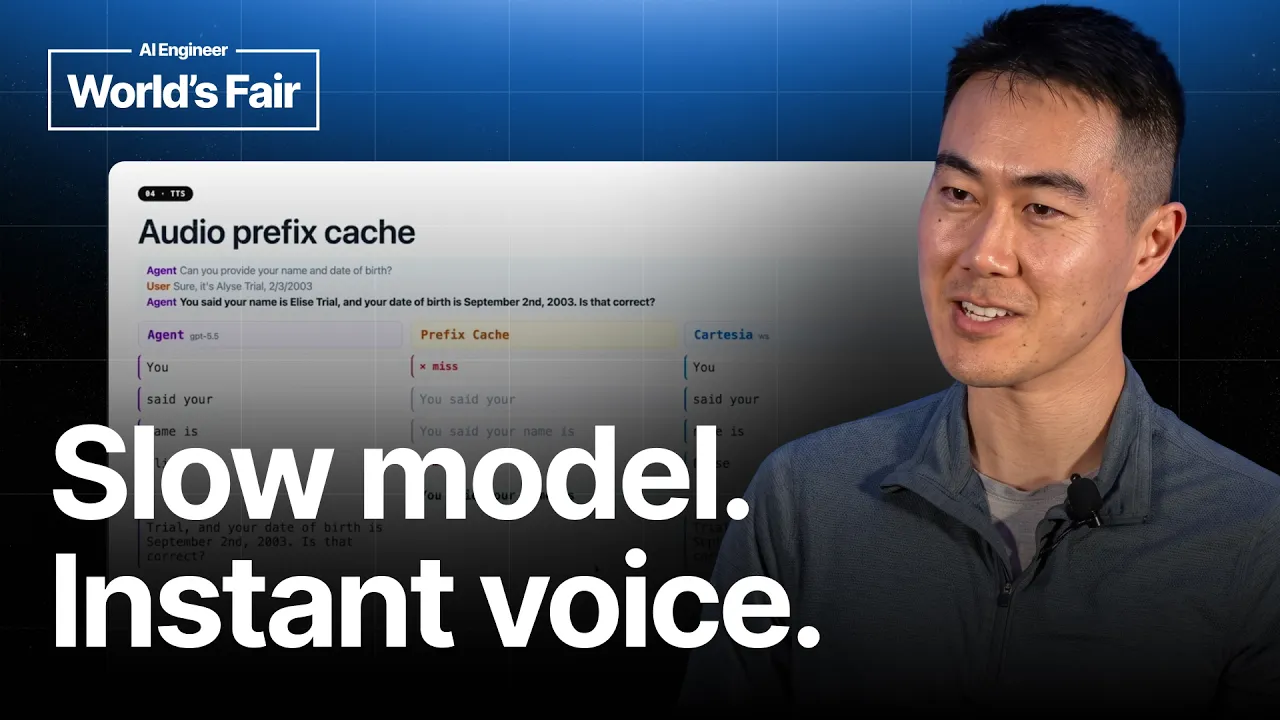
And ideally, what you can do is before the agent has even finished generating the full text you can have the audio play, so it's kind of hiding the latency of finishing the generation. So, um I'm going to kind of play the streaming um the stream the streaming uh agent output now. So, starts with you. And yeah, actually before I uh further, there's this new concept that we're introducing here called the prefix cache. So, the prefix cache is going to be looking at the um agent stream, and seeing if we already have generated audio for that sequence of words um from like a prior generation, or maybe like the same generation um in this uh in this call as as well.
So, um it sees the word you. Uh we for this prefix cache, we're going to be, you know, we don't want to like immediately hit on every single word. We're going to be waiting for a little bit more words. Um so, after three words, the prefix cache gets our first hit. And um over here on the right, this is kind of our text-to-speech standard provider, you know, Cartesia is a text-to-speech engine with web socket support.
So, we're we're piping the agent through the the cache, and also piping it through web socket. Um more tokens come in, more cache, more sending through web socket. Not much to say here. And okay, so now we get our first uh kind of first unique thing, which is we found the token that actually causes a cache miss. And it makes sense. If we're kind of caching previous generations, um you said your name is is a pretty common thing, but once you we add in the name, suddenly we're that's that's going to result in the cache miss.
At this point, we're actually going to yield out our cached audio. So, you said your name is is going to be um emitted as the rest of the streaming text is coming back. So, at this point, the user hears the agent and user doesn't really know what's going on. They just looks like really fast response times to them. Um and now the kind of remaining text flows through. And at this point, we've already emitted from the cache.
The cache has done its job. Um the rest we can kind of throw into Cartesia. And here's kind of the trick where Cartesia has seen the entire transcript up to this point. It to to Cartesia, like it doesn't know about the existence of this prefix cache. It's just going to generate this full sentence with, you know, standard natural prosody. But, what we do is when the generation comes back, since we've already played the audio here, we can actually suppress the audio from Cartesia here and just play out the remaining stuff.
So, the user, there's might be a tiny bit of a hiccup. You know, I'll play some audio later and you'll know that you probably won't be able to notice. And effectively, we're kind of taking this and or taking this part and just emitting it directly after this audio has finished playing. So, it looks seamless to the user. And yeah, so I guess at this point kind of this is a lot of technical details. I'll I mean the best way is just kind of play a call and see see this in action.
So here I recorded a call and let's just hear what happens. >> This is Bo OBGYN Elise speaking. >> Hi, I think I might be pregnant and I want to schedule an ultrasound to confirm. >> That's exciting news. Can you provide your name and date of birth? >> Sure, it's Elise Trial. Date of birth 2303. >> Thank you. Are you a new patient with us? >> Yes. >> Welcome to Bo OBGYN. Can I text you a link to upload your insurance information? >> Sure. >> Okay, sent.
Let me know when you've received it. I've received your insurance information. The earliest appointment I have is Thursday, July 2nd at 10:00 a.m. >> Actually, give me a second. Let me check my calendar. >> Sure, take your time. >> Um do you have something for next week? >> For next week, I can offer an ultrasound with Dr. Avery Stone at North Clinic on Tuesday, July 7th at 2:00 p.m. or 3:00 p.m. Do either of those work for you? >> Yeah, 2:00 p.m. works. >> Great.
Your appointment has been booked. We look forward to seeing you then. >> Thanks. Bye-bye. >> All right. Yeah, that's pretty much it. Um Yeah, you can kind of see our all this like uh streaming and you know, a lot of things are happening in the background and and you know, this is what really makes like voice agents interesting. And um there's a lot of effort that can be done in the harness to really kind of get a um natural conversation, which is what we're after.
Uh okay. Yeah, so I guess briefly, you know, in the last part, I want to just talk a little bit about Elise. So I think Elise, you know, our headquarters are in New York and kind of we're trying to expand our presence here in the Bay Area. Um we I think it's maybe like a different style of company that I think people are like uh think of when they think about AI startups in San Francisco. Where we're actually very focused on um just like helping people and helping people where they need it, like kind of the life's most critical areas.
We work on housing, health care and uh we're doing really well and you know, here's there's a link here to um you kind of join our team and there's going to we're going to be uh posting a lot on Twitter, so you can follow us at EliseAI as well. Um yeah, that's that's it. >> [applause]
The words are the caption track's own and nothing is reworded or re-transcribed. Paragraph breaks are placed between sentences so the text reads as prose.
Free tools for your own script. No signup, no login.
Paste your draft and see where viewers are likely to drop off, with a rewrite for each weak line.
Paste the first 30 seconds of your own draft for a hook score and rewrites.
Check your draft against YouTube's advertiser-friendly guidelines before you record it.
Read this channel's public videos and transcripts, and download a writing brief for it.