Getting the transcript
Reading the captions from YouTube. A video nobody has opened here before takes 10 to 30 seconds; this page fills in on its own.
Getting the transcript
Reading the captions from YouTube. A video nobody has opened here before takes 10 to 30 seconds; this page fills in on its own.
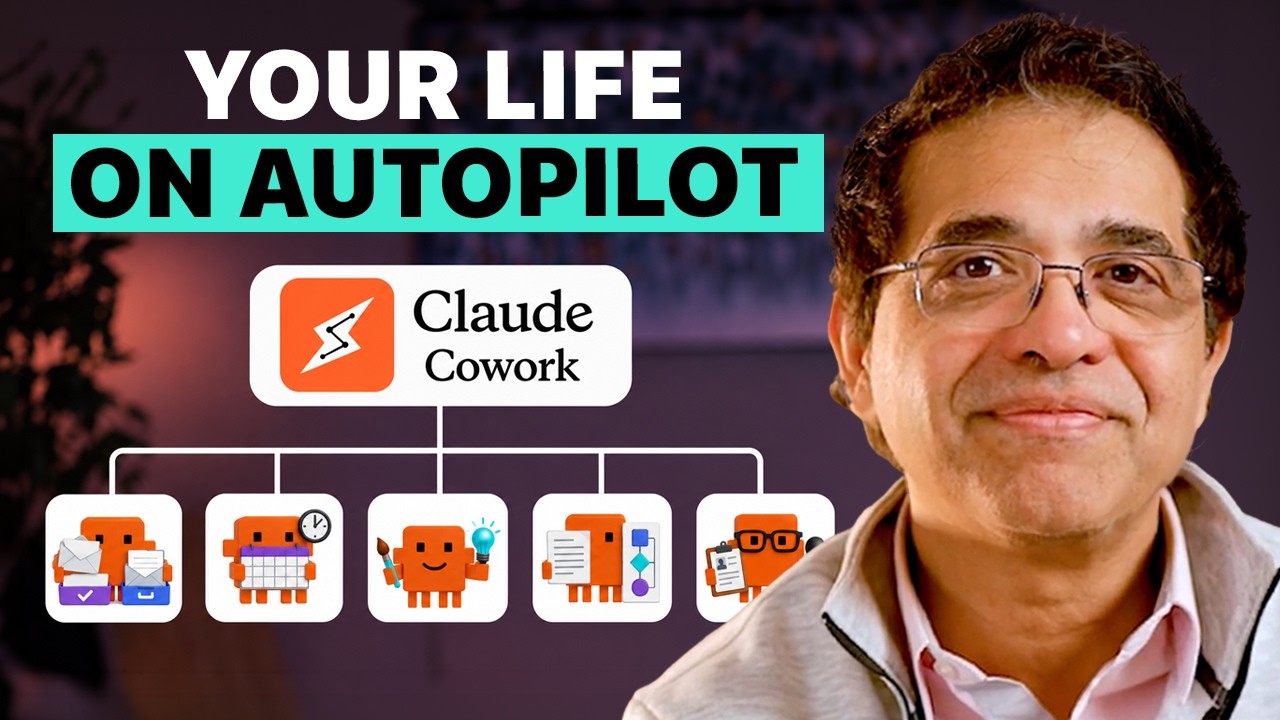
Sandeep Swadia · @SandeepSwadia
Where viewers went back to watch this video again, from YouTube's public Most replayed graph, lined up with what was said at that moment.
Most replayed moment #1
7:412.8x the video's typical replay level
most because that's where you're going to define who it's for, how long, what format, what voice. Okay, so let's use this creativity agent to make a PowerPoint presentation. I open Claude Co-work on my desktop and point it to a
Said at 7:35
Most replayed moment #2
10:242.6x the video's typical replay level
confusing and complex document? What if you need clarity to even understand what's going on in that document? That's our third time-saving pillar. C for clarity. We've all signed things we didn't understand. A loan contract, a
Said at 10:17
Most replayed moment #3
4:592.3x the video's typical replay level
that you found. Organize my day by telling me what creates conflict in my schedule, what needs an action or prep before a meeting, and what can wait. This is the moment the email and calendar start collaborating with each other. Now, the agent starts helping me
Said at 4:52
The graph counts replays. It does not show where viewers stopped watching.
Words
3,158
Runtime
20:46
Speaking pace
152wpm
Reading time
13min
152 words per minute, below the 160 25th percentile of 349 measured videos. That distribution comes from the 349-video hook study.
Opening (first 30 seconds)
four AI agents you can build today that will save you hours of work every week. You don't need any technical skills. If you can type, you can build them and start using them today. We'll do it together, step-by-step. For those who are new here, I spent more than 20 years as a CEO, board member, and investor in tech and AI companies, and I use these agents in my work every day. They're [music]
76 words, the words spoken in the first 30 seconds at 152 words per minute.
Free, no signup. See how the first 30 seconds hold attention, with rewrites.
Sentence shape
| Measure | This transcript |
|---|---|
| Sentences | 273 |
| Average words per sentence | 11.6 |
| Longest sentence | 34 words |
| Questions asked | 10 |
| Sentences containing a number | 12 |
Most used terms
Filler phrases
16 in total: like 10 · you know 3 · actually 1 · kind of 1 · literally 1.
A literal whole-word count of the same phrase list the Prepublish browser extension uses, so a phrase inside another word is not counted and a phrase used in its ordinary sense still is. It is a count and not a judgement.
What this transcript is
Every word below is the caption track YouTube publishes for this video, pulled from the video itself and reproduced unchanged. It is not Prepublish's writing, not a summary, and not a re-transcription: it is the video's own published captions. English captions, generated automatically by YouTube, in the video’s original language. Source: the video on YouTube. A channel that would rather this page did not exist can ask for its removal through the contact page, and it is removed.
four AI agents you can build today that will save you hours of work every week. You don't need any technical skills. If you can type, you can build them and start using them today. We'll do it together, step-by-step. For those who are new here, I spent more than 20 years as a CEO, board member, and investor in tech and AI companies, and I use these agents in my work every day. They're [music] game-changing. But, the agents are the easy part.
You want to learn not just the tools, but the way of thinking or the system that changes how you work with AI agents forever. And that system works on any AI, Claude, Gemini, ChatGPT, you pick. We're going to build four agents around four pillars. I call it four C's framework: coordination, creativity, clarity, and coaching. Each of these pillars make your life less chaotic and more productive. So, let's get to the first pillar.
The first C is coordination, because before anything else, AI should stop your day from getting hijacked. Microsoft studied how we actually work, and the numbers are brutal. The average worker gets 117 emails a day, and we're interrupted every 2 minutes by an email, or a meeting, or a message. That's 275 times a day. And by the way, none of that counts the social media interruptions. Our attention gets chopped into pieces every day.
So, let's build a coordination agent that reads your inbox, checks the calendar, plans your day, and gives you the time and attention back. [music] We will start by building the email agent first, and then we'll add the calendar right after. For this walkthrough, I'm using Claude Cohaerence. Chat is where you ask questions. Cohaerence is where you assign work. But, don't get hung up on the interface. If you use ChatGPT or Gemini or any other agent tool, the same principles will work.
The buttons will change, the workflow will not. So, okay. Here's the Claude app. You can select the mode, >> [music] >> whether you want to be in a chat tab or a co-work tab. Select co-work and it switches you into tasks. That's where we will build agents. Now, we want to think about email, so the first thing we're going to do is connect Gmail so the agent can reach and access your inbox. You do this from the plus menu.
Connectors, add connectors, browse, then select. And congratulations, this is your first leap from chatbot to agent. Once Gmail is connected, you no longer have to copy emails into your chat. You can say, "Summarize my unread emails from yesterday." And the agent knows where to go and what to do. And by the way, if you're little uneasy about letting AI into your inbox, that's a good sign. Trust your hesitation. When you connect Gmail, Google shows you exactly what permissions you're giving it.
Read it. Don't click through it blindly. For the first demo, I want the agent to read and draft emails, not send them. Now, we write the prompt. Same plain English you would type in chat. The difference is that now you're handing it a job. The prompt has five parts: the job, the tool, the categories, the output, and the boundary. You could say something like, "Review my unread Gmail from the last 24 hours. Sort it into three buckets: urgent, informational, and ignore.
For anything urgent, draft a reply that sounds like me. Don't send anything without my approval." Notice the five parts in that one sentence? The job, the tool, [music] the buckets, the output, and the boundary. Now, underneath every agent runs the same loop. It reasons, it acts, it looks at the output, and reasons again. Researchers have a name for it, react, reason and act. But, email is only half of our coordination agent, correct?
Once we've used the email agent for a few days or maybe even a few weeks, we're getting comfortable now. We're ready to add the second coordination layer, calendar. Now, for the walk-through, same path as Gmail, plus menu, connectors, add connectors. This time, select Google Calendar to connect to Google Calendar. Again, I'm not giving the agent permission to move meetings or change my day without my approval. At least in the beginning.
Here's what I would prompt. Look at my Google Calendar for today and tomorrow. Compare it against all the urgent emails that you found. Organize my day by telling me what creates conflict in my schedule, what needs an action or prep before a meeting, and what can wait. This is the moment the email and calendar start collaborating with each other. Now, the agent starts helping me shape my day. Once I run both these email and calendar versions a few times, >> [music] >> and I trust both outputs, I can schedule the full coordination run every morning.
And from that point onward, every morning, you'll know exactly what your day is going to look like. In Coda, you do this by going to the schedule tab in the sidebar or using the schedule command inside a task. Of course, [music] be careful about scheduling anything that touches sensitive data or acts on your behalf without your approval. And then, as you get more comfortable, you can promote this agent as your executive assistant.
You can prompt, "Can you block two slots for 30 minutes each so I can go running with my buddy?" The agent will find time for you so you can do things you want to do on your busy day. So that's your coordination agent. The first lesson, don't delegate the decision immediately. First, make the work visible, then make it efficient, then make it automatic, and then and only then use your judgment to delegate and hand off slowly.
[music] And the second lesson is to not hurry through this process. Start with email, add calendar later after you trust the output. Let your agent earn higher responsibility one step at a time. You know, we don't get promoted easily, neither should your agent. And by the way, if you like these kind of frameworks and systems thinking, I write a newsletter that goes deep into these themes every Tuesday. One insight, one tool, one practice.
Link is below and it's free. All right, now it's time to move to the second pillar, C for creativity. Here, you bring your rough cut, notes, documents, background, messy thoughts, whatever you already have. The agent helps assemble it into something you can judge. You're still the director. You own the decision. So let's do a walk-through on how to build this agent. This time, you're giving the agent your rough cut and a target.
It is the same prompt skeleton from the last agent, the job, the tool, the categories, the output, the boundary. And for this particular agent, the output is where you focus the most because that's where you're going to define who it's for, how long, what format, what voice. Okay, so let's use this creativity agent to make a PowerPoint presentation. I open Claude Co-work on my desktop and point it to a folder on my computer.
That folder is where I drop my rough notes and it's where the finished deck will be created as well. I give it the notes and tell it what I want. Here are my notes for an idea. I want to pitch this to the CFO. Build me a short pitch deck. Ask me questions if you have any gaps in your understanding. I want 8 to 10 slides and I want that pitch to last for maybe 15 minutes. It will read my notes. It will ask me questions if it has any.
It will even fill the gaps with a little research and build the actual deck. What comes out is a real PowerPoint file that I can open and edit in Microsoft PowerPoint. Now, I can direct. I see what's working, what's weak. I can tell the agent what to change. Make this longer, make this shorter, make this a three bullet slide. Can we make the opening slide cleaner? Delete this slide. Whatever comes to mind. The agent will help you rebuild.
Now, this deck came out as a real file because Claude uses something called a skill. That's just a set of instructions for doing a specific job. It ships with skills for PowerPoint, Word, Excel, PDFs, which is why you get real files. Now, what if you want to change the look and feel? Well, you can drop one of the decks that you like and ask the agent to match that style. Another cool way of doing it is that you can even ask the agent to turn your brand template into a skill.
From that point, the agent will then always apply the same colors, the same fonts, the same layout to every deck and document you'll ever make. Now, this is just one example of using skills. You can come up with 100 others. We're not just learning tools here. We're learning a new way of thinking. Now, make sure that the ultimate direction comes from you. These agents are your multipliers. If you come in clear, AI will multiply your clarity.
If you come in confused, well, the AI multiplies the confusion. And the best way to create that clarity is to do a lot of experiments and figure out what's the best way to tweak your output and even your agents. And over time, you'll build a very strong intuition >> [music] >> to get what you want. But what if you're spending hours trying to understand a confusing and complex document? What if you need clarity to even understand what's going on in that document?
That's our third time-saving pillar. C for clarity. We've all signed things we didn't understand. A loan contract, a car lease, a medical report, an insurance policy. It's all right there. It's correct, but it's so confusing because many of these documents are written in a language built to protect those who wrote them. That's where the clarity agent will save you a ton of time and hassle. It's your translator, and that's what we're going to build.
The best way to understand what we're building is to think about two scopes, a telescope and a microscope. Sometimes what you're looking for is scattered across so many places that you need the agent to pull it all together. And sometimes it's the exact opposite. Sometimes what you're looking for is buried so deep in a single dense document that the agent has to dig in, extract the key ideas, explain the jargon, flag the risks.
That is your microscope. So, let's go through both of them and build both ideas. Say I'm about to sign a deal with a company I don't know well. So, I can tell the agent, find out who they are. Find out everything you can from the internet. Analyze our past emails with them because, hey, we've already built our coordination agent, remember? Find out anything recent in the news. And tell me more about this deal that I'm trying to strike with them.
And if I have uploaded documents, the agent will search all my documents, all my connected tools, my Google Drive, and the web and come back with one picture. And what if I want to know more about their product or competitive strategy? We let the agent do the work for us. And the prompt could be, now go and do deep research on their core product from reliable sources, create a document in my folder, and cite the sources.
Cloud agents already have web search and deep research built in. Same for Gemini and ChatGPT. The interface may look different, but it's the same idea. Two phrases I use the most when I work in telescope mode. Please verify, and be concise. They can be super helpful. Sometimes I take the research output from one AI engine to another one and make sure I can cross-verify. That is my advisory board. And there are three members in it, Claude, Gemini, and ChatGPT.
And sometimes they fight among themselves, which is great for me. Now it's time to change our scope. We're going to use the microscope. Let's say we have a contract from the same company. I uploaded the first mistake most people make is asking, summarize this contract. A summary makes a confusing document shorter, sure. But in legal contracts or long policies, the devil is always in the details. So instead, my prompt would be, "Read this document carefully.
Find the key terms like fee structure and obligations and deadlines and exclusions and risks. Pay attention to anything that's unclear or anything that makes me liable." Create a table with five columns. What the contract says, what it means in plain English, why it matters, the risk level, and the questions I should be asking. Again, that's just one of many prompts you can give it, but you get the point. You want to break that document open, not get a bird's-eye view on it.
That's what agents can do for you. And now, one more important thing, your mileage may vary, but I personally don't like uploading sensitive information like personal financial data or medical reports. So, be mindful about all of that. All right, we're on to the fourth pillar. This last agent helps you handle the moment once you're in the room, the interview, the raise, the pitch. With some conversations, you only get one shot.
That's why you have to rehearse. I remember my first job interview. It was long time ago. And I had no idea what to do, what to wear. I didn't even know how to tie a tie. I don't think I even owned a tie. So, I asked my roommate if I could borrow his tie. His name was Mike Green. Awesome awesome roommate. He said, "Sure, but do you know how to wear it?" And I shook my head and we both cracked up. So, he got a tie, tied it around his neck first, loosened it, and handed it to me and said, "Good luck." Of course, I walked in wearing a borrowed tie, but still had the same anxiety about my first interview.
Turns out that when it comes to interview anxiety, I'm not alone. In a survey done by JDP, 93% of people said they get anxious about job interviews. That's almost all of us. But the survey also said something very useful. One of the best ways to reduce that anxiety is to practice that interview out loud. That's the whole point of the coaching agent. The first time you say the most important thing, you should not be in the most important room.
We are going to build an agent that helps you rehearse. I know CEOs who rehearse their entire board meeting with six or seven agents, where each agent is designed to mimic the personality of a specific board member. Yeah. It's that important. We will use job interview as an example as we build it, but you can use it for any professional or personal conversation or negotiations. Okay, first, I add all the context, the company background, job description, my cover letter, my resume, my position statement, [music] and so on.
Second, we want to tell the agent who to be. You are the hiring manager for a senior product role. You are sharp. You're a little skeptical. And you've read my resume, so go ahead and interview me. Ask one question at a time. And push back on weak answers like a real interviewer would. And keep track of our entire interview so we can analyze and improve my performance. And here's the move that makes it all real. Don't type it.
Talk to it. Turn on the voice mode. On your phone. So ChatGPT, Gemini, Claude, they all let you speak out loud, and they all can have natural conversation with you. You can interrupt it, you can ask clarifying questions. It's a real conversation. I do this all the time on my walks. And when I'm done, I want both the agent and me to break character. I would say, "Okay, we're done with the interview. Now, you're my interview coach.
Tell me where I was weak, where I fumbled, what I should have said. Tell me where I rambled on. Give me three ways I could have answered that question better." And once the coaching session is over, now you can turn up the heat. Give that agent a persona of a tougher hiring manager. Maybe you're applying to a startup, and the CEO will be the one interviewing you at the end. Give that persona to the agent. Let the agent know that it should conduct the interview in that persona for 45 minutes, and give you the last 15 minutes to ask questions to the CEO.
Because that will happen in real life. And finally, once you're done with all your reps, don't forget to ask. Turn what you've learned into a one-page prep card, so I can review it before the interview. Now, you have something you can use. [music] Your goal here is not to create a set of scripted answers, but to build the capacity to deliver good answers, no matter what the questions are. Like all great musicians, rehearsals teach you to build judgment and taste, so you can become comfortable improvising on stage.
So, those are the four pillars. You know, as AI becomes more entangled in our lives, there's definitely a sense of fear running under all of this. According to a recent survey, 70% of Americans believe AI will shrink job opportunities. And among Gen Z, it is 81%. Sure, some jobs will be displaced. There will definitely be some pain around that. But, many, many more new jobs will be created over time because of AI. We have been here before.
Every age has believed that the machine would swallow the person. Charlie Chaplin showed it in Modern Times. A man literally pulled into the gears of a factory. And that was made in 1936. If the contest is speed, memory, or faster output, machines will win every single time. But, I think the real contest will be about the things machines cannot own. Your attention, your creativity, your clarity, and that one thing that matters most when you build your career, your life, your company, your judgment.
Those are the four pillars we talked about. Sure, the machines will keep getting smarter and faster. Let them. Use the machines. You don't have to become one. See you next week. Thank you. And I love you.
The words are the caption track's own and nothing is reworded or re-transcribed. Paragraph breaks are placed between sentences so the text reads as prose.
Free tools for your own script. No signup, no login.
Paste your draft and see where viewers are likely to drop off, with a rewrite for each weak line.
Paste the first 30 seconds of your own draft for a hook score and rewrites.
Check your draft against YouTube's advertiser-friendly guidelines before you record it.
Read this channel's public videos and transcripts, and download a writing brief for it.