Getting the transcript
Reading the captions from YouTube. A video nobody has opened here before takes 10 to 30 seconds; this page fills in on its own.
Getting the transcript
Reading the captions from YouTube. A video nobody has opened here before takes 10 to 30 seconds; this page fills in on its own.
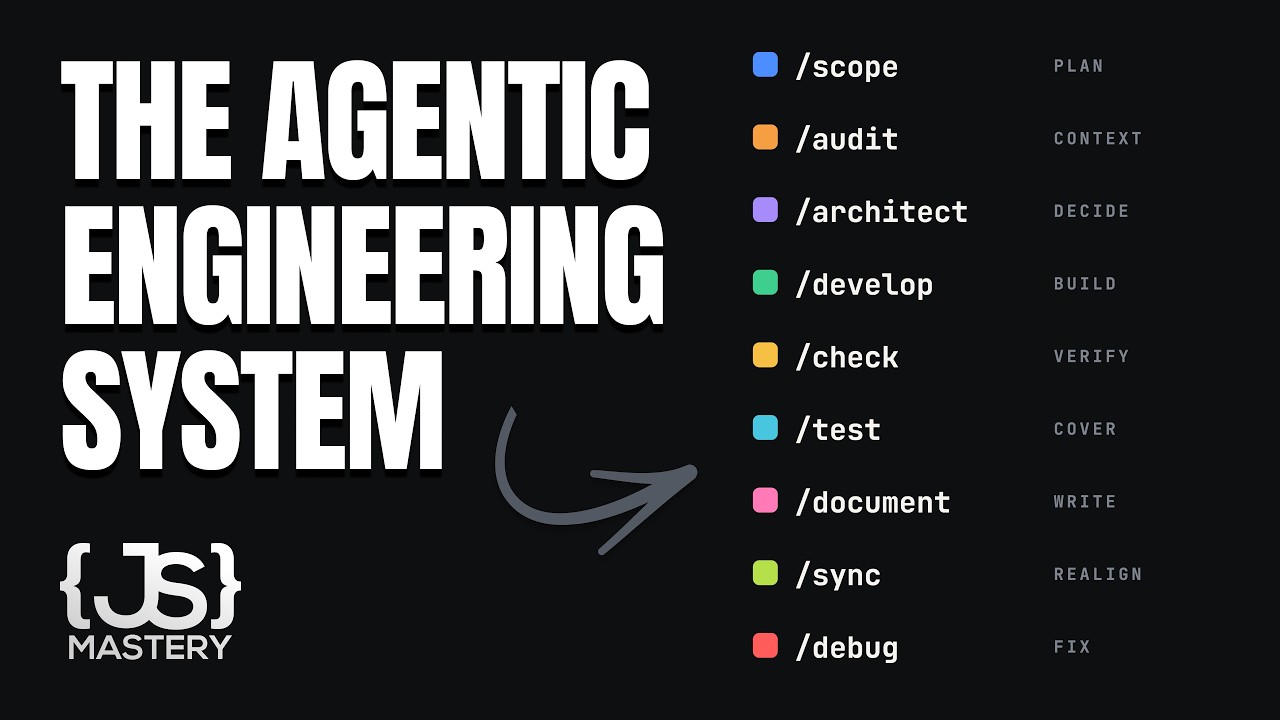
JavaScript Mastery · @javascriptmastery
Words
3,493
Runtime
23:33
Speaking pace
148wpm
Reading time
15min
148 words per minute, below the 160 25th percentile of 349 measured videos. That distribution comes from the 349-video hook study.
Opening (first 30 seconds)
You open your agent and start building. But here's the thing that nobody tells you. Every feature you add makes the next one harder to build. Not easier, harder. Watch how it happens. You've got a plan in your head. You type out what you want and it builds it fast. The front end, the back end, the database. It feels great. Then you look closer. It's missing a few things you actually wanted
74 words, the words spoken in the first 30 seconds at 148 words per minute.
Free, no signup. See how the first 30 seconds hold attention, with rewrites.
Sentence shape
| Measure | This transcript |
|---|---|
| Sentences | 267 |
| Average words per sentence | 13.1 |
| Longest sentence | 94 words |
| Questions asked | 12 |
| Sentences containing a number | 7 |
Most used terms
Filler phrases
31 in total: actually 25 · like 4 · kind of 2.
A literal whole-word count of the same phrase list the Prepublish browser extension uses, so a phrase inside another word is not counted and a phrase used in its ordinary sense still is. It is a count and not a judgement.
What this transcript is
Every word below is the caption track YouTube publishes for this video, pulled from the video itself and reproduced unchanged. It is not Prepublish's writing, not a summary, and not a re-transcription: it is the video's own published captions. English captions, generated automatically by YouTube, in the video’s original language. Source: the video on YouTube. A channel that would rather this page did not exist can ask for its removal through the contact page, and it is removed.
No Script X-ray for this video: YouTube shows a Most replayed graph only once a video has enough views.
You open your agent and start building. But here's the thing that nobody tells you. Every feature you add makes the next one harder to build. Not easier, harder. Watch how it happens. You've got a plan in your head. You type out what you want and it builds it fast. The front end, the back end, the database. It feels great. Then you look closer. It's missing a few things you actually wanted and it added a couple of things that you never asked for.
No big deal. You'll just fix those. So, you prompt again. You fix one thing and something else quietly breaks. A few prompts in, you've half forgotten what you originally set out to build, and you're going in circles reexplaining, refixing, and watching the hours and the tokens go just to get back to something you thought you already had. and say you push through and ship it. You ask for the next feature and instead of using what's already there, the AI writes a whole new component, a new function, the same logic for the third time.
Nothing reused. The app gets slower. The code gets messier. And every now and then, a new feature breaks an old one that was working perfectly fine. That's the decay. Building this way doesn't compound. Every feature makes the next one harder because nothing is holding the project together. No plan the agent remembers, no record of the decisions, nothing making it build with what already exists instead of just piling more.
And that was never something that a better prompt was going to fix. It's an engineering problem. So, let me show you what changes when a real engineering workflow sits underneath the agent from the first prompt all the way through the 10th feature. And not just on a shiny new project. Later in this video, I'll run the whole thing on a codebase you didn't write in a language nobody makes tutorials about because that's the job you actually have.
It starts before you type anything at all. That spiral that I just told you about, the missing features, the wrong guesses, the going in circles, almost all of it traces back to one thing. You never gave the AI a plan. You gave it a wish. And the funny thing is, we solved this decades ago. It just wasn't for AI. No serious engineering team opens the editor first. They plan what are we building? What's in the first version?
What's explicitly out and in what order? Requirements before code. It's the oldest discipline in software and it exists for one boring reason. Changing a line in a plan is free, but changing a decision that's already spread across your codebase is a rewrite. And what happened is when we started building with AI, we quietly threw that step out and jumped straight to just build it part. The scope skill puts that step back.
You give scope your idea and instead of jumping into code, it does what a senior engineer would do first. It interviews you. Who is this for? What's in version one and what waits? What depends on what? It then recommends how to shape the build. Whether you prove one thin slice through the whole system first or ship the smallest usable version or finish the full journey at a time. These are real engineering strategies that have been used for decades.
You choose the one that is right for you and it even recommends which one should be right for you and tells you why. And scope never touches your tech. It doesn't touch your database, framework, or libraries on purpose. It decides what you're building. But the how, such as the stack, the database, and all of that, it comes right after as its own decision. So your plan doesn't rot the day you change the tool. That's scope.
It turns a vague idea into a real ordered plan, one you made instead of the one that AI just guessed in a hurry and then you start building. And that's where most AI projects quietly fall apart. Okay, so now that you've got a detailed plan, but a plan isn't a design. You still have to decide how the system is actually built. How do you design the database? What text stack do you choose? How do you handle the critical logic?
How do you architect the thing so it holds up where it's going? Because on day one, you won't have millions of users, but you have to build it in a way that could get there without overbuilding for a scale you don't yet have. That balance is a real engineering decision, and it's exactly the kind of thing that quietly goes wrong when you let the AI make it for you. And it does make it for you. Every feature has decisions hiding inside it that you never specified.
How the data is stored, what happens on failure, and whether that list even pageionates, which provider you're using. The AI doesn't stop and ask any of it. It picks whatever makes it run and buries your choice in the code. You don't decide. You inherit those decisions and you also inherit the breaks that come with them. And that's exactly why I built the architect skill before any code. It runs through the design conversation a senior engineer would run with you.
It thinks in patterns first. Does this even need to be complicated or is the boring reliable choice the right one? It comes in with opinions that a good engineer already holds. Start with a monolith, use a relational database by default, pageionate every list, rate limit every public endpoint, and never keep secrets in your code. And for every real decision, it puts the options on the table, the one that it recommends and the honest alternative with the actual reason it lost.
That's not buried in code. It's written down right here where you can see it and overrule it. And there's a specific check underneath all of this. That's the real safeguard. For every single value the feature has to show or compute, a total, a date, a status, it names where that value comes from. So anything without a real source is a decision that nobody made and it catches it right here at design time instead of letting the AI invent it later midbu.
Then when you go to actually build it, the develop skill does something you don't expect. It stopped. Develop refused to keep building because building would have meant inventing one of those decisions that nobody made. And here's the clever part, if I can say so myself. It doesn't just decide that by feeling like it's inventing something. Because an AI will happily convince itself that a real decision is just wiring and push right past it.
So it does something mechanical instead. It lists every value the feature has to produce and then checks the plan and says where each one comes from. Any value with no source is a decision that's owed and that's where it stops and sends you back to make the call. an AI that turns down work. And trust me, that's a genuinely different way to build. And you can still override it and build anyway because you're always in charge.
But the moment you do, the assumption gets written down and flagged on that feature until it's properly decided. So even the corner you cut is visible, sitting in a file instead of it being lost in the chat forever. You are the decision maker. Architect makes the decision on purpose and develop refuses to build on one that nobody made and tracks that if you push past it. And it's not magic because no specific prompt catches a 100%.
But catching almost all of them and giving you a senior engineer's judgment on the rest is a completely different world from making all of them silently. So the decisions are getting made properly. Now you're actually building and then you close your laptop for the night. Every agentic setup runs on a context file, an agent's MD, a claude MD, or whatever your tool calls it. It's the file that tells the agent how your project actually works.
The stack, the commands, the conventions. And without it, every new session opens blind and just guesses. And it guesses differently every time. So your codebase quietly drifts into three different styles. So you need one and setting it up well is more work than it sounds. Especially once your app isn't one simple project in a monor repo or a service split, one giant file bloat every session with the rules that it doesn't need.
You want the right context in the right place and it needs to be lean. That's a bit fiddly to get right by hand. So, watch what the audit skill does instead. Audit reads your actual project, its structure, its stack, and the decisions that architect already made and writes the context for you from what's really there and not from what the AI assumes a project like yours would look like. A single app gets one clean agent MD.
A motor repo gets context files placed where they belong. One lean root file for what's true everywhere and then separate ones next to the parts with their own rules. And it's safe on a real team's repo because it never overwrites what a person wrote. Your handwritten edits stay. It only fills the gaps. And when the code disapproves something the docs claim, it flags that conflict and lets you decide instead of just bulldozing it.
And as you keep shipping, the sync skill will reconcile those files against what the repo actually shows now. So the context you read in month three still describes the app you actually have. And here's what that buys you. Your project's knowledge no longer lives in a chat that vanishes when you close it. It lives in a file. A fresh session, a teammate, or a completely different AI tool just reads them and picks up where you left off so that nobody's reexplaining the project to the AI ever again.
So, everything I've shown you so far started from a clean, fresh project. But let me be honest about the job you actually have most days. Most AI coding tutorials, mine included, build on a brand new project. It gives you a clean slate, nothing to fight, and easy to learn from. But that's not your typical Tuesday evening. Your Tuesday codebase is a codebase that somebody else wrote, most often years old. It has no documentation or it has some very outdated one.
And there are conventions that you have to reverse engineer to even figure out. And half the time it's not even in the stack that the tutorials that you've watched online use. So the real question isn't can AI read this? Because of course it can. The question is can a whole engineering workflow actually operate on a mess that you inherited. And this is where the audit pays off a second time. You point that same audit skill at a real project and instead of setting up something new, it reads something real, whatever it is, and writes down how it actually works.
That's how the whole workflow gets into a codebase that you didn't start. And it does not care that it's not JavaScript. pointed at a 15-year-old PHP codebase, no JavaScript anywhere in sight, and it reads that and documents it just the same. Because what it's capturing is engineering context, not a framework. But here's the part that actually matters. And it's why this isn't just the AI can read old code. Once the project's understood, the rest of the workflow bends around it.
The scope skill doesn't pretend that the project starts today. It enrolls what's already been built and then plans your next slice on top of reality. So when you design a new feature, it's designed against the constraint the existing system already imposes the data it has, the patterns it follows, not in a vacuum. The workflow works with the code that's there instead of fighting it, which is really the whole point. It's reusing instead of regenerating.
And that's the whole difference. Plenty of tools can glance at a legacy codebase. The point here is the entire discipline, plan, decide, build, all of it runs on top of code you didn't write in whatever language it happens to be in. And that taking over real inherited messy codebase and moving it forward without breaking it is what you'll actually spend most of your career doing. And almost nobody teaches it. So, let's say you've built your feature on a real codebase with the decisions made on purpose.
The AI says it's done. And this is the last place that it lies to you. I'm sure you've had this moment. The AI finishes, says done, it works, and it doesn't. The button doesn't do anything. the edge case crashes or have the thing the plan asked for was never actually built. And the trap that makes it worse is that the tests are green because green tests only prove the code that the AI thought to test. They never prove the feature actually exists or that the screen it was supposed to build is even there.
So our agentic engineering workflow doesn't just take the it works as an answer. There are really four jobs here and it keeps them separate on purpose. There's the check verify test check review and document. First check verify runs the real app not reads the codebase and nods but drives the actual feature clicks the flow hits the endpoint and watches what happens and checks it against the criteria that the plan set out everyone met every screen the plan promised actually built and that's the difference between the tests pass and I watched it work with my own eyes then there's the test skill which writes the test suite a senior engineer would write tests for what a caller actually relies on and what would genuinely break something.
That's what protects this feature 6 months from now when you or the AI decide to change something near it. The check review reads the code on a different model than the one that wrote it because a model reviewing its own work carries its own blind spots. But a fresh set of eyes reads the diff and ranks what it finds. And document writes the human record, the PR description, the change log from the actual diff, not from the AI's memory of what it thinks it changed.
But that's four skills. Seems like a lot. But how much of that you actually run is up to you and the project. A throwaway prototype just self-checks. A payment system runs all four. You match the effort to the risk. But the point is the same either way. It's not done when it renders in the browser. This is the part that gets skipped because it isn't flashy. It's also the part that decides whether the feature you just added actually works and didn't quietly break the three before it.
And when something does still slip through, because eventually it will. Here's the last one. Something's broken. You tell the AI to fix it and it starts trashing. Changes one thing, still broken. Changes three more, still broken. And then 20 minutes later, you've got five random edits, the original bug, and two brand new ones. It was a pattern matching try of a fix instead of finding the right cause. That's the decay in its purest form. trying to fix one thing and making three more.
The workflow's debug skill doesn't guess, it investigates. The way that an actual engineer debugs, it reproduces the bug reliably first because a bug you can't reproduce on command is a bug that you can't prove you fixed. So it narrows the smallest failing spot and then and this is the discipline that matters. It forms just one theory about the root cause and tests that one thing before it touches anything else. Once it's confirmed, it moves on.
And if it's wrong, it throws that change away and learns from it. It doesn't have a dead edit lying around making things messier. It does one thing at a time where the result actually means something. And it fixes the cause, not just the symptom. It won't just clamp a null value to make the error disappear. It rather finds out why that value was null in the first place. Then it writes a test that fails without the fix and passes with it.
So that exact bug can never quietly come back. It'll even go hunting for the same mistake hiding somewhere else in code. And the mature part is if it turns out that the bug isn't a coding mistake at all, but rather a bad decision, which happens, it says so and sends you back to redesign it properly instead of papering over a bad call with a patch. That's the whole difference. An AI that reacts to a broken symptom versus the one that investigates a cause.
And knowing how to run that, how to debug with discipline instead of vibes is exactly the kind of judgment this is all about. It's not just some rigid process where you follow the exact same steps every single time. Because a small app doesn't need the same workflow as a massive codebase. And working with a brand new project is very different than working from something that's been around for years. The workflow looks at what you're actually building, how big it is, where it's going, and adapts to it.
It guides you the way that a senior engineer would instead of forcing every project into the same process. And that's really the difference between having a bunch of prompts and having an actual engineering system. So that's the whole thing. Plan it properly. Make the decisions on purpose. Keep the state in files. Work on real code. Prove it actually runs. And fix it with discipline when it breaks. That's the workflow that compounds instead of decays with every feature building on the last instead of fighting it.
And the part that you might not expect is that everything I showed you. All of these skills, they're completely open source, free, one command, and they're in your editor right now. So, go use them. And I really mean it. I'm not hiding the workflow behind anything, but use them for a week and you'll run straight into one honest thing. Running the skills is the easy part, but knowing when to run which one, what to decide when it puts a choice in front of you, and whether the AI's recommendation is actually right for your situation, what to do when the plan is wrong or a session goes sideways.
That's the judgment. And you can't install judgment from a repo. which is exactly why I built a course around the workflow that I'm giving away. The tools are one piece, but the course is everything around them. How these agents actually work under the hood. How to run all of this as one system instead of a pile of separate commands. How to build your own skills and how to take this into a real legacy codebase. and what to do when it all goes wrong, which is, if I'm being honest, where the real engineering actually lives and where every free demo quietly stops.
You can look at it this way. The repo gives you the tools, but the course gives you the mindset, the skills, and the judgment behind them. And the course is already fully done. It has been for some time. I first soft launched it to a weightless group and they've already logged over 3,000 lessons in the first two weeks. So, it's not a launch day experiment. Real developers are already deep in it. It's the Agentic Engineering course from JavaScript Mastery and it opens to everyone on September 22nd.
So, mark your calendar. But take the real lesson with you either way, even if you never buy a thing. The difference between someone who prompts an AI and someone who engineers with it was never a better model or a smarter prompt. It's this. Decide what to build first. Make the hard calls on purpose. Keep the state in files and never ever let the AI decide something important without telling you. Do that with my skills or your own and you're already ahead of almost everyone using these tools.
So now go build something that lasts.
The words are the caption track's own and nothing is reworded or re-transcribed. Paragraph breaks are placed between sentences so the text reads as prose.
Free tools for your own script. No signup, no login.
Paste your draft and see where viewers are likely to drop off, with a rewrite for each weak line.
Paste the first 30 seconds of your own draft for a hook score and rewrites.
Check your draft against YouTube's advertiser-friendly guidelines before you record it.
Read this channel's public videos and transcripts, and download a writing brief for it.