Getting the transcript
Reading the captions from YouTube. A video nobody has opened here before takes 10 to 30 seconds; this page fills in on its own.
Getting the transcript
Reading the captions from YouTube. A video nobody has opened here before takes 10 to 30 seconds; this page fills in on its own.
Ben Heath · @BenHeath
Words
2,509
Runtime
11:16
Speaking pace
223wpm
Reading time
10min
223 words per minute, above the 201 75th percentile of 349 measured videos. That distribution comes from the 349-video hook study.
Opening (first 30 seconds)
Meta ads look really intimidating from the outside. You've got campaigns, ad sets, ads, targeting, budget, a dashboard with about 400 buttons in it. And most beginners either freeze and never launch anything, or they click around blindly and burn through $100 or more before they even understand what any of it actually means. Here's the truth. Underneath all of that, Meta ads really only runs on a handful of core ideas. If you learn those, you'll understand more than most people who've been running ads for years. In the next few minutes, I'll walk you through exactly that. No jargon, no assuming you already know anything. Let's get into it. Now,
112 words, the words spoken in the first 30 seconds at 223 words per minute.
Free, no signup. See how the first 30 seconds hold attention, with rewrites.
Sentence shape
| Measure | This transcript |
|---|---|
| Sentences | 156 |
| Average words per sentence | 16.1 |
| Longest sentence | 43 words |
What this transcript is
Every word below is the caption track YouTube publishes for this video, pulled from the video itself and reproduced unchanged. It is not Prepublish's writing, not a summary, and not a re-transcription: it is the video's own published captions. English captions, generated automatically by YouTube, in the video’s original language. Source: the video on YouTube. A channel that would rather this page did not exist can ask for its removal through the contact page, and it is removed.
No Script X-ray for this video: YouTube shows a Most replayed graph only once a video has enough views.
Meta ads look really intimidating from the outside. You've got campaigns, ad sets, ads, targeting, budget, a dashboard with about 400 buttons in it. And most beginners either freeze and never launch anything, or they click around blindly and burn through $100 or more before they even understand what any of it actually means. Here's the truth. Underneath all of that, Meta ads really only runs on a handful of core ideas.
If you learn those, you'll understand more than most people who've been running ads for years. In the next few minutes, I'll walk you through exactly that. No jargon, no assuming you already know anything. Let's get into it. Now, make no mistake, having a big budget when running Meta ads can help you win. But, you're also playing the content game. So, make sure your ads are in tip-top shape and effective from a content point of view before you throw any money behind them.
The worst ad in the world with a $10 million budget behind it would be a catastrophe. Meanwhile, a really effective ad can absolutely fly with a much smaller budget. Here are some things to look out for. So, there are two types of ads we'll be focusing on for now. Static ads and video ads. And then we'll quickly cover your ad copy which relates to both of these. Now, I could make an entire video worth of advice on both.
So, if that interests you, drop a comment below and subscribe so you don't miss the upload. So, for static ads, you'll want to make sure you have four main elements. So, firstly, high contrast visuals. Keep the background clean and avoid over-designing. Then, you want a clear value proposition. Move away from listing product specs and instead show the transformation. How people will improve their lives by buying your thing.
Then, use layouts like before and afters or side-by-side comparisons. You do need to be careful with human elements like body transformations, even a hair salon showing before and afters cuz Meta doesn't like those very often. You can use imagery that shows the product or the desired outcome in its best light. And most importantly, an offer. Something like 10% off or free quote. Now, video ads are of course a little bit more complex, but they follow all the same core principles of the static ads we mentioned before.
The additional things you'll need to keep in mind for videos, though, are that audiences respond well to videos that have an avatar, a person that they can identify with that they can relate to. They feel reassured that the offer is genuinely valuable for them in that case. You can use bold text overlays, captions, really important. Many users will watch ads without sound on. Additionally, you want to frame your video so that it fits for the different placement options.
So, you want a 9 by 16 version for stories and reels, a square version for feeds. That maximizes the display space and gives Meta the most flexibility to put your ads where you want them to be put. You don't just want to upload a horizontal video asset that was made for YouTube, for example, and run that as a Meta ad. With that in mind, one of the absolute keys to scaling ads is working with the right data. Meta ads especially are driven by AI targeting.
Bad data means not only bad ad decisions, but bad AI targeting. Meta tracking is consistently off by 20 to 20% and as much as 50% plus for long-term sales. This leads to that bad data. That's why I want to tell you about Hyros and their new form of attribution called AI swarm data. It fixes this gap in A, allows you to make the correct decisions with your ads. B, sends the right data to Meta. This results in an almost immediate boost to ad ROI via better targeting and better decisions, which is why it's used by major players like Alex Hormozi, Tony Robbins, myself, Four Seasons, Playboy, Watt, and thousands of large-scale e-commerce stores.
Here's an example. Hyros helps point out gaps in tracking. If I couldn't see this data, I wouldn't be able to scale as effectively. More importantly, it feeds the ad platform the right data for better targeting, cutting your cost to acquire customers. That's why I'm comfortable recommending Hyros. They literally guarantee increased ad ROI or you don't pay. Their usual result is around a 10 to 15% increase in ad revenue.
And if you're an agency, not only does it get your clients better results, Hyros pays up to 40% for lifetime commissions on each client you bring. Even better, they will set it up for you, then help you optimize ad platform AI targeting with it. Use the link below. The first 15 people to do so will get a 30% discount. Now, for your ad copy, which includes your headline, primary text description, and call to action, you want to make sure you've got the following.
So, firstly, a scroll-stopping hook featuring something like a 6-to-10-word claim or a problem callout that will help grab people's attention. You could use a three-step problem-solution format. I really like those. You also want to include a clear call to action, so avoid vague phrases in your ad copy like learn more. You want to be very specific with the action that people should take next. And obviously, you want to make sure that it's very clear that there is a place for them to go to buy or inquire or take that next step.
Now, these all sound pretty obvious in hindsight, but you'd shocked how many people get these wrong. I've seen some horrific examples in my time as an ads manager, and it's never nice to have to tell someone that your ads straight-up suck after they've put their hard-earned cash behind them as ad spend and wasted it. So, get to know the winning ad formats right now, or you'll pay the price. So, before we touch a single setting, you need the mental model that everything else sits on top of.
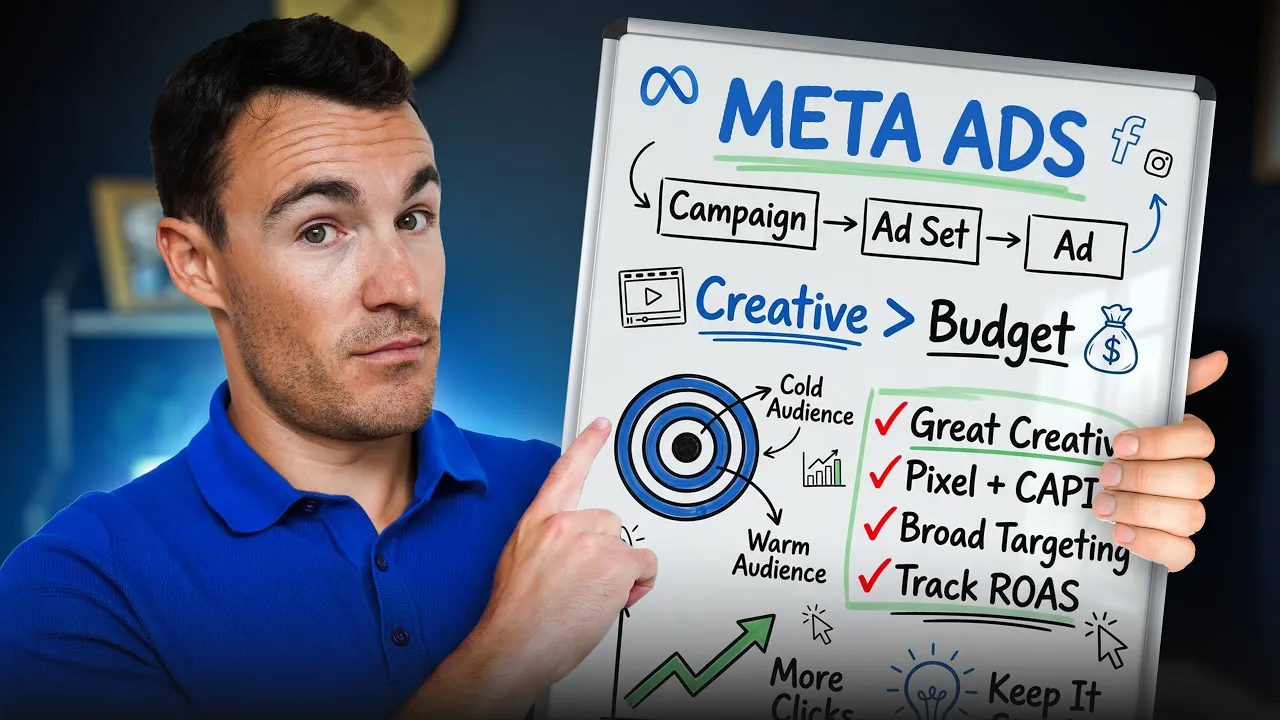
This one thing alone will save you hours of confusion. Meta Ads is built in three layers. Once you understand them, the whole dashboard makes a lot more sense. So, the top layer is the campaign. This is where you decide your objective. Do you want sales, leads, website visits? Do you want more people watching a video? Then you've got the middle layer, which is the ad set. This is where you decide who sees your ad and where within the Meta Ads they see them, whether that's Facebook, Instagram, stories, reels, different placement options, things like that.
The bottom layer is the ad itself. This is the actual thing a real person sees when they're scrolling, the image, the video, the text, the button that they click on to go through to your website. So, within those three layers, the campaign decides the framework, the ad set decides the audience and the placement options, the ad decides what people actually see. And most buttons within the dashboard belong to one of those three layers.
Once this clicks, the whole dashboard stops looking like 400 random buttons and starts looking like three simple decisions made in order. And here's how to set up your ad account the right way from day one. A few setup steps that are easy to skip when you're excited to just get an ad live, but expensive to fix later on once you've already you've spending. So, set up a proper Meta Business Portfolio before you create any ads.
Advertising directly from your Instagram profile, for example, might feel like the quick option, but it costs you 30% more for no extra results, and the options you have there are much more limited. You also want to install something called the Meta Pixel on your website early, ideally before you even launch your first ad. In plain terms, this is a small snippet of tracking code you add to your website that tells Meta when someone takes an action on your site, like landing on a page or actually buying something.
Without it, Meta is essentially advertising blind. It has no idea whether the people clicking on your ad and coming through to your site are actually doing anything once they get there. You'll also want to install something called the Conversions API, or CAPI for short. The Meta Pixel alone used to be enough, but since Apple made some privacy changes, a lot of conversion data now gets missed, so use Meta Pixel and the Conversions API together to get the best tracking, which, of course, is very important.
Next, pick a genuinely appropriate starting daily budget. This is one thing beginners get wrong constantly. They set a tiny budget hoping to test safely, but a budget that's too small doesn't actually protect you. It just means Meta doesn't get enough activity to learn who responds to your ad, so you end up with unreliable results either way. So, to find a good daily budget for your business specifically, work out what you can afford to pay to acquire one customer, and start there.
So, get these basics in place before you ever launch an ad, and you'll avoid the two most common reasons beginner accounts feel like they're quietly wasting money from day one. Now, targeting is the part beginners worry about most, so let's actually demystify instead of overwhelming you with 60 audience options you don't need. So, an audience, in the simplest possible terms, is just who you're telling Meta to show your ad to.
That could be based on location, age, interests, or people who've already interacted with your business in some way. And there are two broad types worth knowing, so you've got a cold audience, which is people who've never heard of you before, total strangers, and then a warm audience is people who've actually interacted with your business in some way. Could be people who've visited your website, bought from you previously, they've engaged with you on Facebook or Instagram.
Now, warm audiences are usually the easiest place for beginners to see their first real results. That is, of course, if you actually have a warm audience. Because with a warm audience, you're not starting from zero, you already have some trust. And here's something that might surprise you. You don't need to obsess over narrow detail targeting or stacking together 10 interests hoping you found the the perfect combination of people to advertise to.
A broader, simpler audience is often a safer and easier starting point because it gives Meta more flexibility and room to actually find the right people for you. So, you don't need to become a targeting expert to get this right. You need to understand who you're talking to and let the platform do the rest of the work. Now, let's go over some tactical advice for your ad creatives. This is what you want to focus on when you're making your very first ads, not advanced testing frameworks or anything like that.
Just what actually matters for ad number one. So, the first few seconds of any ad have to do one job, and that's stop someone from scrolling past. Think about it on your own feed. You skip past almost everything in under a second, right? Your ad needs to interrupt that instinct immediately with a clear image or an opening line that makes someone pause. Also, one clear message beats trying to explain everything about your business in a single ad.
Beginners often try to cram in every benefit, every feature, every reason to buy, but it's much better to pick one thing that matters the most and lead with that. And I'd recommend you start with two or three simple variations of your ad, not just one. This isn't about advanced testing, it's simply that you genuinely don't know yet what's going to resonate with your audience, and a small amount of variety gives you real information instead of a guess.
It's also going to help overcome ad fatigue. So, your first ads don't need to be perfect or clever. They need to be clear enough that someone understands what you're actually offering in the first 2 seconds or faster of seeing it. Now, here's what separates the men from the boys, the women from the girls, etc., etc. Read your results without panicking. The final beginner trap isn't set up or creative, it's what happens after you launch.
Beginners either check obsessively their results and panic or they don't check at all and they miss real problems. So, as a beginner, there are really only one or two numbers worth looking at. Return on ad spend, so how much revenue is generated from your ads, or if you can't track that accurately, cost per conversion. How much did each conversion cost you on average? You want to ignore the rest of the dashboard for now.
It's easy to get lost staring at metrics that don't actually tell you whether or not your ad is working, whether or not it's profitable. You want to want to give a new ad a few days before you judge its performance. Meta needs some time and and real activity to figure out who responds best to your ad. Judging it after a few hours or even a single day tells you almost nothing reliably. And then get to know the difference between a genuinely bad sign and a normal early fluctuation.
So, a cost that's high for 1 day isn't a crisis. A cost that stays high and keeps climbing over a full week or longer, now that's something worth paying attention to. Learning that difference is what stops you from switching things off too early. This is something I see a lot with my clients. Sometimes I feel like I have to be a therapist with the way I have to spend time calming them down. Now, if you start with a large enough budget, you'll know within the first week or two whether something is working.
You just need to know which two numbers to actually look at instead of staring at the whole dashboard hoping something makes sense. Meta ads isn't actually complicated, it's just unfamiliar. And once you understand these six things we run through, you already know more than most people who launched their very first campaign completely blind. And remember when I mentioned earlier I'd seen some horrific examples of ads in my time as an ads manager?
When I recently made a video reacting to some of my followers' terrible ads. Some of them actually weren't so bad, but it was a fun video. So, check it out. As always, thanks for watching. Drop a like and hit subscribe if you found this video helpful.
The words are the caption track's own and nothing is reworded or re-transcribed. Paragraph breaks are placed between sentences so the text reads as prose.
Free tools for your own script. No signup, no login.
Paste your draft and see where viewers are likely to drop off, with a rewrite for each weak line.
Paste the first 30 seconds of your own draft for a hook score and rewrites.
Check your draft against YouTube's advertiser-friendly guidelines before you record it.
Read this channel's public videos and transcripts, and download a writing brief for it.
| Questions asked |
| 5 |
| Sentences containing a number | 16 |
Most used terms
Filler phrases
34 in total: like 17 · actually 15 · literally 1 · right? 1.
A literal whole-word count of the same phrase list the Prepublish browser extension uses, so a phrase inside another word is not counted and a phrase used in its ordinary sense still is. It is a count and not a judgement.