Getting the transcript
Reading the captions from YouTube. A video nobody has opened here before takes 10 to 30 seconds; this page fills in on its own.
Getting the transcript
Reading the captions from YouTube. A video nobody has opened here before takes 10 to 30 seconds; this page fills in on its own.
Caleb Writes Code · @CalebWritesCode
Words
1,349
Runtime
7:11
Speaking pace
188wpm
Reading time
6min
188 words per minute, between the 181 median and the 201 75th percentile of 349 measured videos. That distribution comes from the 349-video hook study.
Opening (first 30 seconds)
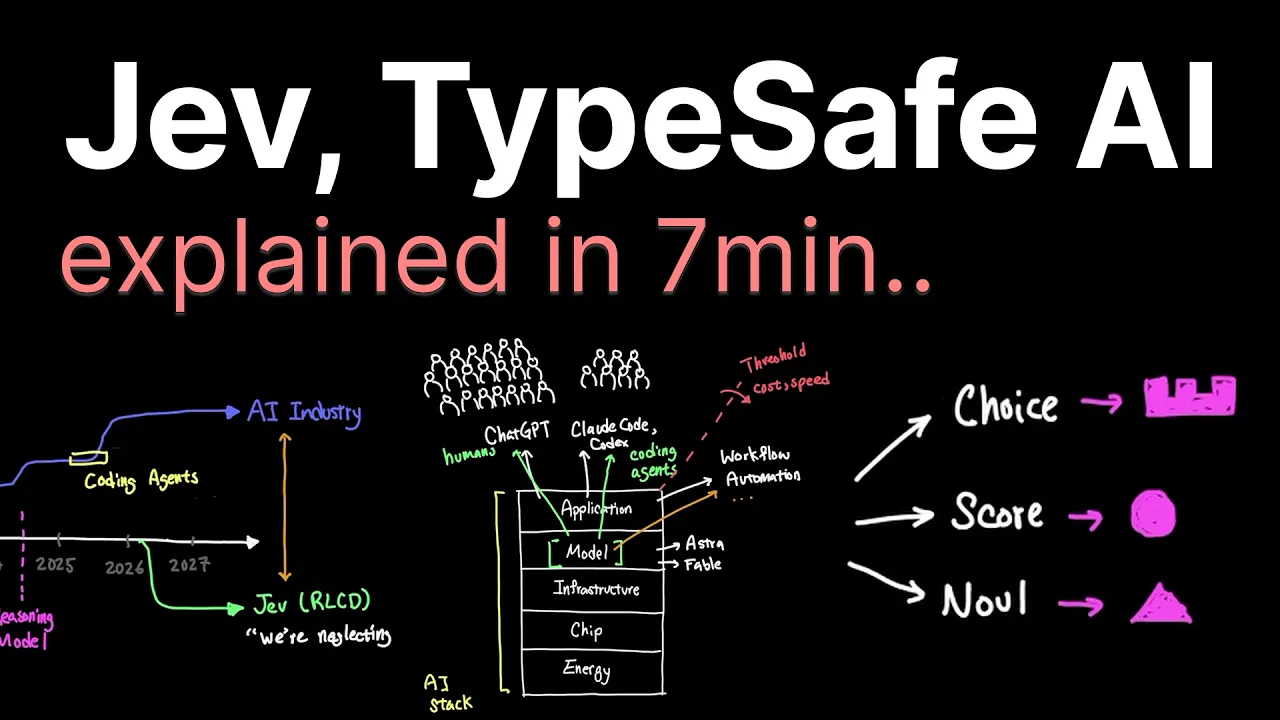
Jev is a new type of model that makes us question how we should really think about optimizing LLMs. When we follow the orthodox path in AI from ChatGPT that was released in 2022, models have been optimized to assist humans in chat applications. Of course, as coding agents like Claude Code and Codex became mainstream around 2025, we also optimized the models for this as well. But, when we look at the AI stack, how AI actually gets end up being used in the application layer often puts a downward pressure on the
94 words, the words spoken in the first 30 seconds at 188 words per minute.
Free, no signup. See how the first 30 seconds hold attention, with rewrites.
Sentence shape
| Measure | This transcript |
|---|---|
| Sentences | 52 |
| Average words per sentence | 25.9 |
| Longest sentence | 52 words |
| Questions asked | 1 |
| Sentences containing a number | 9 |
Most used terms
Filler phrases
20 in total: like 10 · actually 6 · sort of 3 · basically 1.
A literal whole-word count of the same phrase list the Prepublish browser extension uses, so a phrase inside another word is not counted and a phrase used in its ordinary sense still is. It is a count and not a judgement.
What this transcript is
Every word below is the caption track YouTube publishes for this video, pulled from the video itself and reproduced unchanged. It is not Prepublish's writing, not a summary, and not a re-transcription: it is the video's own published captions. English captions, generated automatically by YouTube, in the video’s original language. Source: the video on YouTube. A channel that would rather this page did not exist can ask for its removal through the contact page, and it is removed.
No Script X-ray for this video: YouTube shows a Most replayed graph only once a video has enough views.
Jev is a new type of model that makes us question how we should really think about optimizing LLMs. When we follow the orthodox path in AI from ChatGPT that was released in 2022, models have been optimized to assist humans in chat applications. Of course, as coding agents like Claude Code and Codex became mainstream around 2025, we also optimized the models for this as well. But, when we look at the AI stack, how AI actually gets end up being used in the application layer often puts a downward pressure on the layers below.
And as a consequence, they tend to morph themselves to optimize for the best outcome in the application layer. And models continue to optimize to be more helpful to humans and also optimize to be more helpful in coding agents. But, one area that always felt short in use cases was workflow automation. Even a highly intelligent model like Astra and Fable couldn't really cross a threshold here without a huge cost on the way.
And TypeSafe AI that made Jev is making an assertion here that the reason why this threshold is notoriously difficult to cross even for highly intelligent models is because the state-of-the-art models are optimized for different things. The way that they articulate this is a schism in the orthodox line where the optimizing the model for human preference and further optimizing them for verifiable reward doesn't really carry over when decisions need to be quick given the uncertainty.
Now, what we're talking about here isn't that one path is ultimately superior than the other, but Jev is sort of this antithesis to our current trajectory in AI and arguing that we really have been neglecting the use cases that stand to make a huge difference in automation. And TypeSafe AI is arguing that trying to force a model that's optimized for human interaction and agentic use cases into automation is fundamentally wrong way to go about it.
When we look at all the different projects that people are showing off on social media using Jev, a lot of them are actually more showing off the speed of execution rather than the depth of understanding. Sorting emails, improving rag, playing games, model routing are all tasks that current LLMs can do, but certainly not at the speed of Jev that according to them are 40 to 200 times faster where end-to-end response time is 70 to 500 milliseconds.
Functionally, current LLMs can do everything that Jev offers, including mimicking the response so that it returns a result just like Jev would, but matching the latency of 70 to 500 milliseconds is not something that auto regressive models can easily do, especially since tokens are generated one after another until completion. But Jev is inherently designed to do parallel sampling and typed probabilistic decisions, which is something that LLMs don't do in the architecture.
So, it's less about what Jev is functionally capable of, but what we're optimizing the model so that we can cover more ground in the application layer so that automation, game playing, mass sortings, these types of tasks are practically possible. Now, let's take a closer look at the model Jev and see how it actually works. But before we do that, we have to talk about coding agents, which can be complicated to use. And that's why Juni CLI on AI coding agents from JetBrains could be perfect for you.
Juni is what scored near the top right here on SWE we eventually leaderboard, as you can see, at 61.8% resolved. So, I can bring this very coding agent directly into my terminal right here and ask Juni to work on complex coding tasks. For example, here I'm asking Juni to keep my website up to date. And since there's a lot of information to update, I can hit shift tab and put Juni into plan mode first. Instead of immediately changing code, Juni will then break the task down into these multiple requirements, as you can see, the design, the implementation stages, and the tests that it wants to run.
And now this plan is actually saved inside the folder .juni/plans. So, now I can review it before actually proceeding with Juni to start implementing the code. I can also bring my own API key and choose which model I want to use per task, which means I have more control over the usage limits and pick and choose the models I want for the job. For a limited time, Gemini 3.8 Flash runs at 75% off base price in Juni, while your daily driver can still be Gemini 3.7 as a default.
You can open the IDE plugin or Juni CLI, run a real task, and see how much you might save. Link in the description below. Unlike traditional LLMs, where we give them an instruction and the model responds in text, Jev is different because it basically forces you away from raw text as input but putting them in a structured format that looks something like this. And Jev responds back in a similar structured format but with a probability distribution.
Okay, what do I do with this? And that's where a lot of people who are used to interacting with AI through traditional LLMs sort of get stuck because our rules of engagement is totally different now with Jev. The basic primitive types of Jev are choice, score, and null. And you can ask Jev a categorical question, score-based on order choices, or a probability of yes or no question. And these are sort of these building blocks that software can now use to build on top.
It almost feels like we're back to logic gates and registers, and now we have to build many abstractions on top to build more complicated application as an abstraction. For example, I can take this long list of plants to sort through, and running them through auto-regressive models like Claude Opus 5 would inherently be different than asking Jev to do the same task, which is done in a matter of a second or two. And of course, you can also follow different design patterns given different permutations of these building blocks.
So, when we look at the Pareto frontier, Jev is competing closer to Flash or Nato models like GPT 5.6 Luna, DeepSeek v4 Flash, or Sonnet 5, but only on use cases like workflow-specific tasks. So, what I hope to see going forward is more coverage in this Pareto that not only allows us to use models that are optimized to assist humans in solving complex and creative tasks, and also daily driver models that helps us assist in mundane tasks.
But now with models like Jeff, an explosion of use cases in this section as well, as more models continue to pop up and help us make actual automation possible from companies that built on top of these primitives to create something useful and valuable. And as long as demand and use cases continue to exist, we'll likely see more models in this section here. While Type-A hasn't really disclosed their details around how RLCD method actually works, we've had many similar ideas in the past around the same idea.
In fact, someone on Reddit had already made a very similar model using bidirectional BERT. And this 421 million parameter model that's open source can easily run on consumer hardware. So, how I process this entire news around Jeff is really more about our use cases growing horizontally than about the novelty of Jeff itself. Since narrow models that are specialized like this is something that we've had before generative AI completely took over the public narrative.
And I do think that this is a net positive for the ecosystem to now appreciate a more wider landscape of models that doesn't necessarily brute force a general purpose foundation model for all tasks. And as we hit constraints that are made by the architecture and the training objectives, we can now start building models that are optimized for the right constraints instead.
The words are the caption track's own and nothing is reworded or re-transcribed. Paragraph breaks are placed between sentences so the text reads as prose.
Free tools for your own script. No signup, no login.
Paste your draft and see where viewers are likely to drop off, with a rewrite for each weak line.
Paste the first 30 seconds of your own draft for a hook score and rewrites.
Check your draft against YouTube's advertiser-friendly guidelines before you record it.
Read this channel's public videos and transcripts, and download a writing brief for it.