Getting the transcript
Reading the captions from YouTube. A video nobody has opened here before takes 10 to 30 seconds; this page fills in on its own.
Getting the transcript
Reading the captions from YouTube. A video nobody has opened here before takes 10 to 30 seconds; this page fills in on its own.
Stefan 3D AI · @stefan_3d_ai
This video has no Most replayed graph yet: YouTube shows one only once a video has enough views. These are the moments viewers replayed most in Stefan 3D AI's most watched videos.
Most replayed moment at 4:08
7.0x that video's typical replay level
and it will also have the access to full ai apis. Now let's do some serious tests. The first test will be to do an animation of a character that will be split in parts. The first test will be to create animation. Animation of a character that will be an
Said at 4:01
Most replayed moment at 9:39
5.7x that video's typical replay level
Overall I think this guy's made really amazing job, bring it it all together and I really had a lot of
Said at 9:41
Most replayed moment at 20:36
4.1x that video's typical replay level
Just also because I was playing that game when I was kid. Okay, let me see if I remember how to play that. Let's start with the road, right? Let's try to build a, oh, there are cars. There are cars. It generated nice cars and they're like, wow.
Said at 20:29
The graph counts replays. It does not show where viewers stopped watching.
Words
5,792
Runtime
31:46
Speaking pace
182wpm
Reading time
24min
182 words per minute, just over the 181 median of 349 measured videos. That distribution comes from the 349-video hook study.
Opening (first 30 seconds)
Finally, I'm building my dream game with AI absolutely from scratch. No team plates, no stock assets. And I'm going to show you my complete process with wins and failures, shortcuts that I figured out, and of course, we're gonna calculate how much it all costs. Okay, so the last time guys I showed you already how I started, how I created first map and first game mechanics. And my next milestone was to add characters. Here's the set of units that I planned for my sort of MVP of my
91 words, the words spoken in the first 30 seconds at 182 words per minute.
Free, no signup. See how the first 30 seconds hold attention, with rewrites.
Sentence shape
| Measure | This transcript |
|---|---|
| Sentences | 542 |
| Average words per sentence | 10.7 |
| Longest sentence | 48 words |
| Questions asked | 16 |
| Sentences containing a number | 50 |
Most used terms
Filler phrases
241 in total: like 147 · actually 41 · basically 19 · sort of 10 · right? 9 · you know 8 · I mean 6 · kind of 1.
A literal whole-word count of the same phrase list the Prepublish browser extension uses, so a phrase inside another word is not counted and a phrase used in its ordinary sense still is. It is a count and not a judgement.
What this transcript is
Every word below is the caption track YouTube publishes for this video, pulled from the video itself and reproduced unchanged. It is not Prepublish's writing, not a summary, and not a re-transcription: it is the video's own published captions. English captions, published by the channel, in the video’s original language. Source: the video on YouTube. A channel that would rather this page did not exist can ask for its removal through the contact page, and it is removed.
Finally, I'm building my dream game with AI absolutely from scratch. No team plates, no stock assets. And I'm going to show you my complete process with wins and failures, shortcuts that I figured out, and of course, we're gonna calculate how much it all costs. Okay, so the last time guys I showed you already how I started, how I created first map and first game mechanics. And my next milestone was to add characters.
Here's the set of units that I planned for my sort of MVP of my game. Let's say for first playable level, there will be human race, skeleton race, horses, and some wild creatures. One of the wild creatures will be wild skeleton and wild wolf. Did I manage to do all the units or not? You're gonna see in the end of the video. But before I actually put all effort into creating characters and animation, I decided to bring some beauty to my game by adding nice UI.
And since chat GPT already released, I also wanted to first try to do the animation of a creature because in my game I plan to have a lot of creatures such as wolves, at least can be contours, can be scorpets, can be spiders. And I was quite worried. So I wanted to try that out. First, let me explain how I approached UI. And I think that's a brilliant approach. Instead of designing hood right in the game, I actually asked it. chat.
GPT to design it as an HTML page. And it created me pretty, pretty decent one. So you can see this one is. HTML page. And by the way, I actually redesigned my workspace. Basically that's the same exact workspace, but this looked more like a. Website right now because there are more creatures, castles, locations, mechanics, there's plenty of things. And I'm trying to keep everything. Organized so I can navigate easily.
And I'm going to show you more cool things that I figured out how I can put it here. And just a few days ago, I actually. Made a video sharing my workspace. It's on GitHub, guys. Take a look on the video. Like it's absolutely free. You can use it. The way I use, but the cool thing about it is that you can customize it, especially for you. Now in this UI, it created me complete. Working prototype where I can click everything.
I can even like everything that I can cover on all the. Presses and sort of imitates the game logic. While it's just an HTML page. I did a lot of iteration. I would say like I spent roughly. A day like doing different versions, et cetera, studying different versions. Here you can see some old versions I was creating before I. Actually did HTML version. I was brainstorming some ideas, like with GPT image, with grok imagine recently tried.
Grok imagine too. And it's not that bad, especially for my. Style. But again, I really recommend you to try different models because they do have some bias, et cetera. And when I figure out the direction, et cetera, I actually ask it to create a hood demo, which you can see here. And again, it pretty much works quite well, reflecting all important stuff. Like not all of this stuff because like it's hard to predict right away.
But again, like it's clickable. It works. You can see like all the stuff, at least what I want in the very first version. Oh, and by the way, I also finalized my characters crests for all of my characters again, like they can be allies, enemies or neutral. And for each character with minimax h3 for almost nothing, I generated this animated portraits that are meant to be used in UI when we select the unit. I think this small detail adds so much and to make your process of creating 3d characters as smooth as possible.
I definitely recommend you to try Tripo, especially with the new Tripo p2 and smart UV. It is basically first AI that does artist level UV unwrapping, not to say how good low poly looks. And they also improve texturing for me and my team. It is number one 3d AI generator. I really use it in all of my videos, whether it directly on Tripo or to the platform. That's the best choice for now. And of course, by my link in the description, You can get extra free credits or promo code for 60 % off for first months.
And lastly, before asking Chad GP to to implement all of this, I also created specification for the interface, basically taking care in advance of all the icons, all the crests, etc. You can see like what will be used in UI, making sure that we don't miss some logic, etc. Put it here on paper like quick review. And then I say, well, let's implement it. And dang, that was actually looking so great. Immediately the feeling from my game became different.
I already have UI. It looks some nice, especially this portraits. Yes, my character is still not there, but it already looked like a solid prototype. I like this animated portrait so much that they also created them for castles. Well, why not castles are very important building as well. And in the meantime, I also started to work on the Wolf to quickly test whether GPT -6 will finally allow me to do this animations. I just so you know, one week before GPT -6 release, I already bothered myself with this question and Fable 5 .1 was not able to really handle that.
And then come GPT -6 and I do this first test and I'm shocked. Just so you know, I didn't ask it just to do it right away, because again, like I already tested it with Fable and that's not working. So the best results. I got with Fable was with this simple idea, create video references with the animation and character to match this reference and ask Fable or GPT to create the key frames and do the animation, etc. Following this reference.
And also for wolves or creature like this, rigging, like basically how you add the armature is also a big issue. So I was trying to solve both things. I also tried free mesh motion. It sort of gives you like this tool that you can place the skeleton, etc. But to be honest, first it takes time and the skeleton there is not really that perfect. And if you think that you're going to get animations there, well, not just look at this animations.
They were made for folks and they only have like the folks, the closest creature. So that was very, very sad. And I like almost abandoned it. There's another paid tool that I tried called Animate Anything where you can also rig both. And I must say like it was the most successful approach, like the idle animation and the run animation were more or less nice, but all other animations was not really working. And also this one is actually paid.
I even tried to put it in Cascade or if you know this software, like for animation, they recently added like support of quadrupled characters. I spent four hours like doing this outer rig for posing, etc. Which supposed to predict some stuff. But since. My skeleton was not unified, again, I created an animate anything or like mesh to motion. It doesn't really fit their. Standards Matching them was complete nightmare.
And I didn't really manage out of posing to work. Look, I even connected. Claude to Cascade or MCP. So it helps me to do the posing according to the video reference, etc. So. That time I was completely desperate. And GPT -6 release, it was like fresh air for me. And I like, OK, I give it one more. Try I already have all this set up. And you know what? I just open Blender, give this model that I generated in Tripor, just put it.
There like Textured model, open the Blender with Blender MCP and say like, look, bro, try to do this. Here is the list of. Video references, etc. Can you do that? I said X -High, not even Max or Ultra Plan. And well, let's give it a try. And you. Cannot imagine how surprised and happy I was to find out that it actually managed to do decent. Looking animations. I didn't record the process, how it does the cooking, because I was doing like some other stuff in a parallel.
But I opened the. Blend file and saying this animations look solid. I'm not saying they work like 100 percent perfect, but after just. Few iterations, like addressing some feedback, they become ready to go into the game and adding wolf to the game. was. Actually the easiest part of my day. I basically set GPT to expert wolf with all the animation tracks, went. To my other agent. And by the way, here is my setup of agents.
I have Overlord animations, that guy who actually did the. Animations overall, Unity, Unity, basically the guy who work in Unity, add stuff, remove stuff, like basically work only in Unity. Some other agents helping with some other stuff like Overlord voice will help me with music and sound effects. I'm approaching them soon. So. I drop all expert files to my Unity agent. Again, that's also Codec CLI with X -Hi, just with the context of.
My Unity development process. Describe the logic to him and just in 30 minutes, I already can play by my wolf. By the way, if you're. A solo developer, the cool thing that you can do for you is that you can organize testing playground like the way you want. Like for. Example I realized that going to test units quite often. So I asked it to create a unit playground where I can quickly choose any unit. And preview all the animations like how it works, et cetera.
That was super easy. Again, like two hours, I have this unit playground. Working and you cannot imagine how much time I saved with it. Not bad progress so far. I also spent a day creating. Scorpion character. This character was not meant to be in my MVP in. My first version of the game, but since I was overexcited that now it's possible to do this animation, I actually decided to also give it a try. And if it will be successful, I'm going to make a video about it.
And since I made a video, it was successful. Yeah, the video is actually on my channel. If you want to see how I created this awesome guy, take a look. Workflow was exactly the same. And to my surprise, it was even easier. All rigging was done by Chad GPT. I'm not kidding. Like all rigging, all legs, tail, et cetera, was done completely by Chad GPT. I think if I would do that myself, I could spend like half a day easy, even though I'm quite proficient with rigging.
And one last thing I did before focusing on characters, I adjusted the movement system. All what I created before was with Fable 5 and there was a lot of testing, like a lot of. So I decided like to revamp it once. So the testing is easier. Like mainly it was issue with selecting units, movements with formation and stuff. And I addressed it in a smart way. I basically first did one complete research on top of what I already created because I accumulated all context about my game, what I want again, like for mechanics, I have like the whole tab here, like with a lot of stuff, like reflecting all the changes, what.
I. Want like how it's going to work, et cetera. There's quite a lot of stuff like combat you can see, like there's like everything described. And I did one final. Revamp I spent half a day in parallel with finalizing the characters. And honestly, GPT -6 just nailed it. I was so happy with updated movement, the formations, the speed, the selection started to make sense. And I was enjoying testing. My game. So day 11, I decided to start with skeletons.
I thought they will be the easiest ones. I was mistaken. Obviously creating 3D models was not an issue. Again, we have freshly released Tripo P2 with smart UV. And now guys, I don't know, like this low poly is absolutely insane. It's already unwrapped. They also improved texturing,. All that stuff. Like, I mean, no issues at all creating characters. And of course, for my RTS game, I don't need them like. Very highly detailed again, because you're going to see them from top all the time.
I want details, but again, of course, they must be optimized. There. Will be a lot of units. So my budget for each character was around like 10, 12, 15 ,000. Like it was. Maybe my general or my knights will be more of a budget, maybe horses a little bit more. So I quickly generated all the parts,. Assembled them in Blender. And I also rigged them with Mixamo. And why Mixamo? Because Mixamo skeleton is simpler. Than. Aqua rig.
And for these needs, again, I just don't want like I mean, technically that not going to hurt that much, but I just want to keep things optimized. And I think again, like less bones, easier animations, because again, GPT -6 will handle most of the animation pipeline. But with human noise, it was a bit more difficult than with creatures. And then I realized that those legs movements like for wolf and for sort of like you can try to calculate them with the mass.
It's So -called locomotion, right? So it's predictable. And there is a lot of information across the internet, how you can do that, et cetera. And there are even a real time calculations of that for humanoid motions. Asher was able to do that, but I saw that was not really that efficient. And my first iteration doing like the skeleton was quite long and a bit frustrating. So I decided to improve my pipeline. I added two things and actually guys about all my decisions or my struggles, wins and failures, I post the next with all details to definitely consider to follow.
So two things that I added is mocaps and Mixamo animations or any other animations. I figure out the hack. I can basically go find animation that has part of what I need. For the moment. That's exactly what I did. I was absolutely not happy with the arm swing. So I recorded myself and did a mocap. That converts it to some skeleton animated. By the way, in Unreal Engine, in 5 .8, you can do that for free with markerless mocap animation that they recently added.
And that actually works very well. I was also testing Quick Magic. You probably know it, but it's paid. It's not crazy expensive. And I choose it to save some time because it is obviously less friction and set up. Just upload the video file and here we go. And it also can export for Mixamo skeleton. Unfortunately, Unreal Engine exports in inner formats and you'll need some pipeline to actually bring them to Blender. And again, my game is on Unity.
And if you are shy and you don't want to record yourself, can actually generate videos with AI and provide them for mocap. But one thing I figure out that my videos with skeletons are not suitable for mocap because there is no humans on this reference. So what I had to do actually had to figure out motion transfer. And I use like Seed Dance 2 .5. So I actually converted skeletons into humans so I can mocap them and provide it to chat.
With all these puzzles fused together, I finally made it work guys. This way I created set of animations for my skeleton, for my archer, and for a wild skeleton. Wild skeleton has two handed weapon and different animations basically go like this. There they are all my three bad boys. Here we go. Here is my guy like warrior. And what you see right now, I also add like extra pass adding like turn left, turn right animations.
So now you can see there's a small delay. That's exactly what I wanted because before I was like sort of sliding right away. I actually made a post where I showed comparison like before and after. And also I was not really planning to add VFXs so soon but since my units were prepared so well again like they are like almost perfect. Like there is an arrow, the bow etc. Maybe I try to ask it like to do the bow VFX. Basically I want like shooting animation and that the arrow actually stuck in the target.
And guys, that was the easiest thing to do right? I mean like 20 minutes or like 30 minutes. Like look, it actually works. Boom. And look the animation looked really good now. This skeleton has only one attack animation. My fantasy was limited on it but for my warrior I actually have three animations. And there's also some VFX. Like you can see there is some quick blink on the target and you know this VFX actually lands where it hits the target.
So it feels quite natural. And here is the guy like look how we walk. Like bam. Okay let's come and hit target. Dang. When I first played this guys I mean I still cannot believe I actually making it. And it. Looks exactly how I envisioned that. I don't know. Like this kind of satisfaction is hard to explain. And as you can guess all of my next. Characters was way easier to approach. And I also promised you the cost breakdown.
So let me explain and let me break it down. On real how much it cost me to create these Ursa characters. First of all there are plenty of images. Again like to. Come up with this concept I did like a lot of iterations. Basically first iteration that I showed you in my previous video was not really. Final Because I sat down, I thought about it and I think I wanted better. And look the bad guy that I created. And they.
Do have some unique features compared to each other. Like this part here. And here actually one big build and this guy is sort. Of like older I guess. More crazy. Just look at these portraits. Crazy good. And to figure out right reference. Again you can do a lot of a lot of images. Let's say in average it is like 40 to 50 images until you. Happy with one character. I use image generation through API. And let's say GPT image 2 .5 cost me 4.
Cents per image. Roughly again it is 50 images. So we can say that is like 2 .5, 3 dollars for. All the concepting images. Again even toy if you come up with the characters fast. There also like a crest, some additional references etc. I do that with the agent. I appreciate convenience. So this is how much I spend on images alone. Next comes 3d models. And again here my favorite will be Tripo. Especially Tripo P2 with smart UV.
And these Ursa if you watch my channel you already saw them. I actually created them the day Smart UV released. And my workflow immediately shortened it by one hour at least. Because I don't have to unwrap them anymore. And also less noticeable but again P2 is now public. Meaning that they also updated it once more. And I can see the difference like the quads are even better, less artifacts etc. That's my recommendation number one.
And of course by linking the description you can get extra free credits or juicy promo code. Now if you use P2 true API, not true Tripo Studio, it can cost you around 80 cents like all together. Like low poly, texturing and UV. If you use a true Tripo Studio you can get a lot of free credits. And it's sort of cheaper. I would say 60 cents one model. I always generate it in parts. So let's say it takes eight models in average to generate one character.
Again like more or less. Some skeletons I generated like with less parts. In average total spendings here will be around five to six dollars. I think it's quite good price. And also it includes some. Texturing passes. Sometimes I do the baking or joining the objects and then bring them to Tripo back and do once again the texturing. So far we have expenses around seven eight dollars. But next one is really expensive. I showed you a lot that I do video references for animations.
So later I can provide this video reference either directly to Chat GPT or to use it as a mocap. And what's really expensive is Cdance 2 .5. Let's say I generate around seven eight video references with Cdance and some of them with Minimax. Altogether in average you can like 13 to 15 dollars. That's a lot but that's true API. If you use some platforms you can actually cut the cost. But this video reference are much hair for creatures because unlikely you're going to find some video references.
For humans later and partially for Ursus I actually started to combine more of the Mixamo animations like some other animations that I can find. And I reduced the need to generate so much videos and spend so much on credits. Here for example human archer I was able to find very very suitable animations or Mixamo or elsewhere. I just did few edits on top and that's it. I already can use them. Like almost all animations that I used from Mixamo I had to edit them.
And normally that could be quite painful thing like retargeting like adapting for proportions like for the weapons again like Weapons you can hold them different way. But with GPT Astra that was absolutely easy. I also show you one cool tip later how I improved it even further. And one of the last item is mocaps. Again you can do that for free with markerless mocap animation in Unreal Engine. Or I actually did it through quick magic and roughly 3 4 clips cost me around 3.
And this mocap approaches I only use for creatures really like skeleton and Ursus. For humans I did it again through adjusting poses without really need to do this. And of course there's also GPT subscription. I'm obviously on max possible plan because I basically work on my game every single day. And to be honest guys I reached limits only once. I used that limit reset. I still have one. I tried to track my expenses.
Let's say approximately for one character from A to Z I spend around 5 10 % of weekly limit of my GPT subscription which is 20x. How you gonna calculate that up to you but let's say it's equivalent of 5 10 bucks. So approximately one character can cost you 20 25 bucks if you follow my workflow exactly. But again there is a video generation that actually takes the half of this amount. And of course you can reuse a lot of.
For example my Ursus pretty much share all the animations. Only 3D model is different and like few animations are different. Or Skeletons. They share similar skeleton body and some of the animations. So in reality it can't be even less. Anyway my Ursus are ready and I'm so freaking happy. And you know what I also did? I also did VFXs. Look at this. You can see this cars and again all of that was made by GPT 6 in two iterations.
First iteration actually it did it but it was too thin and I just asked it like to add more distance between this claw traces. I didn't want it to be too fancy but noticeable. I think I'm gonna add something more to emphasize this attack. But look here how it looks on the fire Ursa. Here we go. Here this. And you can see there is some fire or his claws. It's quite simple VFX. I didn't really spend a lot of time on it.
It's just like one pass. And look at this. I mean VFXs is a black hole for me. I know like technically how they work but I was really never doing VFXs. And you know when you don't know something you are sort of scared of unknown. Scared to approach it. And that's exactly my feeling about my ultimate units that I have to make. It was a general because it was on the horse and I was like dang there's like two units to animate like human on top the horse itself and I thought like that will be crazy.
So that. Was my ultimate challenge for day 14. For human warrior and human archer there were no surprises at all. Again it was extremely smooth. Again I was taking like Mxama animation. Actually full disclosure I bought around four or five really nice animations on Akurik each for two bucks. I think that's a quite decent price. I was not using them completely but I reused some either like arm movements or like leg movement.
In this case it was about arm movement like how they do the swing. Also you can Grab some free animations here and use them the same way. Just use them as a mix or as a base. They work the same way as Mxama. And again before it was such a nightmare like do the retargeting etc. Well at least time consuming maybe that was easy but now I just drop it to my agent and it figured out. Like retargeting no issues at all. It just do it flawless.
So my boys were an archer. Around half a day I got them up and running. Again also creating 3d models with Tripo was not an issue at all. That was extremely simple. And my final boss general. So what I did of course I generated 3d model and assembled that. So as you can imagine there was no issues at all. And something I didn't told you guys I actually reworked the concept so my final general looks like this on a white horse.
You know, because that's a general right? He must be cool. Previous version was sort of early prototype. And there will be knight which will look like the previous version of a general but like with the spear. So, general with the sword and knight with the spear. Generating an assembling model for me it was not an issue. I kept them separate so I can have a control. And also I do not point it that much but you might see that my units they do have interchangeable parts for flags or like for attributes for colors basically right?
Basically each unit have that. I did it actually in very simple way. I separated those objects in one texture baked it and then with GPT image you can recolor this. For example here is my blue color. There is also gray which is like a neutral color and red color for each texture again. And guys if you also want to learn assemble characters that quick be able to do magic with AI. You are very welcome to join my 3d AI course where I teach how to do 3d characters with AI.
And also game environments with AI. Using best tools such as tripple and other. We already have more than 200 happy students. Thanks a lot for your trust guys. Link will be in the description. And what comes next? Animations of course. I did quite a good research. Basically I have an agent that do research. and figure out for me some reference animations that we can use and then I evaluate them. By the way it's not always one animation.
Basically what you see here is what I accepted. You can see that it suggests me like sometimes up to six animation here. You can see for example for the walk I suggested with seven animation. This guy is crazy. He figure out all these animations previews from Mixamo website from accurac website and from other websites. So for me it's so cool. I can just preview it here. I don't need to go to Mixamo website. Like I don't know.
Like this is like a dream of development. Same it did for my knight. And I saw something that really helped me out. There was a guy called MantB who actually created bunch of animations for horses. And I would say like half of the animations presented in his pack is exactly what I need. Even though I can potentially create it with GPT. But paying 19 bucks to solve half of my problems was actually sounding very very reasonable.
And the only issue it was for Unreal Engine. It was like a pack for Unreal Engine on fab. So you can just install it in your project. And that made me sad. But only for five seconds because I basically bought it installed it in a sample project in Unreal Engine and ask a chat GPT to figure out how we can export. All these animations in FBX and use them later. I also reuse the rig for the horse so I can use the same animations smooth.
Very nice. How much time GPT 6 saved me? You cannot imagine. Like this process I explain it sounds simple. Three years ago to mate something like this, you had to find professional animation artist who will do this retargeting, like export it from one engine to another and then apply it to your character. And I have it done in like one hour. That pack of animation was sort of peaceful and I needed attack animations. Not problem at all.
I asked my guy to find some sword swing animations and spear animations. Luckily for me, there were plenty of them. And for example, here's the animation. I mean, this is exactly the swing I want. I will just ask it to tilt the body a little bit and he will hold the shield. And again, like he will do the same swing, right? Amazing. So after he prepared that basic set of animation, I asked it like, okay, now let's make some idle animation for horse with this attack animation for my knight.
And just after two hours or so, I got all my animations done. Look, half of this animation was made with GPT -6. And if you're still watching on this moment, let me share one more cool thing. I figure out how to make this process even easier. The problem That I faced was like how to tell GPT -6 what I'm not happy with. For example, in first version, the body was actually looking too much to the side and I wanted like to move it.
You can basically say to Astro, like rotated like 15, 20 degree, but that's not precise. And it will be guessing. And you need one more iteration. I asked it to create me a simple controller where I can set the pose and save it as a reference. So when I provide a feedback, it will take that into account. It is extremely simple. I just press a button. You can see I have this sort of rig and I, for example, can move the arm.
You don't really control the bones. You can control this. You see like the rig, right? And I can move the head, for example, or I can move the head in different side like this. Click this button, save pose reference and tell GPT -6 like I set the right position for the head or right rotation, preserve it and make sure that all animation actually align with this. It will recalculate the rest of the animation. It's like out of posing and cascading, but with GPT -6 and this one I like so much.
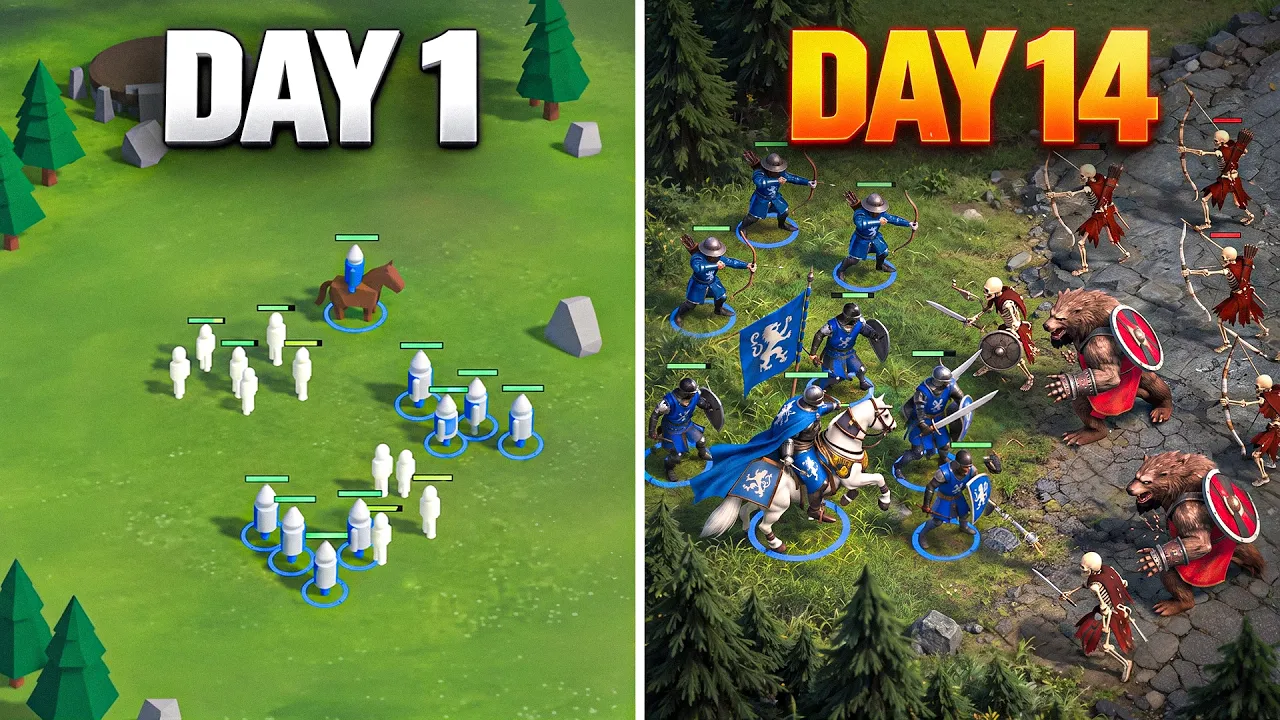
With this approach, I started to move like crazy. Finally, I have my full roster ready. I have a special map called Playgrounds where I test all of this stuff. It looks Like this when you're not playing the game. Let me click play and show you my bad boys. Let's go. Nice. This is absolutely different thing, right? It's not like what you saw in day one, right? Wow. Look, it's so cool, right? It's so freaking cool. Let's kick some asses like this.
Those are wild skeleton. Let's go. Yeah, I have some UI notifications, guys. I'm making some progress even though I didn't really spend a lot of time. Boom. Okay. Skeletons are actually crazy. Look, there's plenty of them and we need to attack them one by one. All right. I definitely want to put some effort into how responsive everything is. You instantly get the idea that there is a war and things. I didn't really get there yet, but I'm about to approach it.
And also I reworked castles a little bit so they fit the map better, but that's coming in the next video. I have so much cool plans. I'm going to show you how I address sound effects. I'm going to create new biome, which will be the winter more creatures, of course, better VFXs and gameplay. Well, guys for today that's all. And thanks a lot for all your supports, for all your comments. Sorry, I did not reply on all of them, but I read most of them and I'm really, really happy and motivated to move on.
Again, on X, I try to post as often as I manage time. To build this game I'm a hundred percent motivated to make a really, really great demo so you can actually play it and release it one day on Steam. That was like and subscribe and then see you in the next video.
The words are the caption track's own and nothing is reworded or re-transcribed. Paragraph breaks are placed between sentences so the text reads as prose.
Free tools for your own script. No signup, no login.
Paste your draft and see where viewers are likely to drop off, with a rewrite for each weak line.
Paste the first 30 seconds of your own draft for a hook score and rewrites.
Check your draft against YouTube's advertiser-friendly guidelines before you record it.
Read this channel's public videos and transcripts, and download a writing brief for it.