Getting the transcript
Reading the captions from YouTube. A video nobody has opened here before takes 10 to 30 seconds; this page fills in on its own.
Getting the transcript
Reading the captions from YouTube. A video nobody has opened here before takes 10 to 30 seconds; this page fills in on its own.
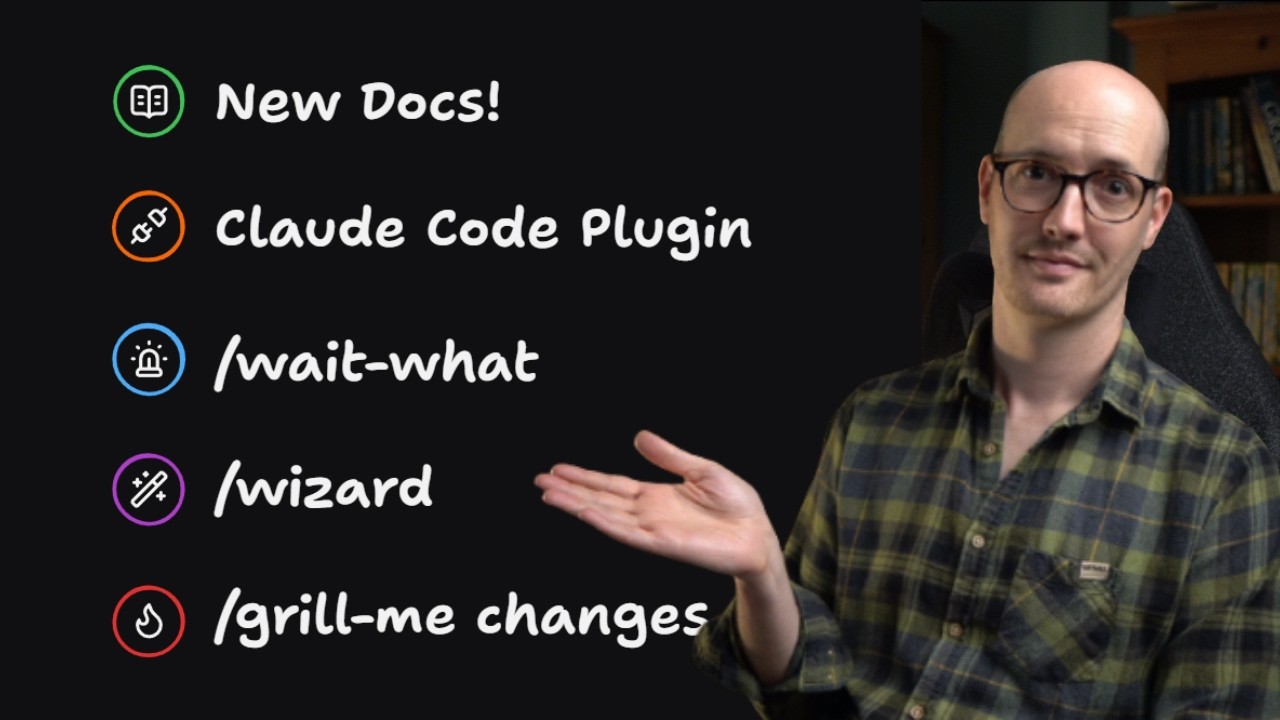
Matt Pocock · @mattpocockuk
Where viewers went back to watch this video again, from YouTube's public Most replayed graph, lined up with what was said at that moment.
Most replayed moment #1
8:023.8x the video's typical replay level
stuff with computer use or something, but it just felt pretty icky. I wanted to have control over all of it, but I wanted it to be as easy as possible. And here is what one looks like. This was for, I think, migrating to a remote box setup. So, you just kick it off, and
Said at 7:56
Most replayed moment #2
7:273.3x the video's typical replay level
model-invocable as well, and it's a really clean description here. So, it should pull it in whenever it's modifying agents.md, which is just great. The next one is a new skill, one that I've been keeping under wraps for a little while. This is the wizard skill. I found myself recently having to provision a bunch of uh
Said at 7:19
Most replayed moment #3
6:243.2x the video's typical replay level
we need something to change. And then further down, we can see round two came in and the same setup. So, we answered the first round of questions, and then we got another round of questions, and we kept pushing the frontier back. The next big change is that I've modified my writing great skills skill, because I
Said at 6:16
The graph counts replays. It does not show where viewers stopped watching.
Words
2,486
Runtime
11:37
Speaking pace
214wpm
Reading time
10min
214 words per minute, above the 201 75th percentile of 349 measured videos. That distribution comes from the 349-video hook study.
Opening (first 30 seconds)
Skills, skills, skills, folks. We have yet more skills for you. This is version 1.2.0, which adds a bunch of improvements to my already extremely popular engineering skills. The skills repo is now, I think, the 24th most starred repo of all time on GitHub up to 204K stars. And as a mature project, we need some proper documentation, and so we have it. This is at aihero.dev/skills, and I've been working with my team to produce this absolutely wonderful site. The best way to navigate this is by going to the main page, /skills, and then looking at the kind of groupings that we've got here.
107 words, the words spoken in the first 30 seconds at 214 words per minute.
Free, no signup. See how the first 30 seconds hold attention, with rewrites.
Sentence shape
| Measure | This transcript |
|---|---|
| Sentences | 136 |
| Average words per sentence | 18.3 |
| Longest sentence | 59 words |
| Questions asked | 9 |
| Sentences containing a number | 12 |
Most used terms
Filler phrases
24 in total: like 8 · actually 7 · kind of 3 · basically 2 · uh 2 · sort of 1 · you know 1.
A literal whole-word count of the same phrase list the Prepublish browser extension uses, so a phrase inside another word is not counted and a phrase used in its ordinary sense still is. It is a count and not a judgement.
Run the check on the words above: where attention is likely to drop, with a rewrite for each weak line. The free check shows the scores and the one issue costing the most.
What this transcript is
Every word below is the caption track YouTube publishes for this video, pulled from the video itself and reproduced unchanged. It is not Prepublish's writing, not a summary, and not a re-transcription: it is the video's own published captions. English captions, generated automatically by YouTube, in the video’s original language. Source: the video on YouTube. A channel that would rather this page did not exist can ask for its removal through the contact page, and it is removed.
Skills, skills, skills, folks. We have yet more skills for you. This is version 1.2.0, which adds a bunch of improvements to my already extremely popular engineering skills. The skills repo is now, I think, the 24th most starred repo of all time on GitHub up to 204K stars. And as a mature project, we need some proper documentation, and so we have it. This is at aihero.dev/skills, and I've been working with my team to produce this absolutely wonderful site.
The best way to navigate this is by going to the main page, /skills, and then looking at the kind of groupings that we've got here. For instance, we can see here the main flow, where you start with grill with docs, then go to to spec, then to ticket, implement, and then code review. In the left-hand panel here, you've got a full reference of every single skill and what they do. It used to be my actual uh full-time job to write documentation, so I was pretty happy to go back to it.
There's even a list of common questions, which are actually sourced from a personal wiki that I maintain of all the questions people ask me. These skills are also linked to an AI coding dictionary that I've been putting together. For instance, this little ticket link here is the dictionary definition for what I think of as a ticket. So, these docs, not only can you use them to learn my skills better, you can also use them just to learn about AI coding and understand how things work at a deep level.
The second big change is we are now an official part of the Claude Code official plugin marketplace. What that means is you can open Claude Code, you can say plugin like this, you can search for Matt Pocock here, or Matt Pocock skills, and then you can install it right from here. This means you end up with a read-only bundle. There's no extra steps here, and any updates I make to the skills will be automatically pulled down to you.
That sounds pretty good if you're a Claude Code user, but what if you're a Codex user? What's in this release for you? Well, I now include open ai.yaml files for every single skill, which means that it should properly work out of the box with UIs like Codex UI. And also, it means that this allow implicit invocation false travels over to Codex. Before, we had model invoked skills and user invoked skills. And the benefit of user invoked skills, which we can see inside the main skill.md file, is these are hidden from the agent's context window until you invoke them.
That works for Claude Code, it works for Pi, it works for a couple of other harnesses, but it doesn't work for Codex. I didn't quite realize that. And so, now we ship these sidecar with every single skill to mean that we have this allow implicit invocation false, so that works out of the box with Codex, too. The next thing I wanted to ship a skill for is that Opus, especially Opus 5, is talking garbage at the moment.
I don't understand what it is. I think it might just be a new model thing. But, for some reason, every time I interact with Opus, I it just goes right over my head. It's incredibly verbose, it uses really weird LLM phrases, and I just find it really, really hard to read, and a lot of people will feel the same. The honest options are to accept it and reword the AC or to persist the digest along the export, so a resumed unchanged publish can skip the read to flagging rather than picking.
What does that mean? It is genuinely load-bearing, though, so that's how you know it matters. I've tried all sorts of ways to fix it, such as output styles or adding things to my agent.md, but what I realized I needed was just a skill to say, "Wait, what did you just say?" And so, the skill is called Wait What. It's a very, very simple skill that just does a couple of things. First, it says, "Use this specific standard ASD STE 100 Simplified Technical English," which is essentially just a leading word to the agent to say, "Use very simple language.
Speak in clear declarative sentences." And secondly, it also tells it to ground itself in the ubiquitous language in context.md. The real cure for verbosity is not to tell it to use simple language, although we are doing a bit of that, is to tell it to use your language, the stuff that you have come up with in Grill with Docs. You use this skill whenever the agent just creates some random garbage and you've no idea what they just said.
You just say, "Wait, what?" and it should reply with a much better alternative. The next thing that's changed is a pretty big one. It's an update to my most popular skill, which is Grill me. Previously, Grill me used to grill you one question at a time. In other words, you'd get a question and then you would respond and then another question, then you would respond. So, one question per turn. However, this has a horrible failure mode, which is when you get to the end of a grilling session and most of the hard stuff is already done, you just have a bunch of easy questions, one per turn, that you're just basically saying, "Yeah, that sounds good.
Yeah, that sounds good, too." This is incredibly frustrating and it feels dead slow. So, for a while, I've wanted to find a way to speed this up. The thing that makes most sense to me is to have multiple questions per turn. So, if you have lots of easy ones, you can just say, "Yes, yes, yes, yes, yes." But, what happens when the answer to question three depends on the answer in question one? Before, you never had that problem because you would just answer them one at a time.
So, if a question depended on an earlier question, then that one had already been answered. But, in this new setup, surely that's more confusing because you're going to be answering erroneous questions or questions at the wrong time or questions that need to be answered before other questions. How is that going to work? Well, if you think about it, these questions are really like a graph. There might be one critical question at the very start that needs answering first that opens up a whole raft of other questions, and maybe they lead on to other questions themselves.
And so, now Grill me is designed to follow this graph, to answer only the questions that are available now, but to ask them in rounds. And so, you get the first round of questions, which might be as little as one critical question. Then, you go to the next round of the questions that opens up, and it's always pushing you as fast as possible down the frontier of questions. And this is what it looks like. You can see I'm at round one here, and we have Q1, and then we get this little recommendation here.
I've decided to use I know I know you probably don't like it, but I love it, emojis here for a little pop of color. This makes it super easy to navigate with my eyes. I can see, okay, this is Q1, and then I can see the recommended answer. Q2, see the recommended answer. And because I'm using dictation, I just get to blast out, okay, Q1, I agree. Q2, I agree. Q3, we need something to change there. Q4, we need something to change.
And then further down, we can see round two came in and the same setup. So, we answered the first round of questions, and then we got another round of questions, and we kept pushing the frontier back. The next big change is that I've modified my writing great skills skill, because I noticed that I was using it for stuff other than skills. I was using it for anything that an agent read to make the agent better, to make the doc more concise, and to make the output a bit more predictable.
And so, now we have writing for agents, where you can modify it for agents.md or Claude.md, or when you're creating editing skills. And it has some extra skill mechanics stapled on inside this reference file. So, you can use it for writing skills, you can use it crucially for taking your agents.md, pulling it out into skills to stop that horrible front loading. So, overall, I find myself using this skill so so often whenever I need to write any agent configuration, and I want it to read well, I want the agent to perform well with it, writing for agents is the right call.
And it's also model-invocable as well, and it's a really clean description here. So, it should pull it in whenever it's modifying agents.md, which is just great. The next one is a new skill, one that I've been keeping under wraps for a little while. This is the wizard skill. I found myself recently having to provision a bunch of uh infrastructure and walk through a bunch of AWS stuff, and I I hated it. And I thought, surely there's a way that the agent can help me here.
And so, I created this wizard skill that generates an interactive bash wizard that walks the human through steps only they can perform. In other words, I probably could have got the agent to, okay, go into AWS and provision the stuff with computer use or something, but it just felt pretty icky. I wanted to have control over all of it, but I wanted it to be as easy as possible. And here is what one looks like. This was for, I think, migrating to a remote box setup.
So, you just kick it off, and then you say, "Ready to start?" Yes, please. And then it sends me off to exactly the page I need to go. That opened the script, by the way. I didn't need to do anything there. Sends me off, gets me to log in, gets me to change the exact thing we need to. I can then paste in my API keys, and remember this is a deterministic script, so nothing's touching an agent here. It's not sending it off to Anthropic or anything.
So, I paste it in here. It saves it into the files it needs to. It's even saving them into GitHub secrets if it needs to. And it walks through these separate stages with me, keeping going with this nice little UI until we end up with what we need. I found that this takes provisioning services from incredibly painful to weirdly joyful because I just know how long it took me before. So, wizard has become an essential part of my skill set.
I had it in in progress for a couple of months, and I just think, "Okay, it's time for you guys to see it." The next one is certainly the most boring skill name that I've ever produced, but I found myself really, really needing it, and I realized it would be useful for more than what I had just used it for. It is called to questionnaire, and its purpose is that you take the decisions inside a grilling session, and you pull them out into a document that you can walk through with someone else.
I was doing a wayfinder session to try to build a garden office in my back garden, and I realized that the agent was grilling me, but the person I really needed to speak to about it was my wife because my wife, obviously, was going to use this space, too, and so we're going to design it together. And so, I got the agent to take the stuff it was going to ask in the grilling session and turn it into a markdown document.
I then put that into a Google Doc. I sent that over to my wife and we walked through it together and then we pulled the answers back into the agents. Now, this is a skill that I hope someday to delete because it's sort of like a patch for the fact that agents are kind of hard to collaborate with at the moment. Some teams who have like what I consider a really good setup is they have the agent in Slack and they have these conversations they can then tag the agent in.
So, they can collaborate together, answer questions together, especially with stakeholders and then the agent can actually pile in and go, "Okay, I'll implement it based on that." But, a lot of people are not in that world right now. A lot of people are not AI native. Maybe they don't even have Slack or Microsoft Teams or something. And so, actually having a document that you can just pull out, give to someone, they can comment on it on Google Docs or whatever is actually really useful.
And so, that folks is basically it. We've got a tranche of new skills and especially looking forward to your reactions to wait, what? Because I think it will actually save your ass a couple of times when Opus is doing strange things. There were a few things that were just a bit too small to mention here and so, you can go to V1.2.0 in the GitHub releases to take a look at the full change log. And if you're digging this stuff, then I'm putting out an AI coding crash course, which is pretty different to the paid courses that I've put out before.
Instead of being a cohort where you do it over a couple of weeks and everyone's doing it together, this is going to be a cheaper course that's available throughout the year. My personal opinion about AI coding is that it's kind of settling down a little bit. There's not actually that much has changed since about December last year and so, I now feel confident enough that I can put out a self-paced course that hopefully won't change too much at even as things develop.
I'm hoping to give you a stable foundation from which you can work and actually ship amazing stuff. And the link to this is down below and you can join the waitlist. It should be coming out only in a couple of weeks, I think. So, thank you so much for watching. Enjoy the new skills, and I will see you very soon.
The words are the caption track's own and nothing is reworded or re-transcribed. Paragraph breaks are placed between sentences so the text reads as prose.
Free tools for your own script: paste a draft and see where it stands before you record it.
Paste your draft and see where viewers are likely to drop off, with a rewrite for each weak line.
Paste the first 30 seconds of your own draft for a hook score and rewrites.
Check your draft against YouTube's advertiser-friendly guidelines before you record it.
Read this channel's public videos and transcripts, and download a writing brief for it.