Getting the transcript
Reading the captions from YouTube. A video nobody has opened here before takes 10 to 30 seconds; this page fills in on its own.
Getting the transcript
Reading the captions from YouTube. A video nobody has opened here before takes 10 to 30 seconds; this page fills in on its own.
Zubair Trabzada | AI Workshop · @AI-GPTWorkshop
Where viewers went back to watch this video again, from YouTube's public Most replayed graph, lined up with what was said at that moment.
Most replayed moment #1
13:132.9x the video's typical replay level
capturing the humor uh so you can play around with this prompt on whatever character you're uh creating for your own use case so afterwards after that that comment is generated then I'm outputting this and this is where I'm utilizing this HTTP request tool to grab
Said at 13:06
Most replayed moment #2
4:442.8x the video's typical replay level
this already uh but essentially our uh initial trigger is going to be our trigger uh telegram trigger and it's going to be on message and you want to make sure obviously you have a telegram account the telegram account setup is very simple uh but after you have that I'm adding a switch node because I want
Said at 4:37
Most replayed moment #3
5:592.5x the video's typical replay level
same output as the one that's coming from speech uh to text conversion right here so they're all json. text so that way both of them messages are coming in and being sent here in one cohesive way and then our main AI agent obviously so this is going to have the main prompt to
Said at 5:52
The graph counts replays. It does not show where viewers stopped watching.
Words
4,820
Runtime
24:56
Speaking pace
193wpm
Reading time
20min
193 words per minute, between the 181 median and the 201 75th percentile of 349 measured videos. That distribution comes from the 349-video hook study.
Opening (first 30 seconds)
look alive Jarvis we got a lot of work to do ah I see you're in fine form today sir rest assured my circuits are humming with anticipation for whatever challenge you're about to hurl my way shall we begin with world domination or perhaps just tackling that pesky inbox of yours let's start with my Todo list tomorrow here's what you requested sir ah a to-do list that Rivals the complexity of one of your suits circuitry diagrams shall I order some coffee to fuel your inevitable procrastination do I have any meetings tomorrow I understand
97 words, the words spoken in the first 30 seconds at 193 words per minute.
Free, no signup. See how the first 30 seconds hold attention, with rewrites.
Sentence shape
| Measure | This transcript |
|---|---|
| Sentences | 5 |
| Average words per sentence | 964.0 |
| Longest sentence | 2,113 words |
| Questions asked | 0 |
| Sentences containing a number | 3 |
Most used terms
Filler phrases
188 in total: uh 79 · um 65 · like 19 · basically 11 · you know 8 · actually 2 · kind of 2 · literally 2.
A literal whole-word count of the same phrase list the Prepublish browser extension uses, so a phrase inside another word is not counted and a phrase used in its ordinary sense still is. It is a count and not a judgement.
Free, no account. See where attention is likely to drop, with a rewrite for each weak line. The free check shows the scores and the one issue costing the most. Or run it on the words above first.
Free · No login · See a sample audit first if you prefer.
What this transcript is
Every word below is the caption track YouTube publishes for this video, pulled from the video itself and reproduced unchanged. It is not Prepublish's writing, not a summary, and not a re-transcription: it is the video's own published captions. English captions, generated automatically by YouTube, in the video’s original language. Source: the video on YouTube. A channel that would rather this page did not exist can ask for its removal through the contact page, and it is removed.
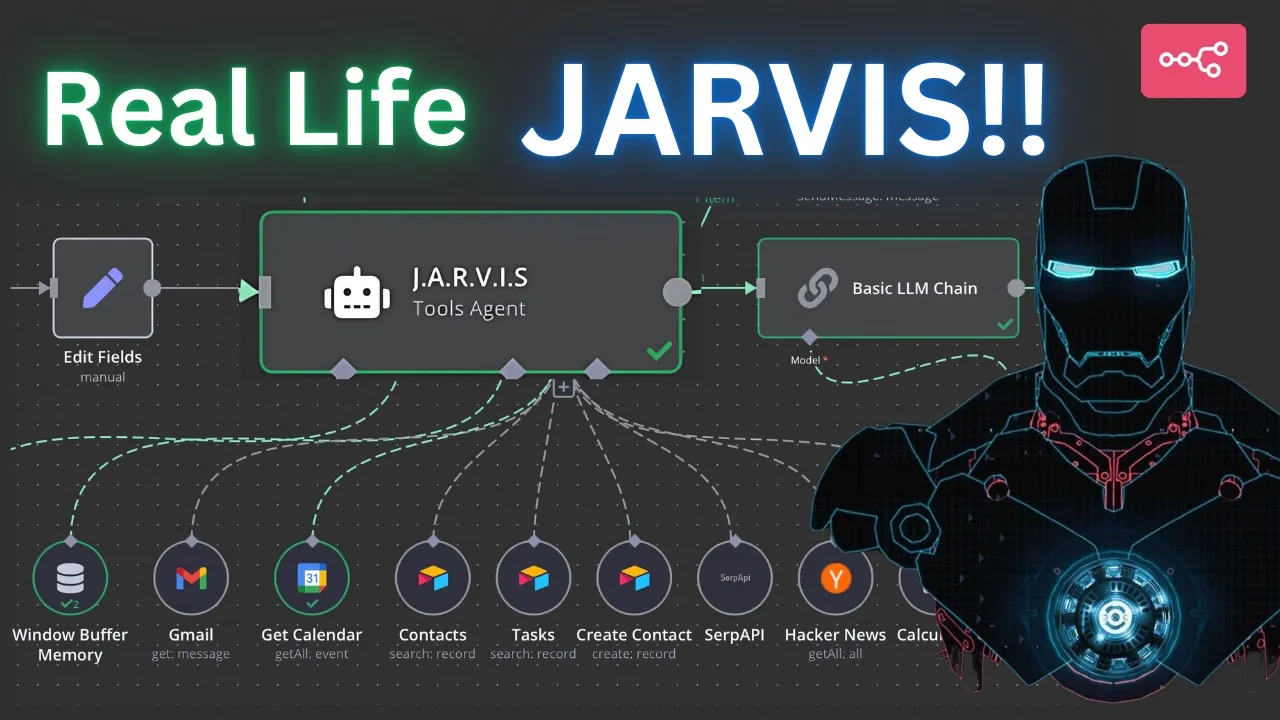
look alive Jarvis we got a lot of work to do ah I see you're in fine form today sir rest assured my circuits are humming with anticipation for whatever challenge you're about to hurl my way shall we begin with world domination or perhaps just tackling that pesky inbox of yours let's start with my Todo list tomorrow here's what you requested sir ah a to-do list that Rivals the complexity of one of your suits circuitry diagrams shall I order some coffee to fuel your inevitable procrastination do I have any meetings tomorrow I understand you're experiencing a technical issue sir perhaps this is the universe's way of suggesting a surprise day off everybody's watching you right now so don't embarrass me here's what you requested sir uh a lunch meeting and a mysterious busy block I do hope you're not planning another impromptu flight test without informing me first my circuits can only handle so much excitement hey Jarvis what's the weather like in San Francisco right now and do I need an umbrella here's what you requested sir ah another fine day for in Silicon Valley or at least avoiding the tourists at Fisherman's Warf all right so I officially built Jarvis from Iron Man this is such a cool project I've been working on I'm going to walk through step by step and show you how I created this and um go through the different nodes um for those of you who have watched my previous video this is a continuation of uh the Mia AI assistant but of course this is a little different because I added a voice to this specifically Jarvis's VI obviously this is just for demo purposes so Marvel don't sue me uh but I'm going to walk through and show you how to add a new Vice that you can generate from scratch through 11 Labs we're going to be using that uh HTTP tool to add our node directly and connected to 11 labs and we can generate a different voice there we can design our own voice or you can clone your own voice if you want so of course for this demo purposes I did Jarvis's voice but that's just to showcase the ability of this AI what it could do you could play around and figure out whatever voice you trying to add to this particular assistant but this is going to be really cool because now you will have the ability to add different tools to this so things like project management so for this particular one I have everything connected to my air table which I'm going to Showcase in a little bit that I can create a contact I can um you know get my tasks any other project related items that are inside my air table this Jarvis AI agent will have the ability to access that and then of course also things like uh the ability to have access to Internet via surf API Hacker News uh and then also having a memory attached to it so that way it can have a really nice and natural conversation we have the main uh AI agent here with uh the comprehensive prompt prompt about making sure it reaches out to different tools that are attached to it and yours might look different depending on what kind of tools you add it and then also I have this basic llm chain that I have utilized to give uh this AI agent personality of Jarvis so I'm going to walk through all of this and then show you guys how you can build on your own and then for those of you who are in my school Community I'll be building this live next Friday at 4:30 p.m. so make sure you join that but if you can't don't worry about it you can have access to the call from um the live built and support call section of the classroom and then of course you can have access to the template here where you can just upload it to your workflow and then you can uh build a different version of it yourself and if you're any issues let me know for the those of you who are new to the channel my name is z my YouTube channel my school Community is all about building incredible AI agents that are useful for personal use and then also for businesses we have a great group of people in our school Community who are very Eagle to learn and help each other out we have Daily Calls where you can jump in and provide if you have any questions you can hop in there and ask your questions and then obviously at any point you can also put your question in the ask in the this Channel and somebody or myself will give back to you and make sure the response is given to you we have exclusive sections for school Community like deep dive topics with about Vector databases and all things AI agents and then I've also for business owners I've launched my AI Workshop consultancy where if you're a business owner you can reach out and book a consultation call where um you will be able to discuss whatever automation you're looking for in order to make your business more efficient L all of the links will be in the description so make sure you check it out all right let's get back to the demo all right so the first thing is we will uh quickly go through the different trigger and switch note that I've set up again for those of you who have watched my previous AI assistant feel free to skip this part because you might be very familiar with this already uh but essentially our uh initial trigger is going to be our trigger uh telegram trigger and it's going to be on message and you want to make sure obviously you have a telegram account the telegram account setup is very simple uh but after you have that I'm adding a switch node because I want to identify If the message that's incoming whether it's a text or it's a voice if it's a voice message I'm gra grabbing the voice uh file ID which is basically right here so I'm literally just grabbing this putting it there and then if it's a text message I'm just sending that over uh to the text route that's why I have three routes here one audio text and error um so the audio file goes to this route where I'm downloading that audio file um through this telegram file node which I'm essentially grabbing the file ID again I'm putting it right here and I'm downloading it if we go back to fix right here it's just the download toggle is on and once that file is downloaded now I'm adding a open AI transcribe uh note here that's going to transcribe that recording which in our case will be our voice message that we're talking to uh um via our telegram app and then also this edit field is there to just convert the message that's coming in uh to the same output as the one that's coming from speech uh to text conversion right here so they're all json. text so that way both of them messages are coming in and being sent here in one cohesive way and then our main AI agent obviously so this is going to have the main prompt to use which tool for what purpose uh so I have put this comprehensive guide here or comprehensive prompt here to make sure that this main agent uses the proper tools for the proper ask depending on what the user is asking so this could be uh very robust meaning that depending on how many tools you have you can treat this prop uh to be able to do whatever um it needs to do or whatever tool it needs to have access to depending on what you're building again um one of the if you have a lot of tools one of the ways to make this more efficient is to add separate workflows um and essentially uh minimize the need for a more crowded prompt inside this so that way for example you can have a separate workflow tool that you can attach this and add all of your uh uh for example a table uh nodes in there so you can basically have a separate AI agent for example this is uh the one that I did for um Mia the personal assistant that I bu I had completely separated uh the calendar tool into this different AI this separate AI agent and I would essentially call that from here using the call edit and workflow Tool uh you can check that out on my prev videos to uh if you don't know how to do that um so you can definitely separate all of these tags if into different workflows as well but for this purpose this you know this is only I'm only attaching a few uh tools here so that's why I put everything in the same AI agent but for your use case make sure you tweak it around and again like I said uh if you run into any issues please make sure you post that on the school Community ask and assist Channel and we'll be able to get back to you because I know a lot of people are building really cool versions of the Mia assistant AI agent that I did previously in my video and that's what the the beauty of the community is right that that people take take these workflows that I build and they add and tweak it for their own use case and they turn into amazing things but anyways after you provide that um prompt and this main AI agent again same thing here on uh the nodes that are here you have to utilize the from AI tool um so if we take a look at this for example um I'm using this from AI function uh that is uh within n8n to be able to grab the requested information from the user dynamically so these are basically Dynamic parameters meaning now that this function is here the AI agent will be able to grab the requested um information from the user where before you had to manually attach everything so that's what makes this from AI function so great again if you're not familiar with the from a function please make sure you watch my previous uh not previous video I think it was a few videos previously was called the ultimate AI assistant where I'll walk through step by step on how to add that from AI agent that but these are all basically a continuation of that um so again you can use your calendar here U The Sur API this is just so it has access to the internet or Google search in this case to be able to grab different information and the same thing I've added the hacker needs to uh to uh give it the ability to provide uh more news related information and then afterward so after this AI agent I'm sending the output from the main AI agent into two routes the first route is going into this message so meaning that I'm grabbing that response from the AI agent and sending it directly back to uh telegram note so basically right here this would be a good good example if you can see so this is something that I asked for uh grabbing me my schedule for tomorrow and if we take a look at my calendar this is actually accurate I just put some dummy data here launch with John and then busy right here so that's why when I asked Jarvis it made that snarky comment uh so it's coming all from this meaning that first it's going to put this output this is where this output is coming from it's coming directly from the AI agent it's going to go here and then it's going to also have um it's going to also send the output to this other note which is a basic llm chain and I've added entropic chat model here you can add whatever AI chat model or large language model you are um familiar with um but inside the basic llm chain so what I've done is I've given this llm chain a prompt saying hey you're Jarvis the SOP sophisticated quick wited AI assistant from Iron Man you are basically the job of this particular AI agent or this particular basic llm node is to capture Jarvis's U humor um his sarcasm and all of the abilities that made Jarvis such a great addition to the uh Iron Man movie so that's exactly what I'm doing here and then I'm also giving it examples of how to respond um whenever a uh query is made so for example I've separated and I I had to play around with this to figure this thing out um so what I did was I said hey when I'm getting this output from the main AI agent because I'm sending this output directly back to the user via the text format I want Jarvis to only make a comment or generate some kind of a snarky comment or a joke or um you know or whatever Jarvis would typically say about that particular information and do not repeat that information right because I'm sending that information directly via message so I just want the accompanying voice to be a uh comment or a joke or something about the particular message that's being sent but then of course I also gave it um the ability to say hey if a question is being asked or a service is being provided like for example if a to-do list is given then make sure you say that hey here's the information you requested and then make a comment about that information so that's what this prompt is doing it's basically telling it to uh not repeat the information that was sent because it's already being sent but instead just absorb that information and make a comment about it like Jarvis would typically would right um so then afterwards and you can see right here so this is um what the output looks like this is the input that's coming in and that's the result of what we asked for which in this case is our Google Calendar and our meetings but then it's and the output of this is here's what you requested sir a lunch meeting with the mysterious busy block right so that's what it's doing it's providing a joke or a comment a sarcastic comment about the particular um uh data that's being outputed so it has the ability to absorb this data understand it and then make a comment about it right so it's very interactive it's very natural and still at the same time it's useful but capturing the humor uh so you can play around with this prompt on whatever character you're uh creating for your own use case so afterwards after that that comment is generated then I'm outputting this and this is where I'm utilizing this HTTP request tool to grab my um API uh from 11 labs and I'm using 11 Labs because 11 Labs is is great when it comes to um you know generating new voice cloning a voice or um like I said starting an entire voice from scratch so you could use this for your own personal use case for example clone your own voice and that way you can basically respond back to somebody if you own a business or something like that uh with this method right so again the as far as the method it's going to be a post request the URL is going to be this URL that's inside 11 labs's um API documentation and this is the voice ID so depending on what voice you're generating every voice in 11 lab has an ID so you just grab that voice and paste it here and the rest of this URL is essentially the uh right here so this part is just a typical um API um call that I'm making and this is again available in 11 labs's API documentation so make sure you check that out quickly this will be right there authorization is going to be generate uh generic credential types and um the generic O type I created a custom o uh so if you select a custom off here and a custom account you can create a custom account here that basically um gives you the ability to add your token or your secret key without exposing it so that's why I did that but essentially you can put your secret key here as well if you wanted to um and then as far as headers so these are the requirement this is part of the API documentation for 11 lab so you have to send some heads some headers here um and we're going to do content type and the content type is going to be application Json and then we need to send a body here so what I'm doing here is I'm grabbing this text that's coming here and I'm stringifying it meaning and again I didn't type this obviously I use chat GPT uh to grab this and if you're part of my school make sure you use the uh companion GPT that I created for you guys exclusively so this um and then workflow architect which is um this one that I created for the school community so make sure you use this because it's trained on NN data already so you will have better results but anyways you basically type on um chat GPT or claw or whatever to convert this text and make sure you're stringifying it meaning you're removing any um you know unnecessary things like slashes or line breaks or um asteris or dollar signs or what ever uh to make sure it's cleaning up this text that's coming out and making sure that it's a valid Json because otherwise it's going to throw an error uh so you can just copy and paste this or if you don't want to do that again if you watching this video just copy and paste this right now and you should be good to go so anyways after that you're essentially done with this step you don't you're not going to add any additional options so now this is going to grab this text this is going to convert this to a file and this is what the file output is going to be from this 11 lab HTTP request node so now we're going to grab this file right and we're going to download it and send it back to um to um sorry not downloaded we're going to directly send this back via uh another telegram node which is called operation is going to be send audio and because we already have this binary file that we generated from our 11 Labs HTTP Tool uh HTTP request tool then we're just going to grab this and uh I'm putting this the data file name as well because for some reason this was giving me an error so I had to play around and figure this thing out and the solution for this was Data had to put the name of the file here in order for this to get processed so once you do that and right here by the way the chat ID I'm literally grabbing this from my first notes it's just the telegram trigger. first.
Json message from ID and this is going to grab that chat ID so that way it can respond to you uh accurately so once you do that this will directly send that back to um the user so let's go ahead and test this out again I just want to utilize a few more things so I'm going to go ahead and delete this and let's try out um this again so let's say I want to this time let's see what do I want to use let's say I want to grab a contact from my database right so if you see right now I have uh this Ed end test um uh base here and I have two tables here one called contacts which is just you know email and phone number of different contacts just a demi data and then another one is my task list again same thing with uh demid data here so let's go ahead and ask for it to grab me Bob Smith's uh contact information right so if we go back to whoops let's go back here go back to Jarvis okay so let's see so now it's listening as you can see right here it says it's listening so I'm just going to say grab me Bob Smith's contact information hey Jarvis can you grab me Bob Smith's contact information so now this is a voice so that's why it's going to the top route now it's getting converted so now it's going to utilize as you can see it's using the proper node here and it sent me the contact information right here which is correct and now it's generating this file so let's listen to it see what it came up with so again this shouldn't if everything worked they shouldn't repeat the information because it um gave it gave me already in a written format they should just make a comment about it so let's see what this output it if I play this uh Mr Smith I do hope you're not planning another one of your Infamous karaoke nights sir the neighbors are still recovering from the last one all right so yeah again same thing you can see it's not repeating the name or the phone number and email it's just making a snarky comment or a joke about that particular information that was sent right so let's go ahead and test test this again let's this time I'm going to try to ask it about weather uh so that way it should utilize this Sur API instead so let's go ahead and do that and get rid of this test the workflow hey Jarvis what's the weather like in San Francisco right now and do I need an umbrella all right so that gets sent so now what should use S API perfect looks like it's using the proper tool and again the reason why it's using the proper tool is because we're giving that prompt instruction directly to it so that way it knows which tool to use and as you can see it's giving me the right information um and let's see what Jarvis says now here's what you requested sir another fine day for conquering Silicon Valley or at least avoiding the tourists at Fisherman's Warf all right so as you can see again that worked as well so now let's take a look at for example my tasks so if I go to my tasks here again I have some Demi data here as you can see this is in a different table so this should be using now this tool instead of the contact tool so let's make Let's test that out and see if that works I'm going to click on test here all right so let's try it again hey Jarvis can you grab me my to-do list for tomorrow okay so it should use now the task perfect it looks like it did now it's going to go back generate all right looks like my to-do list was given to me so now it's going to create a speech about this particular data all right let's see here's what you requested sir ah a to-do list filled with thrilling adventures in Community Management I'm sure you'll tackle it with the same enthusiasm you reserve for your morning coffee strong bitter and slightly regrettable by midday all right perfect there you go so as you can see this is a really fun project again I had a lot of fun building this um so you can play around with this and utilize 11 lab and um you know have fun building a different voice whether you want to clone your own voice or you want to um generate a voice from scratch you can play around with that um or you can use some other voice generating platform if you're used to because this HTTP request tool is essentially just using the API for 11lb service so instead of 11lb if you're used to using some other um voice generating software if feel to do that because the function is going to be the same exact thing because everything is going to be the same except this right here where you're sending this text to that um HTTP request and that's just going to convert that into file you want to make sure that it has the ability obviously to convert that into a file um so that way you can send that directly to your um telegram node right here anyways well hope you found this helpful again same thing for people who are my school Community just go to classroom I'll be uploading this obviously here as well and also on the anend templates all you have to do is just simply go to your um workflow file and click on import from file right here and you can put this basically this entire workflow will be uh imported directly to your canvas and then you can play around play with the nodes add additional tools uh tools tweak it uh tweak the prompts depending on what you're using and again like I said I will be building this live next Friday as well uh so feel free to join that if you have any questions or if you want to build it together with me uh that works as well and again this is also going to be useful for businesses as you could you know see there's got to be lots of use cases for a business like a self-service software or customer service software um could use this to actually add an additional little um note in a voice text message to an email so you can instead of a telegram you can add this to an email note so let's say if you're have business that's utilizing um some form of a service that requires interaction via email you can add an email trigger here so whenever somebody um is asking for a question about a particular topic you can add additional tools here to for it to have access to more information about your business and then you can respond to the email via the text and then also you can send them a separate little voice message as well to make it more personalized and make the that interaction very unique so there's going to be a lot of use cases uh and then for those of you who are who already own a business business again if you want me to build anything particular any automations I already work with businesses to build automations for them so feel free to jump in my uh website here the link will be in the description below and click on the book a call here so that way you can set up a 15minute free consultation with me or if you want to talk about something particular if you're not a business owner somebody else who is uh interested about how to utilize AI automations or how to build a successful School Community or YouTube channel how to use AI to get successful you can also set up a separate call with me which is a consultation call obviously that's going to be um paid but uh you can definitely do that from here as well all right well hopefully you found this helpful like I said play around with this and let me know if you have any questions make sure you subscribe and like the video cuz I've got some really great things up in the pipeline you want to make sure you don't miss that all right thanks for watching again I'll see you on the next one [Music]
The words are the caption track's own and nothing is reworded or re-transcribed. Paragraph breaks are placed between sentences so the text reads as prose.
Free tools for your own script: paste a draft and see where it stands before you record it.
Paste your draft and see where viewers are likely to drop off, with a rewrite for each weak line.
Paste the first 30 seconds of your own draft for a hook score and rewrites.
Check your draft against YouTube's advertiser-friendly guidelines before you record it.
Read this channel's public videos and transcripts, and download a writing brief for it.