Getting the transcript
Reading the captions from YouTube. A video nobody has opened here before takes 10 to 30 seconds; this page fills in on its own.
Getting the transcript
Reading the captions from YouTube. A video nobody has opened here before takes 10 to 30 seconds; this page fills in on its own.
The Andrew Faris Podcast · @andrewfarispodcast
Words
1,960
Runtime
8:42
Speaking pace
225wpm
Reading time
8min
225 words per minute, above the 201 75th percentile of 349 measured videos. That distribution comes from the 349-video hook study.
Opening (first 30 seconds)
it's a small thing in some ways but it's actually really important in meta ads advertising to get your column set up right and so this is a new account that I'm working on and I wanted to show you my exact column setup and why I set my columns up in meta ads the way I do so I'm going to start by going to the columns here and go to customize columns and I'll start by just getting rid of all of the ones that are here and close those all out um and we'll go from left to right so first is going to be campaign name obviously you need
113 words, the words spoken in the first 30 seconds at 225 words per minute.
Free, no signup. See how the first 30 seconds hold attention, with rewrites.
Sentence shape
| Measure | This transcript |
|---|---|
| Sentences | 1 |
| Average words per sentence | 1960.0 |
| Longest sentence | 1,960 words |
| Questions asked | 0 |
| Sentences containing a number | 1 |
Most used terms
Filler phrases
59 in total: uh 21 · um 17 · actually 6 · like 5 · sort of 4 · kind of 3 · basically 2 · you know 1.
A literal whole-word count of the same phrase list the Prepublish browser extension uses, so a phrase inside another word is not counted and a phrase used in its ordinary sense still is. It is a count and not a judgement.
Free, no account. See where attention is likely to drop, with a rewrite for each weak line. The free check shows the scores and the one issue costing the most. Or run it on the words above first.
Free · No login · See a sample audit first if you prefer.
What this transcript is
Every word below is the caption track YouTube publishes for this video, pulled from the video itself and reproduced unchanged. It is not Prepublish's writing, not a summary, and not a re-transcription: it is the video's own published captions. English captions, generated automatically by YouTube, in the video’s original language. Source: the video on YouTube. A channel that would rather this page did not exist can ask for its removal through the contact page, and it is removed.
No Script X-ray for this video: YouTube shows a Most replayed graph only once a video has enough views.
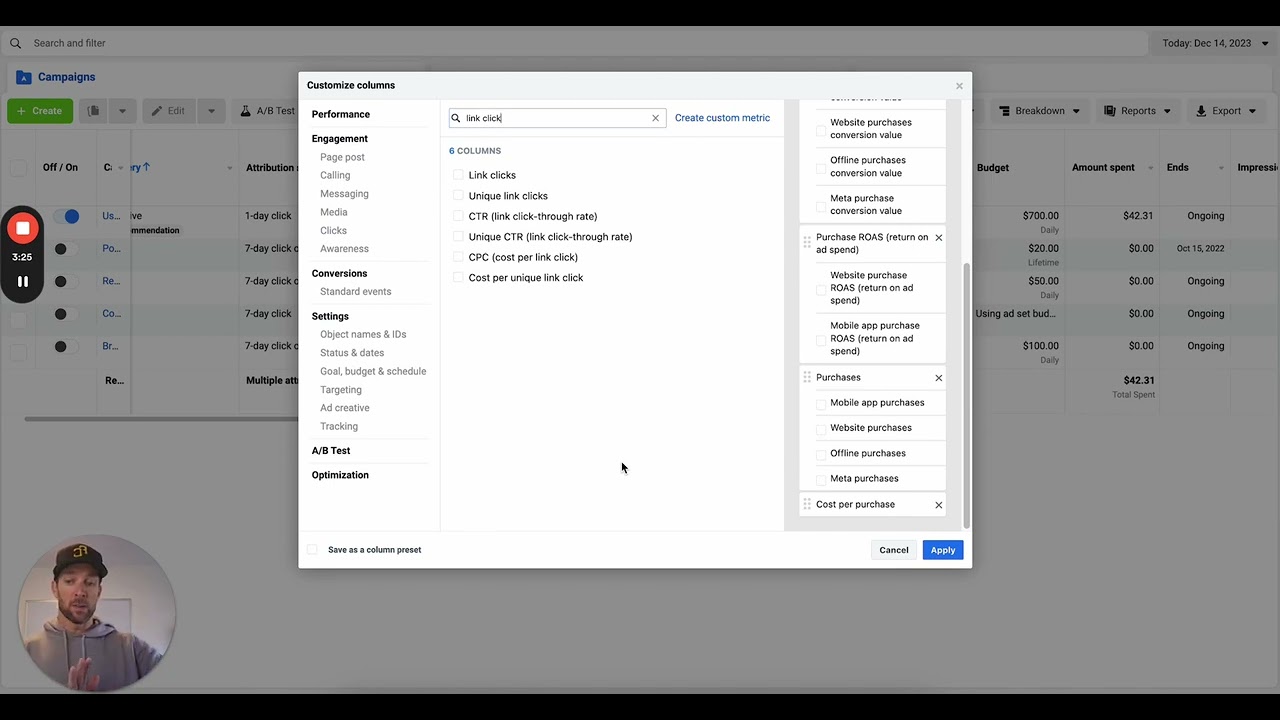
it's a small thing in some ways but it's actually really important in meta ads advertising to get your column set up right and so this is a new account that I'm working on and I wanted to show you my exact column setup and why I set my columns up in meta ads the way I do so I'm going to start by going to the columns here and go to customize columns and I'll start by just getting rid of all of the ones that are here and close those all out um and we'll go from left to right so first is going to be campaign name obviously you need your campaign in there um you may want to have adset name as well well um at uh that obviously actually we'll take that out for now we won't worry about ad that name for now okay number two for me is going to be bid strategy that's going to be really important for me to see my bid strategy um that way if I'm running mro ass or bidc caps which is usually what I'm running one of the two of um I can see what that's going to be very very quickly on quick glance then my budget important obviously uh delivery this is going to show me kind of how things are going in the ad account attribution setting this is really important as well because this basically now with all of these has given me the sort of my setup and what this is now giving me with my bid strategy my budget my delivery and my attribution setting it's all the stuff that's feeding back to me sort of how my account is set up what's my optimization am I bid capped all those kinds of things and so that's where I start all right from there I'm going to want to go towards purchase metrics okay so I've got sort of my setup metrics in bucket one next from left to right is going to be my purchase metrics and that's going to start with the amount spent it's the most important thing there for sure so I'm going to do amount spent bent and then I'm going to go to purchase metrics and that's going to include um starting with purchases conversion value and so first I'm going to put in the value under this purchase section and when I do that I get all of these things here from meta okay but now I've got spend and value and uh and so I'm going to have my amount spent and my Revenue basically and I'm going to uncheck these boxes now one thing I will say here is that this account is not running any um shops ads right now but if I'm running shops I'm probably going to at least somewhere in here keep the meta purchase conversion value and the website purchase conversion value boxes checked whether I do that um right here or have some other ways of doing it with a custom column or something like that um is not as big of a deal but I I probably want to see both of those split out in this case this brand is not running any shops right now they can't which means by just unchecking all of those I'll just see my total conversion value which is just the same as website conversion value all right next is roas and now I've got spend revenue and Rass and once again I don't need those split out at all I'm just going to have them right there and now I want to just not only see the total revenue but the volume okay so um that means I want Total purchases are there so again once again I got to get rid of all these guys and after total purchases I want cost per purchase and so once again we can just do that and now I've got a bunch of different stuff all set up um from here I want to grab my click metrics now I'm going to grab link Clicks in this case and not outbound clicks um and a lot of times I'd run out I'd use outbound clicks um because outbound clicks are going to be clicks that take me to my website but in this case I'm going to use Link clicks um even though we're not running shops the distinction here is that if you're running ads to shops a link click is going to cover any AD that goes out to shops but doesn't go to your website whereas an outbound click will only cover clicks that go to your website and so you have to have that distinction now I told you this brand is not running shops and I don't expect them to anytime soon but there's no real reason not to just use Link clicks here and so in fact you can probably just use Link clicks all the time uh because why not uh and then we'll go CPC cost per link click and CTR but we got to make sure we get the right CTR here because there's a lot of different options and so that's going to be link click through rate there you go and now I've got all of those so that's going to give me my click data uh and now I want CP M and so this is now going to move us into like cost and reach sort of metrics we'll go to Impressions reach and frequency and now all of these are all here and I've got from top to bottom my setup metrics my spend and return metrics my click metrics and then my like Impressions and reach kind of metrics all in there and I'm going to save this as my column preset I'll call it AJF growth dashboard okay in fact we'll make it a little smaller for myself we'll call it AJ FG dashboard and that's going to be my main dashboard now there's other column sets you'd use for all kinds of stuff but in this case I've got it as uh as this one as my core dashboard okay so now I'm going to hit apply and I've saved it and I've got this here and now when I look in the ad account I've got from left to right campaign name bid strategy budget attribution setting uh you can see all these are turned off besides this click attribution setting what I eventually do because I only run flick attribution anyway is I'll shrink this so it doesn't take up too much space and all I need to see is the one or the seven just to see because sometimes I run seven sometimes I run one depends on the brand Etc all right now spend value row ask Etc but what you'll also see that's happening here is that these columns have actually given me two different columns one of them right here and then a 28 day click version there's a 28 day click version because I've already gone and done something which is to select in the compare attribution settings drop down the 28 day click attribution because whether I'm running one day click or 7-Day click that those metrics will show up right here in this purchase conversion value column so if I'm running one day click this will show me on a one day uh window on a 7-Day click it'll show me on a 7-Day window but I want to be able to see the difference between between my core Target and my 28 day click Target because if I'm running bid caps I have to set those bidc caps according to my one or or 7-Day Target depending on my optimization setting but that's not the total revenue that I'm generating the total revenue that I'm generating is happening at least over a 28 day click window and so I want to see the relationship between those two things that I can see you know historical purchase multipliers Etc so if I go last 30 days or something for this account smaller account obviously oh it looks like in this case they're about the same uh return over this time period let's see can we go maximum this one this account does not have very much history but there you go um anyway in the long run that's that's how uh that's right this is a new account so that's why it doesn't have that I think everything's been run in the last seven days actually so that's why that's there all right so I've got my one day click or 7day click and 28 day click targets that doesn't get me all the way there yet okay first I'm going to the next thing I'm going to do actually is give myself a couple of custom columns as well so I'm going to go to customize columns and I'm going to go back here and create a couple of custom metrics all right so the first is going to be uh aov if it's if I am running uh bidc caps I need to be able to see my average order value because it's not only is it generally interesting and important but I have to adjust my bidc caps relative to aov uh and so I'm going to make this available to everybody and all I'm going to do here is go uh purchase oops purchase conversion value divided by uh purchases and that's going to give me my average order value let's make that not numeric but let's make it a currency and now everyone with access to this business has that I'm going to create that metric and then let's go to oops I need to do one more create custom metric which is conversion rate well let's do it like this CVR we'll call it uh this needs to be a percentage we'll call it conversion rate uh and then same thing this will be purchases over link clicks again you got to get the clicks number right but if that's what we're measuring that's what we're measuring there you go got it as a percentage got that there and now we need to add both of those in as well aov is more important to me in this case than CVR CVR is just kind of interesting but it's not much else so the way that I'm going to do this is I'm going to put my aov right here uh under cost per purchase so now I have my CAC or my CPA right and my aov right next to each other and that's again going to tell me this those two things in fact I'm going to put aov in front of CPA because it's something I reference actually more often in this case all right now I've got my purchases metrics all the way filled out again I'm going to save this as my column preset replace it and now I've got all of those there so uh there you go that's the way I set things up you can see in this case right here's my last seven days in this setting $12 aov is in there $16 CPA and so everything else I do um is going to be built off of that uh so I can see all of my my metrics so um there you go that's the way I set things up and that's the way I'm going to view things from left to right going forward
The words are the caption track's own and nothing is reworded or re-transcribed. Paragraph breaks are placed between sentences so the text reads as prose.
Free tools for your own script: paste a draft and see where it stands before you record it.
Paste your draft and see where viewers are likely to drop off, with a rewrite for each weak line.
Paste the first 30 seconds of your own draft for a hook score and rewrites.
Check your draft against YouTube's advertiser-friendly guidelines before you record it.
Read this channel's public videos and transcripts, and download a writing brief for it.