Getting the transcript
Reading the captions from YouTube. A video nobody has opened here before takes 10 to 30 seconds; this page fills in on its own.
Getting the transcript
Reading the captions from YouTube. A video nobody has opened here before takes 10 to 30 seconds; this page fills in on its own.
Sam Piliero · @SamPiliero
Where viewers went back to watch this video again, from YouTube's public Most replayed graph, lined up with what was said at that moment.
Most replayed moment #1
3:193.0x the video's typical replay level
reporting. You need to set these up in your advertiser settings. These are going to define your engage and existing customers. So make sure you do in fact set these up. And the way that I like to set these up is in the engaged audience set up site visitors 30 days and add to cart 90 days. And then in our existing
Said at 3:12
Most replayed moment #2
4:481.7x the video's typical replay level
That is going to expand. And we're going to actually tweak some settings here. Now, for audience, the only thing we need to do is click show more controls and exclude custom audiences. What we're doing is we're making sure that this is only targeting new prospects. So to do
Said at 4:41
Most replayed moment #3
7:011.6x the video's typical replay level
understand the scaling mechanism in place. Now scaling mechanism has two phases to it. And phase one starts with the creation of our second campaign, which is our scale campaign. So, for the scale campaign, we're setting up very similar settings. Our campaign objective is sales. Just like before, we're running a
Said at 6:53
The graph counts replays. It does not show where viewers stopped watching.
Words
3,821
Runtime
18:27
Speaking pace
207wpm
Reading time
16min
207 words per minute, above the 201 75th percentile of 349 measured videos. That distribution comes from the 349-video hook study.
Opening (first 30 seconds)
Today, I'm going to walk you through the exact Facebook ads campaign structure that is directly responsible for taking this brand from $56,000 in net sales all the way to $250,000 per month. And all of this was done in just 90 days. I've been running ads for over 10 years, and one of the highest impact things that I see across 7, eight, and even nine figure brands is the way that they set up their ads and a proper campaign structure. So, when this brand came to us, they were at a flat trajectory for a long period of time. and we
104 words, the words spoken in the first 30 seconds at 207 words per minute.
Free, no signup. See how the first 30 seconds hold attention, with rewrites.
Sentence shape
| Measure | This transcript |
|---|---|
| Sentences | 266 |
| Average words per sentence | 14.4 |
| Longest sentence | 51 words |
| Questions asked | 5 |
| Sentences containing a number | 52 |
Most used terms
Filler phrases
40 in total: actually 18 · like 17 · literally 3 · basically 1 · you know 1.
A literal whole-word count of the same phrase list the Prepublish browser extension uses, so a phrase inside another word is not counted and a phrase used in its ordinary sense still is. It is a count and not a judgement.
Free, no account. See where attention is likely to drop, with a rewrite for each weak line. The free check shows the scores and the one issue costing the most. Or run it on the words above first.
Free · No login · See a sample audit first if you prefer.
What this transcript is
Every word below is the caption track YouTube publishes for this video, pulled from the video itself and reproduced unchanged. It is not Prepublish's writing, not a summary, and not a re-transcription: it is the video's own published captions. English captions, generated automatically by YouTube, in the video’s original language. Source: the video on YouTube. A channel that would rather this page did not exist can ask for its removal through the contact page, and it is removed.
Today, I'm going to walk you through the exact Facebook ads campaign structure that is directly responsible for taking this brand from $56,000 in net sales all the way to $250,000 per month. And all of this was done in just 90 days. I've been running ads for over 10 years, and one of the highest impact things that I see across 7, eight, and even nine figure brands is the way that they set up their ads and a proper campaign structure.
So, when this brand came to us, they were at a flat trajectory for a long period of time. and we started to implement our strategies around the 1st of September. What you can see right here in my Shopify dashboard with absolutely no filters is that from June to September, they were super flat and the trend line starts to pick up throughout September, throughout October and I've cut off any Black Friday sales November onwards.
We could also see this very clearly from September 1st to November 15th compared to the previous period where we see our total sales climbing every single day compared to what they had last year where literally sales declined during this other period. Gross sales are up 143%, net sales are up 120%, total sales up 120%. Sessions during this period were up 77%. So we increased site traffic. And while we increased site traffic, conversion rate actually went up 19%.
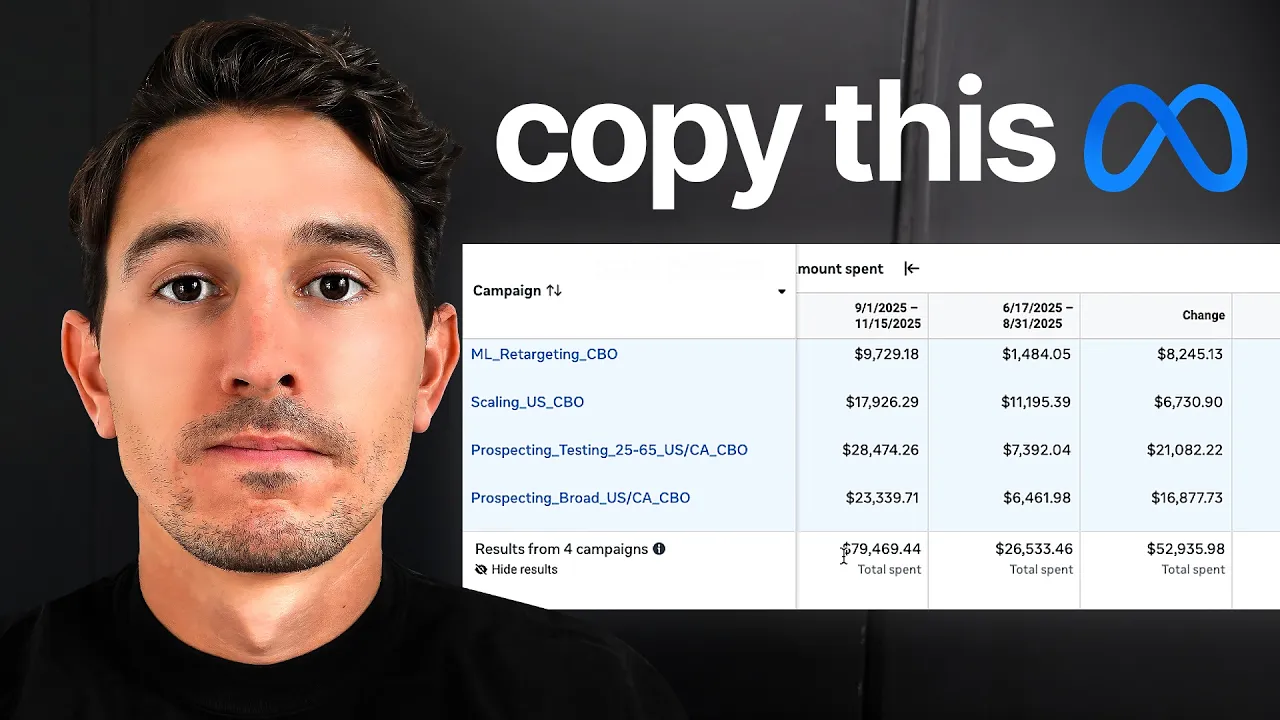
So we drove higher quality traffic to the website at the same time that we drove more traffic. And when we compare the same period in Facebook ads, you can see we increased spend 199% and we increased purchase conversion value 205%. That means we were able to scale effectively with no impact on return on ad spend. We can see rorowaz stayed flat 1.9 but we were able to 200% increase the spend from just 26,000 to 79,000 period versus the previous period.
So I think it's important to actually break down what is a structure, why it's so important. A structure allows us to scale predictably. It allows us to create systems that actually work outside of Facebook. For example, how often are you actually implementing new creative? Where do you implement that creative? How do you make sure that creative doesn't interfere with your other ads? These are all very critical things that need to be applied in a proper structure.
So, what we're going to go through is campaign setup, ad setup, and even ad breakdowns for what to optimize. So, starting in a completely blank ad account, the first thing I would do is create a salesbased campaign. And we're going to call this campaign prospecting CBBO. This is going to be a campaign budget optimization campaign that is only going to be acquiring net new customers. You're going to notice a theme here is that we're going to separate out our new customer acquisition, our engaged customer acquisition, and our retention.
So, in our settings here, our budget is campaign budget. Our daily budget we can get to later, but just note that this is the most important scaling campaign in the account. So, whatever your budget is, whether it's $100, $1,000, $10,000, this campaign generally represents 80% of the total ad spend. So, for this case, we're just going to pretend we're spending $1,000 a day, and we're going to set this for $800. The next piece is campaign bid strategy.
We are keeping this at highest volume or value which is the standard setting in Facebook. Under this we have our audience segment reporting. You need to set these up in your advertiser settings. These are going to define your engage and existing customers. So make sure you do in fact set these up. And the way that I like to set these up is in the engaged audience set up site visitors 30 days and add to cart 90 days. And then in our existing customers, hit your purchase 180 days from your pixel and your alltime purchasers from your Clavio or your CRM list.
The next piece here is our ad sets. Now, our ad sets are essentially where we're going to be defining our audiences and they're going to be packs of creatives. So, this is where we're grouping together our creatives. Something that we like to do here at the Moonlighters is use a modular packbased system. And that's what I would advise for about 95 plus% of brands. And how we label these is we call them broad pack one.
So this is going to represent our first pack. This adset is going to be fully broad in the audience that it's targeting, but it's still going to have exclusions, which we're going to get to. So our conversion location is website. Our performance goal is maximize number of conversions. Our data set is our correct pixel. And our conversion event is purchase. We're going to skip cost per result goal. We're going to skip value rules.
We're going to click more settings. And we're going to be using standard attribution with normal 7-day click, one day engage, one day view. The next piece is budget and schedule. This is where things are going to get interesting. For your first pack, leave it as is. You're not setting anything here. You're letting everything run daily. You're not setting any adset spending limits. But stay tuned because pack number two, pack three, and so on.
That is going to expand. And we're going to actually tweak some settings here. Now, for audience, the only thing we need to do is click show more controls and exclude custom audiences. What we're doing is we're making sure that this is only targeting new prospects. So to do this, we're going to exclude add to cart 90 days and site visitors 30 days. We're also going to exclude anyone who's purchased over all time. So to do this, I'm using a purchase 180day pixel list and I'm also using my Clavio list, which is my all-time purchasers.
What you should see here is purchase 180day, add to cart, site visitors, and then a customer list of everything coming from Clavio for all of your past purchasers. We're keeping languages on all languages. And then we're going down to placements. Now, generally speaking, we want to make sure that we're on all placements unless you have some crazy indication of data or you physically can't show up for like legal reasons or something complicated on a certain platform. 99% of the brands that we work with are running all placements.
We do find that this works better unless we find key data points where refinements are necessary. So now for the important part when you set up one pack in one campaign, who cares? Nothing really happens. The important part that happens here is after we create our first pack. Pack number two is going to be where we actually implement a new round of creatives. So in time, your ad account starts to look like this. You have broadpack one, broadpack 2, broadpack 3, broadpack 4.
And every time you launch new ads in your ad account, you're creating a new pack. Packs are just organization pieces. They're not actually doing anything unique. They're just not interfering at the learning phase. For example, if I were to just throw all my ads into one campaign and one ad set, then what would start to happen in time as I created new ads is that everything in pack number one or my only pack would get interfered with.
So, what we like to do is have this modular setup where we have multiple packs organizing each round of creative. And a pro tip that I like to deploy is after I call it pack one, I actually put the date. So if today was 1 2026, I would put the date that I launched the pack. And after we create our prospecting CBO core, which is going to consist of multiple broad packs building over time, the next thing we need to do is understand the scaling mechanism in place.
Now scaling mechanism has two phases to it. And phase one starts with the creation of our second campaign, which is our scale campaign. So, for the scale campaign, we're setting up very similar settings. Our campaign objective is sales. Just like before, we're running a campaign budget, although it doesn't really matter here because this is all going to be grouped into one ad set. We're running this budget at actually lower than our prospecting CBO, but it's going to gain traction over time.
I would start at no less than 1x your cost per acquisition. So, if your CPA is 100 bucks, set this to no less than $100. Your campaign bid strategy is highest volume or value. And then everything else is set up from our previous in our ads set. This is where things start to matter. We're changing our conversion location just like before to website only. Performance goals maximize number of conversions. The pixel is our standard pixel and the conversion event is purchase.
Our attribution setting is the same 7-day click one day engaged one day view. And our budget strategy and settings are going to be flatout no changes here. Our audience we're doing the exact same exclusions that we did in the previous setup. So we're going to go down to here. We're going to click exclude these custom audiences. And just like before, we're entering our visitors 30 days, our add to cart 90 days, and alltime purchasers.
Once we do this, we go down to placements. We make sure all placements are on. Most of the time, you're going to see advantage plus on. Really straightforward. So, so far, your ad account structure looks like so. You have a prospecting CBO and you have a scale campaign. I want to mention something about the scale campaign. The scale campaign is not special. It's not going to actually do anything unless you put the right ads in the scale campaign.
All the scale campaign is is a place reserved for your best of your best ads. And the way that we identify our top performing ads, which is completely different than the way we've done it in the past, is by going into all of our ads. Now, I'm going to show you an example here of an account. So, I would set up my normal columns, most importantly, amount spent, purchases, purchase conversion value, rorowaz, and cost per purchase.
These are just the staples that we're going to focus on. Then I would go to my column set and click compare attribution and click incremental attribution. What this is going to show me is the purchases that were most likely occurring because of Facebook. This means Facebook is only taking credit for what it thinks it drove literally because someone saw or clicked on the ad. And then what I'm doing is I'm sorting all of my ads by the most spend.
And I'm looking for my top performing ads that had high incremental attribution and spent a lot. For example, ad number one here, despite spending $7,500, it only drove a 2.6 rorowaz and a 2.3 incremental. Where ad number two here crushed it. It drove 5,500 spend, 3.6, and a three incremental row, which we could actually see is just about above almost every other ad in this account. So, what I would then do is I would take this ad right here and I would duplicate it into my scale campaign.
Now, this doesn't mean you pause those ads down. In fact, we're completely comfortable having duplicates of those exact ads. The next piece that we want to establish is our interest audiences within our prospecting CBO. And the way that we do that is just like we've created these broad packs here, we go ahead and we create a new ad set. And we're going to call this interest to be determined. All of our settings are exactly the same from the broad packs.
The big change that we're making here is we are creating an actual targeted audience. So, we're going to click further limit the reach of your ads. We're going to go down to this bottom option here, which is further limit the reach of your ads again. And then here we're going to actually select in our detail targeting section an interest. Your broad audiences do a very good job of attacking people who are within your pixels range.
For example, if you are Nike, they're already attacking Reebok, Adidas, and other sportsware brands. But what they might not be targeting is brands that are a little bit outside of that normal realm. So again, if I'm Nike, a great example of what I would use is something like Range Rover. And you can see here, this audience size is massive. We're not going to have the same massive 200 million person audience that we have on a broad audience, but we're still going to have 10 to 11 million people here, which is going to be a very different subset of an audience that we would have in our broad audience.
And what this does over time is it actually could expand our broad audiences to make them target different people that they wouldn't have considered previously. What goes in this interest is the same ads that go into the scale campaign. You don't want to test both an interest with new ads at the same time. You really just want to test your best ads in the interest because then the interest is the variable. The ads you know already work and that's the core difference.
And what winds up happening over time is you wind up stacking different interest. So you have one interest for Range Rover, you have your next interest built on something different. And over time, your campaign starts to grow. You have a lot of packs. You have a lot of interest. And the problem that everyone runs into is that one audience or one ad set gets all of the spend. So here's how we test in a very competitive system.
The next time you go to launch a new pack, you're going to quickly duplicate just like always. You're going to rename this pack and you're going to insert your new creatives. And once you do that, you're going to go down to this section called ads set spending limits. You're going to set a minimum or maximum. And when you do this, you're going to change the percentage to dollar amount. What I like to do here is set this to a small number, usually equal to one time my target cost per acquisition.
So, if I know my target cost per acquisition is 100 bucks, I'm literally setting $100 in here. It is on you as the media buyer, the operator here to check this after just a period of around 4 to 7 days, somewhere in that range. You're going to know if this is going to work. What you don't want to see is it's spending the same $100 minimum every day. If that's the case, remove this, move on. Those ads are not good. If it is spending over $100, then good news for you as well because you could also pause it cuz it's freely going to overspend your minimum.
Okay, so we have clearly established our prospecting CBO, our scale campaign, and the graduation system. The next two campaigns are what tie this all together. So the next campaign that we're going to set up is an engaged slash retargeting audience. This is how we make sure that we don't overspend on people who are engaged with our brand, people who are interested in us, people visited our site, and we serve them the right ads at appropriate frequencies.
The way that we do this is we create a new sales campaign and we follow the exact same settings that we've set before. In fact, if you want just a shortcut here, what you can do is take this scale campaign, you can click quickly duplicate and you're going to save all those settings in this duplication for the retargeting campaign. And again, we're using campaign budget. Everything is going to stay exactly the same. But once we go to our ads set, which we're going to redesign because it's not going to be like the scale campaign, we're going to be targeting the things that we excluded from the prospecting and the scale.
This starts with a 30-day site visitors. I like to call this visitors 30 days. All of these settings remain exactly the same except when we get down to the audience. There's actually a little trick we can use here. First thing we're going to do is click further limit the reach of our ads and click further limit the reach of your ads again and then go to custom audiences. Now, right now it says exclude everything. So, we're excluding just as we set up before our add to cart 90, our site visitors 30, and our purchased all time.
What we're doing here is very different. We're taking our site visitors 30 and we're actually going to click this little toggle and click include this audience. And there's one thing that might happen to you. So, pay attention because this is important. This little button uses a suggestion maybe auto selected for you. And if it is, you're going to notice your audience definition is broad. This is not what we want. Broad audiences are not for retargeting.
How could it be broad? broad is millions. So what's actually happening if you check this box is Facebook is actually starting to look at this audience. But right after it looks at this audience, it's saying we can go beyond it and spend in other places. That's not what we want here. This is strict retargeting. So we're going to unselect this and our audience definition is going to go to narrow. Don't worry about the red.
This is what we want. So the visitors 30 has targeting visitors 30 excluding add to cart and excluding purchasers. The next audience that we're setting up, we're going to quickly duplicate the visitors 30. We're going to change this to add to cart 90. And the way that we do this is we go all the way back down to audience. Nothing else changes. And we're going to include the add to cart 90. And then you're going to have add to cart 90 and 30 up here.
You're going to remove completely the site visitors 30 days. And then the final audience that we create in retargeting. We're going to quickly duplicate the visitors 30 cuz it has all the exclusions in it. We're going to go up to the top and we're going to call this engagers. Engagers is a very simple audience where you're using your Facebook and your Instagram engagement and you're pulling it together to make sure you target those people.
If you don't have a huge following on these platforms, don't worry about engagers. Don't even set this up. If you have a moderate following, you're getting thousands of views, you're posting frequently, this is an easy way to grab some extra conversions. To set this up for engagers, you're going down to your custom audiences here. You're excluding your site visitors. You're excluding your ad to cart 90. You're excluding your purchasers.
And what you're doing here is you are creating a new audience, clicking custom audience, using your Instagram account, making sure your source is correct, use your audience retention for 30 days, and you want the event to be people who engage with this professional account. And then once you set this up, name it engagers and click create audience. So we have our engage audience for our Instagram setup. We would do the same thing for our Facebook page.
Very simple. We now have our core of retargeting. This is going to make sure we don't miss anyone who's important to us at the middle or bottom of the funnel. And then finally, our retention campaign. The way that we set up our retention campaign, again, going shorthand here, is we're going to duplicate our retargeting campaign. We're going to rename this retention. Now, retention very specifically stands for existing customers.
This is anyone who's purchased from you already. So, first, I'm just getting rid of my engagers audience cuz we're only going to set up two adsets for our retention. And really all I care about here is anyone who's ever purchased. So to do this, we go down to our audience section here. We're clicking on our custom audience just like we did before. We are removing our add toart 90 and we are including our purchasers 180.
So this one is going to be called purchase_1 180 days. After that, we go to our next ad set and we're basically doing the exact same thing except this is going to be purchasers all time. Now to do this, we go to our audiences yet again. We're going to remove our site visitors. We're going to remove our ad to carts. We're going to include our purchasers all time. And then we're going to exclude our purchasers 180 days.
So now in this adset here, we are targeting our all-time purchasers, but we are excluding our 180 days. So we have one adset targeting 180 days and then another adset targeting everyone after that. So this is the core. What happens after this gets really, really complicated really quickly. You could do everything from running value rules to running max conversions or max rorowaz campaigns. You could test cost caps. You could test bid caps.
There are so many different things that could be intertwined in here. Everything from catalog setups to retargeting catalog setups to the most complex shotgun and sniper strategies that we've talked about many times. If you want to understand every detail well beyond this strategy, then I've left a link down in the description to my full 22page guide called the M3 method. This is every little thing that we do here at the Moonlighters.
And if you want to actually work with the Moonlighters, then click the other link down in my description to book a call to work with us. So that is all for today. Let me know if you have questions in the comments below. And I hope you got a ton of value out of this. I'll see you in the next
The words are the caption track's own and nothing is reworded or re-transcribed. Paragraph breaks are placed between sentences so the text reads as prose.
Free tools for your own script: paste a draft and see where it stands before you record it.
Paste your draft and see where viewers are likely to drop off, with a rewrite for each weak line.
Paste the first 30 seconds of your own draft for a hook score and rewrites.
Check your draft against YouTube's advertiser-friendly guidelines before you record it.
Read this channel's public videos and transcripts, and download a writing brief for it.