Getting the transcript
Reading the captions from YouTube. A video nobody has opened here before takes 10 to 30 seconds; this page fills in on its own.
Getting the transcript
Reading the captions from YouTube. A video nobody has opened here before takes 10 to 30 seconds; this page fills in on its own.
Coke · @Mexican_Coke
Words
1,455
Runtime
13:55
Speaking pace
105wpm
Reading time
6min
105 words per minute, below the 160 25th percentile of 349 measured videos. That distribution comes from the 349-video hook study.
Opening (first 30 seconds)
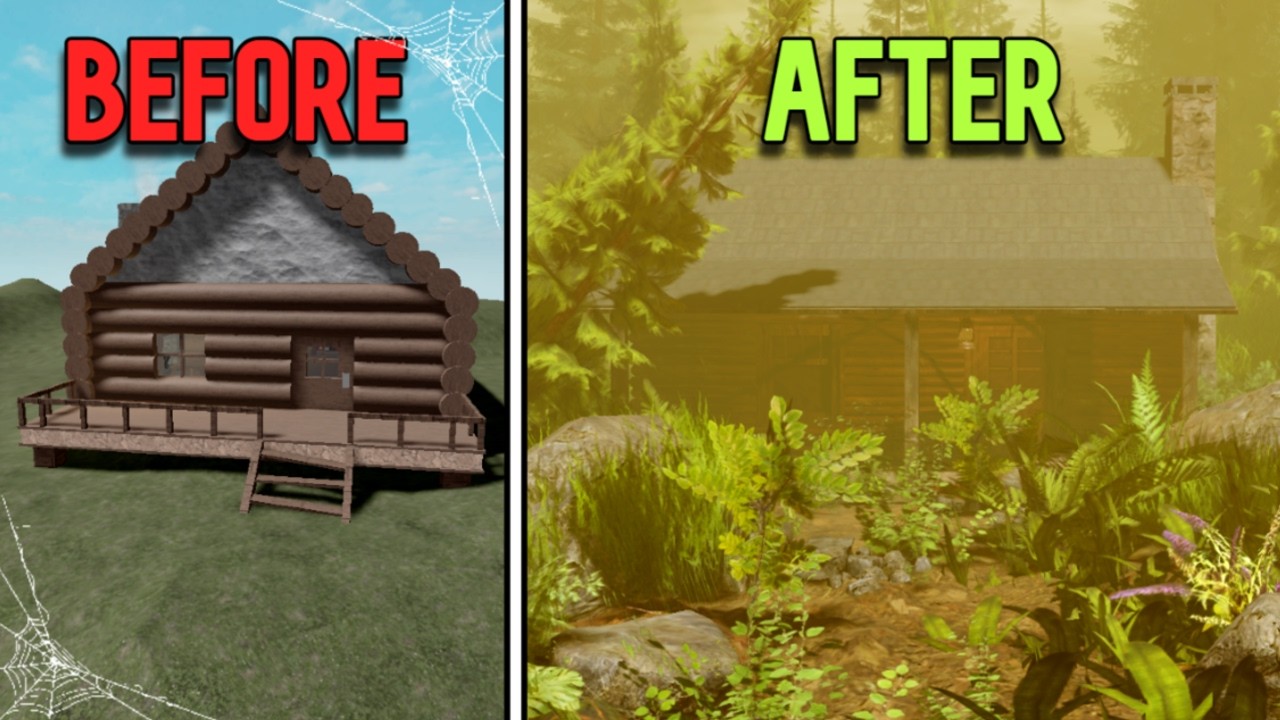
This is Roblox. But there's just one issue. How do people even make this stuff? It's so detailed, so abstract, and even the textures are so detailed. So that's why I will show you step by step how to make an ultra realistic build to impress the competition. I will show you tips
53 words, the words spoken in the first 30 seconds at 105 words per minute.
Free, no signup. See how the first 30 seconds hold attention, with rewrites.
Sentence shape
| Measure | This transcript |
|---|---|
| Sentences | 165 |
| Average words per sentence | 8.8 |
| Longest sentence | 40 words |
| Questions asked | 6 |
| Sentences containing a number | 6 |
Most used terms
Filler phrases
29 in total: like 17 · actually 5 · kind of 3 · um 2 · I mean 1 · uh 1.
A literal whole-word count of the same phrase list the Prepublish browser extension uses, so a phrase inside another word is not counted and a phrase used in its ordinary sense still is. It is a count and not a judgement.
Free, no account. See where attention is likely to drop, with a rewrite for each weak line. The free check shows the scores and the one issue costing the most. Or run it on the words above first.
Free · No login · See a sample audit first if you prefer.
What this transcript is
Every word below is the caption track YouTube publishes for this video, pulled from the video itself and reproduced unchanged. It is not Prepublish's writing, not a summary, and not a re-transcription: it is the video's own published captions. English captions, generated automatically by YouTube, in the video’s original language. Source: the video on YouTube. A channel that would rather this page did not exist can ask for its removal through the contact page, and it is removed.
No Script X-ray for this video: YouTube shows a Most replayed graph only once a video has enough views.
This is Roblox. But there's just one issue. How do people even make this stuff? It's so detailed, so abstract, and even the textures are so detailed. So that's why I will show you step by step how to make an ultra realistic build to impress the competition. I will show you tips and tricks many people don't even show you. So let's get started. So to start, we'll be needing a reference. And to get a reference photo, you'll just need to search up Pinterest.
So, we can just search. Um, I already have lots of ones. And I'm going to go with a old house. And there's many different photos to choose from. There's like this one. Oh, that looks looks nice. Oh, this one looks really nice. Uh, I'm just going to quickly get one for the sake of the time of this video. Let's look at this one. Okay, it's pretty good. Pretty good. Okay, I'll just settle with this one. It looks pretty nice.
The building looks pretty good. I'm not going to be using the background, of course, but I'm just going to be using this. So, now you can send it to Roblox Studio. So, before we start actually building, we have to to actually see our reference photo. How do we see our reference photo? And to see your reference photo, we need to download Pure Ref. And what Pure Ref does is it drops your reference photo in here and on top of the Roblox Studio so you can always see it.
So, how it works is you go to your browser, copy the image, go back to Roblox Studio, and then Ctrl +V. So, now you can scroll in and out, and it's always going to be there. And the first thing we're going to drop in here is actually our person. So, we're just going to insert it with this plugin. And he's here. And now we will start modeling the building finally. And we're going to be doing the base. So, I'm going to start off by just making the bottom.
I'm going to make it about we'll go 25. 25 looks good. And we're going to scale it up so it's above the player about eight. And we're going to make it thick. 14. Yeah, 14. 14 looks good. It is time to go with the roof. The super roof. Now step one is done. We are going to be moving on to the more detailed parts, okay? Like the logs and like the stairs, the little thing right here, and the roof. Heat. Heat. Okay. Now, after a while, I have it almost done.
I have to tweak it a little bit and I have to do the um textures and colors, which I'll show you in a bit how I do that. But first, I'm going to put the windows and doors in. Now that we're done with step two, we're going to go ahead and move on to step three, which is textures and colors. Now, we're not going to be using the Roblox textures. I mean, they're okay, but they're not like really good. But if you really want some good stuff, you're going to have to go to the search bar on your toolbox and search up PBR.
Now, right here, you're going to have lots of PVR textures. Now, what PBR textures mean, PBR textures are just textures that react to light. So, we're just going to go and get this one. Just click it. It's going to be in material source. But I'm going to unionize these. So, then the texture doesn't split off. Now you can just do this with all them. And now you have created your first realistic building. And now it's time to move on to the terrain.
And how we do the terrain is not with the terrain editor. This is just weird. It looks weird. It's not realistic at all. And it is just so many triangles in this. There's so many triangles. So, we're not going to be using that cuz it is just tedious. Instead, we are going to be using PBR meshes. And now you may be intimidated by this, but if you search up PBR rock and you go down to PBR Nature Forest by Caroline A, you will see this monstrosity.
You're going to be presented with this. But you can actually make pretty good terrain with this. I've made one build with this terrain and honestly it looks just fabulous and we will be getting a different image of terrain so we can base it off that terrain. I kind of like these textures. I won't change them. You can just kind of eyeball it a little bit, but I am going to eyeball it. Don't do this really. Take your time with it.
You don't need to rush this. Color them so they all match the same color. Now I think my terrain looks nice enough. Looks practically done. And you can see it looks really good. Don't look at it too hard. It looks good. Oh my god. Why am I laughing like that? Stop laughing like that. What am I What am I doing? We're done with the terrain. Looks all right. I guess it's time to get to the foliage. And to get the foliage, we're going to go in the toolbox.
Get the PBR jungle by buying and seek. So now you have all of this free foliage. You don't need a pay dime. And I'm going to get these rocks cuz you're going to be needing these rocks cuz you're going to be placing it everywhere. And there lots of trees here in the photo. It's pine trees. So, we're going to bring these trees over here cuz we're going to be using them. We need grass. I'm just going to go with these ones.
They look very nice. Okay, I am Now all done with grass and put in the rocks. We're going to be spreading them out. Putting big ones, small ones, like little details along the porch on the pathway up to the cabin. But yeah, put them all over. Don't put them back there or where your build is not cuz that's just a waste of time. And yeah, you you could make some money like building could go to hidden devs, but they Oh god.
Yeah, they're not the best community. There's lots of scammers, but just be careful cuz if you're building a team and they're saying like they're going to make like lots of money, don't even bother joining that because they just use you and waste your time. Yeah, I've been scammed on my time, but I want to say it's a big deal. I might tell that story someday, but right now I'm just focusing on getting this done cuz it is 2 a.m. in the morning and I am tired.
Yes, this is what it looks like with all the foilage. And you might be saying it doesn't look that good. It looks horrible. I'll get to that later, but right now we are going to put the trees in. Well, we're on. But there's one critical thing missing and it is lighting. This this lighting sucks. It looks like poo. We're going to go to toolboxes. Search up sky. Everyone does this. Okay. Delete this guy. And it looks even worse.
What type of star you're going for? And I am going for a misty. Like a misty kind of but yellowish like this. This looks pretty good. Or like this. So try this one out. Okay, pretty nice. Try another one out. This one looks realistic. This looks beautiful. Turn up density. Change this to bright. Going to make it very bright. Maybe like five. So we're going to search up a lantern. I am too tired to make my own lantern.
Hang this up maybe right there. It's already looking nice. Could make it better by adding clouds. And we're done. Oh, wait. We are not done cuz we forgot to add particles. So, you're going to go in the toolbar, search up dust, and it should be the first one to come up and it is a box. And you're going to go into the dust storm. I use this all the time to make mist. So, it's actually misty on the ground. And now you can take screenshots, you can take photos, you can record, you can animate here, you can do whatever you want.
You can give this to your boss or the person who hired you. You can do anything.
The words are the caption track's own and nothing is reworded or re-transcribed. Paragraph breaks are placed between sentences so the text reads as prose.
Free tools for your own script: paste a draft and see where it stands before you record it.
Paste your draft and see where viewers are likely to drop off, with a rewrite for each weak line.
Paste the first 30 seconds of your own draft for a hook score and rewrites.
Check your draft against YouTube's advertiser-friendly guidelines before you record it.
Read this channel's public videos and transcripts, and download a writing brief for it.