Getting the transcript
Reading the captions from YouTube. A video nobody has opened here before takes 10 to 30 seconds; this page fills in on its own.
Getting the transcript
Reading the captions from YouTube. A video nobody has opened here before takes 10 to 30 seconds; this page fills in on its own.
Notion for Business · @Notion4Business
Words
764
Runtime
9:30
Speaking pace
80wpm
Reading time
3min
80 words per minute, below the 160 25th percentile of 349 measured videos. That distribution comes from the 349-video hook study.
Opening (first 30 seconds)
Welcome to AI Agency OS. A complete operating system built in notion for AI agencies, automation agencies, and AI powered service businesses that want to manage clients, projects, experiments, revenue, and team operations from one centralized workspace. This system is
40 words, the words spoken in the first 30 seconds at 80 words per minute.
Free, no signup. See how the first 30 seconds hold attention, with rewrites.
Sentence shape
| Measure | This transcript |
|---|---|
| Sentences | 61 |
| Average words per sentence | 12.5 |
| Longest sentence | 42 words |
| Questions asked | 0 |
| Sentences containing a number | 1 |
Most used terms
Free, no account. See where attention is likely to drop, with a rewrite for each weak line. The free check shows the scores and the one issue costing the most. Or run it on the words above first.
Free · No login · See a sample audit first if you prefer.
What this transcript is
Every word below is the caption track YouTube publishes for this video, pulled from the video itself and reproduced unchanged. It is not Prepublish's writing, not a summary, and not a re-transcription: it is the video's own published captions. English captions, generated automatically by YouTube, in the video’s original language. Source: the video on YouTube. A channel that would rather this page did not exist can ask for its removal through the contact page, and it is removed.
No Script X-ray for this video: YouTube shows a Most replayed graph only once a video has enough views.
Welcome to AI Agency OS. A complete operating system built in notion for AI agencies, automation agencies, and AI powered service businesses that want to manage clients, projects, experiments, revenue, and team operations from one centralized workspace. This system is designed to bring structure to fastmoving AI agencies. Instead of juggling tools, spreadsheets, and scattered dashboards, everything lives inside one organized ecosystem.
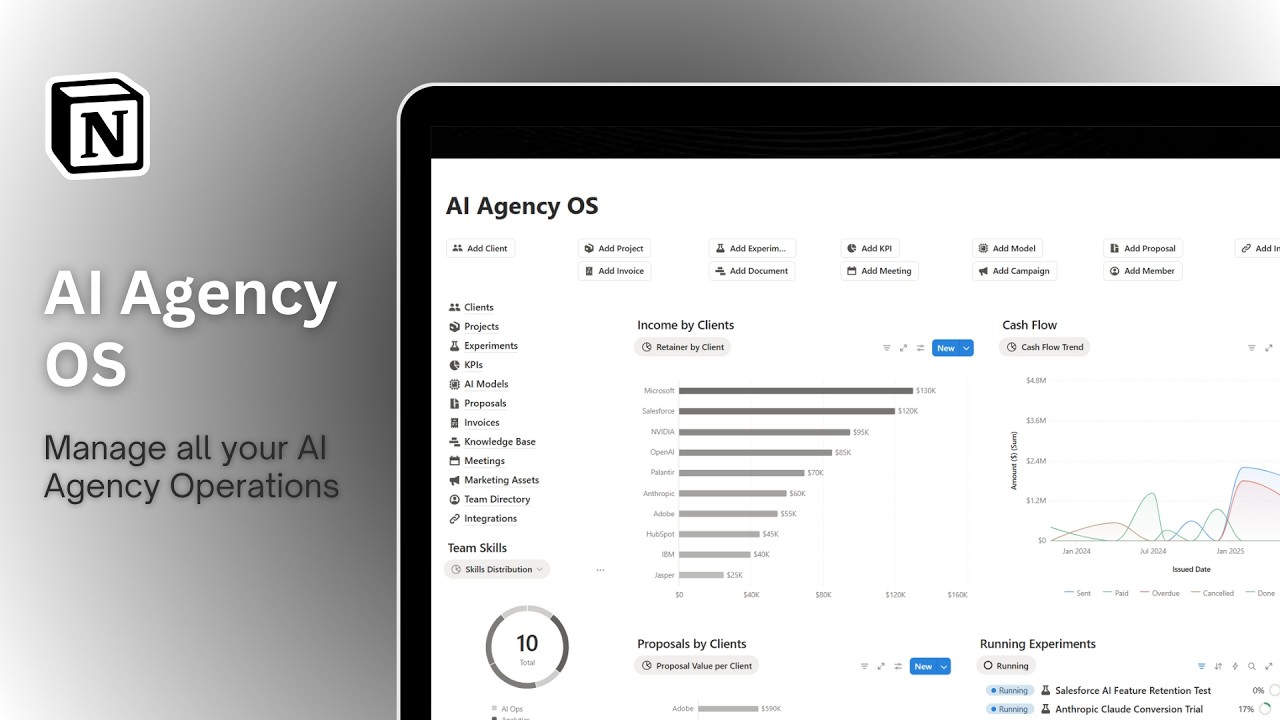
As soon as you land on the main dashboard, you get a high-level overview of your entire agency. You can instantly see financial performance, active projects, running AI experiments, proposals, team roles, and operational insights. The dashboard is designed to give founders clarity in seconds. Before we dive deeper, if you're looking for a fully customized system built specifically for your AI agency, including automations, integrations, and advanced workflows, you can book a call directly using the link inside the system or in the YouTube description.
We design custom notion infrastructures tailored to your exact business model. Now, let's go database by database. We'll start with the client's database. This is the foundation of your agency. Every client has a dedicated page where you can track status, linked projects, proposals, invoices, experiments, and performance. Different views allow you to filter active clients, group by industry, or analyze revenue contribution.
This keeps your relationships structured and scalable. Next is the project's database. This is where all delivery work is managed. Each project is linked to a client and includes timelines, deliverables, assigned team members, and financial data. You can view projects by status, timeline, or priority, ensuring execution remains organized even as your agency grows. The experiments database is a key component for AI agencies.
This is where you track AI tests, automation workflows, model comparisons, and optimization experiments. You can monitor experiment status, KPIs, performance metrics, and outcomes. This helps you validate ideas using data rather than assumptions. Moving into KPIs, this database centralizes performance metrics across clients, campaigns, and internal operations. Whether it's revenue, model performance, lead conversion, or automation success rates, this section allows you to track measurable growth.
The AI models database helps you catalog the models and providers you use, whether it's OpenAI, Anthropic, open- source models, or custom solutions. You can track provider, use case, performance notes, and integration details. This keeps your technical stack organized. Next, the proposals database allows you to manage offers sent to potential clients. You can track proposal status, value, and client relationship, ensuring no opportunity is lost.
The invoices database tracks billing and payments. You can monitor paid, pending, and overdue invoices linked directly to clients and projects. This ensures cash flow visibility at all times. The knowledge base acts as your internal AI agency library. This is where you store prompts, workflows, technical documentation, frameworks, and best practices. The meetings database centralizes client calls and internal strategy sessions.
You can track meeting notes, action items, and link them to projects and clients. The marketing assets database stores case studies, landing pages, pitch decks, ad creatives, and other growth materials. This keeps your acquisition engine organized. The team directory provides visibility into roles, skills, and responsibilities. You can track who handles what, ensuring accountability and structured delegation. Finally, the integrations database helps you document connected tools, APIs, automations, and system architecture.
This is especially important for AI agencies managing complex workflows. Now briefly, the quick ad section allows you to instantly create a new client, project, experiment, KPI entry, AI model, proposal, invoice, meeting, marketing asset, or integration. This makes daily operations smooth and frictionless. Now let's return to the main dashboard and walk through the key elements. Income by clients shows how revenue is distributed across accounts.
Cash flow provides visibility into money movement and financial stability. Team skills highlights expertise distribution within your agency. Overdue invoices ensures you never miss follow-ups. Proposals by clients shows potential pipeline revenue. Running experiments displays active AI testing initiatives. Active campaigns reflects marketing momentum. Project's timeline gives a visual overview of delivery schedules. AI models by provider shows your technical stack distribution. and team roles clarifies operational structure.
If you're serious about scaling your AI agency with structure, clarity, and performance tracking, and you want a fully customized system tailored specifically to your workflows, you can book a call using the link inside the system or in the YouTube description. This was a full walkthrough of AI Agency OS. If you want to access this premium template, you'll find the link in the description. Use the code off 20 to get 20% off.
Thanks for watching and I'll see you in the next
The words are the caption track's own and nothing is reworded or re-transcribed. Paragraph breaks are placed between sentences so the text reads as prose.
Free tools for your own script: paste a draft and see where it stands before you record it.
Paste your draft and see where viewers are likely to drop off, with a rewrite for each weak line.
Paste the first 30 seconds of your own draft for a hook score and rewrites.
Check your draft against YouTube's advertiser-friendly guidelines before you record it.
Read this channel's public videos and transcripts, and download a writing brief for it.