Getting the transcript
Reading the captions from YouTube. A video nobody has opened here before takes 10 to 30 seconds; this page fills in on its own.
Getting the transcript
Reading the captions from YouTube. A video nobody has opened here before takes 10 to 30 seconds; this page fills in on its own.
Danny Why · @danny_why
Where viewers went back to watch this video again, from YouTube's public Most replayed graph, lined up with what was said at that moment.
Most replayed moment #1
10:049.4x the video's typical replay level
you're paying more attention because your brain wants to understand how it happened. Not because the story changed, but because now you can see it happening. That moment right there is exactly how YouTube retention works. People don't just want to hear things,
Said at 9:59
Most replayed moment #2
4:044.0x the video's typical replay level
from zero today, this is the strategy I would use. So, if you're serious about growing on YouTube, pay close attention because today you're going to learn how to create the best YouTube video for your channel. I will teach you the one viral punch method so that you can punch
Said at 3:57
Most replayed moment #3
11:173.7x the video's typical replay level
So, whatever I'm doing seems to be working. Inside Higgsfield, you can go to the dashboard and click on video generation. From there, you'll see a lot of different options, but one of my favorites is something called Vibe Motion. This feature lets you create motion graphics using simple prompts.
Said at 11:10
The graph counts replays. It does not show where viewers stopped watching.
Words
2,894
Runtime
15:01
Speaking pace
193wpm
Reading time
12min
193 words per minute, between the 181 median and the 201 75th percentile of 349 measured videos. That distribution comes from the 349-video hook study.
Opening (first 30 seconds)
Okay, you probably clicked on this video because you're tired. You're tired of opening YouTube studio and seeing nothing. Your videos get a few views and then they stop. So, you start watching tutorials about the algorithm, about thumbnails, about editing, just like this video over here. And you try to apply the advice. You change things. You upload again and you're still stuck. After a while, it starts to hurt. You feel frustrated, you feel lost, and sometimes you even feel a little bit embarrassed. And I know this because this is exactly how I used
97 words, the words spoken in the first 30 seconds at 193 words per minute.
Free, no signup. See how the first 30 seconds hold attention, with rewrites.
Sentence shape
| Measure | This transcript |
|---|---|
| Sentences | 259 |
| Average words per sentence | 11.2 |
| Longest sentence | 40 words |
| Questions asked | 19 |
| Sentences containing a number | 13 |
Most used terms
Filler phrases
32 in total: actually 10 · like 10 · right? 4 · kind of 3 · literally 3 · I mean 1 · you know 1.
A literal whole-word count of the same phrase list the Prepublish browser extension uses, so a phrase inside another word is not counted and a phrase used in its ordinary sense still is. It is a count and not a judgement.
Free, no account. See where attention is likely to drop, with a rewrite for each weak line. The free check shows the scores and the one issue costing the most. Or run it on the words above first.
Free · No login · See a sample audit first if you prefer.
What this transcript is
Every word below is the caption track YouTube publishes for this video, pulled from the video itself and reproduced unchanged. It is not Prepublish's writing, not a summary, and not a re-transcription: it is the video's own published captions. English captions, generated automatically by YouTube, in the video’s original language. Source: the video on YouTube. A channel that would rather this page did not exist can ask for its removal through the contact page, and it is removed.
Okay, you probably clicked on this video because you're tired. You're tired of opening YouTube studio and seeing nothing. Your videos get a few views and then they stop. So, you start watching tutorials about the algorithm, about thumbnails, about editing, just like this video over here. And you try to apply the advice. You change things. You upload again and you're still stuck. After a while, it starts to hurt. You feel frustrated, you feel lost, and sometimes you even feel a little bit embarrassed.
And I know this because this is exactly how I used to feel when I used to upload and it didn't get more than 1,000 views. After doing that for a while, I kind of started hating myself. So, just so you know, you're not alone. I've had the same problem. And this happens because when you first decided to start YouTube, you felt excited. You imagined people watching your videos. You imagined getting comments, maybe even making money one day.
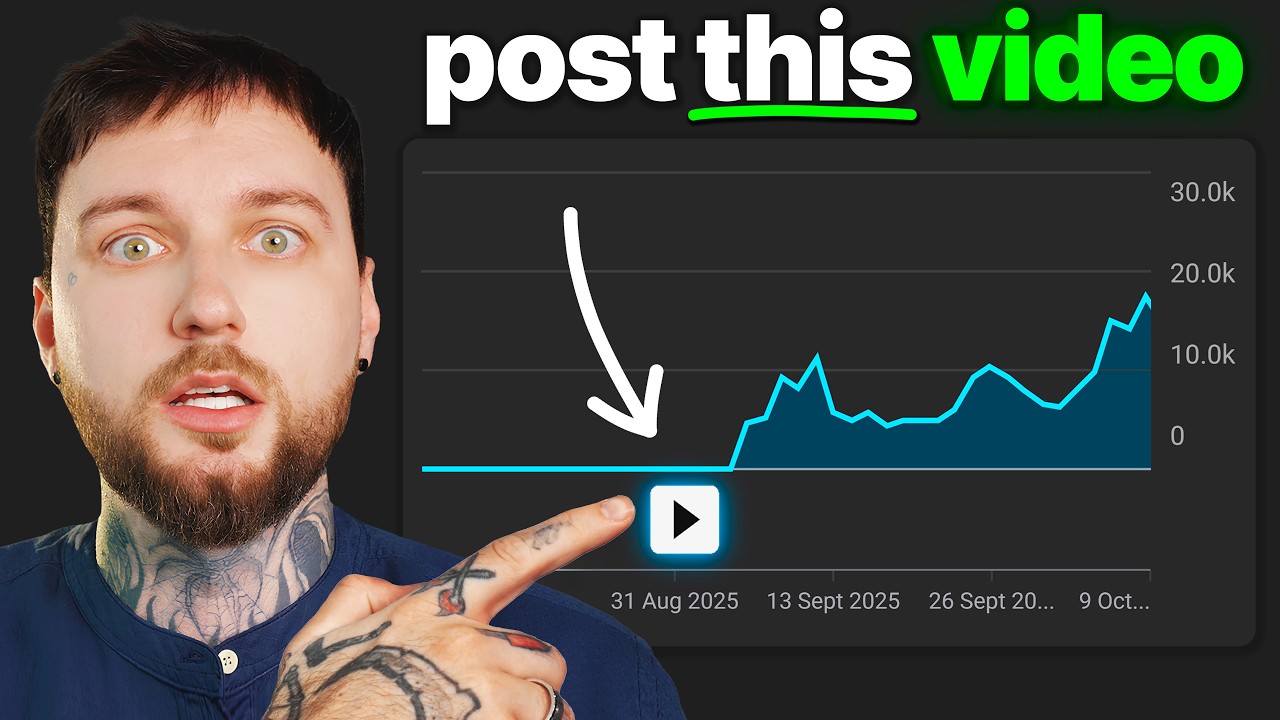
But now, instead of feeling excited, you feel stuck. And maybe you're even thinking about quitting. Or maybe you already did. And that's probably the reason why you clicked on this video because you're hoping someone can finally explain why your channel isn't growing. And as I've mentioned before, I had the exact same problem. My channel was completely stuck, as you can see in my analytics. And during this period, I felt very lost.
I've had anxiety and I started hating myself because I thought I'm not good enough. But look what happened later. My channel blew up. And then I started getting consistent views. So, let me tell you what usually happens. When most people start YouTube, they believe that if they just learn enough, it will eventually work. So, they keep learning. They watch more advice. They try new strategies. They upload more videos.
But their channel still doesn't grow. And slowly, this creates something that quietly destroys small creators. Confusion. Chaos. Your head fills up with too many strategies, too many numbers, too many things you think you need to fix. You don't know if your title is good enough anymore. You don't know if your thumbnail is good enough anymore. You don't even know what you should focus on anymore. And when your head is full of that kind of chaos, you stop trusting your creativity.
You stop trusting yourself. So, how can you succeed on a platform called YouTube when you don't trust yourself? Does that make sense? So, now instead of focusing on making one great video, you start chasing strategies. But the truth is simple. None of those strategies matter if the video itself isn't great. Because in the end, the only thing that actually grows a channel is making one video that people truly want to watch.
So, I want to show you something. Let me show you a channel as an example. It's called 20-Minute University. And it got over 100,000 subscribers with one single upload. The first video on this channel got 2 million views and it's the only video uploaded on this channel. That's insane. And it shows the power of something I call the one viral punch. I've seen many new channels go viral after their first or second upload.
So, you're probably asking yourself, how is this possible? Well, instead of focusing on uploading as many videos as possible, what if you focused on one video? One video that takes you 2 weeks or 3 weeks to plan and make. One video where you try to make the best video you possibly can. The best idea, the best title, the best thumbnail, the best story. Everything. So, now imagine removing all that chaos from your head.
No more worrying about the algorithm. No more worrying about your analytics. No more worrying about what strategy someone posted yesterday. Instead, you have one clear mission. One road. And that road leads to one video. You can focus completely on making that one video the best thing you've ever created. That's what I like to call the one viral punch. In this video, I'm going to show you the exact strategy to create your one viral punch.
The kind of video that actually has a chance to blow up your channel. If you don't know me, my name is Danny Wyatt. I've built multiple successful YouTube channels and helped creators inside my community get monetized. And if I had to start a brand new channel from zero today, this is the strategy I would use. So, if you're serious about growing on YouTube, pay close attention because today you're going to learn how to create the best YouTube video for your channel.
I will teach you the one viral punch method so that you can punch the algorithm in the face. Let's begin. Okay, now I'm going to say something that might sound crazy. Ignore the thumbnail. Ignore the title. Seriously, for a moment, forget about them. I know that sounds like terrible advice. Every YouTube tutorial tells you the opposite. Even I teach people inside my videos how to make the best titles and thumbnails. But I want to teach you about something that's even more powerful than the thumbnail and the title.
I've been on YouTube since 2009. And there's something I've seen happen again and again. It doesn't matter how much YouTube changes. It doesn't matter how many algorithm updates happen. The videos that usually explode follow this exact same pattern I'm about to show you. Let me show you what I mean. Imagine Fortnite announces a huge in-game event. Maybe Travis cos suddenly appears inside the game, which happened, by the way.
Millions of players jump online to watch it. And naturally, videos about the event start getting views. Now, think about Minecraft. A big update drops and the entire community starts talking about it. Players want to see what changed and how the game looks now. So, videos about the update quickly attract attention. Or think about something completely different. Sometimes a random food suddenly goes viral online. Maybe it's a strange dessert or a new chocolate everyone is talking about.
Creators start trying it, reviewing it, reacting to it. And those videos get more views. Not because of some secret thumbnail trick and not because the algorithm suddenly decided to help them. Those videos work because people were already interested in the topic. And this is the pattern I've seen repeat for years. The videos that explode are almost always connected to something people already care about. Something people are already curious about.
So, instead of trying to make people interested in your topic, just make a video about a topic that is already interesting. And these topics exist everywhere. Every has them. I just gave a few examples with Fortnite and Minecraft and food. But the same thing happens in politics, cars, racing, finance, gaming, literally everywhere. Even inside my niche on my channel, I do this. For example, when the YouTube algorithm introduces a new update, I talk about that update.
And because a lot of people are interested in the update, they come to watch my video. And that video on my channel will get more views than usual because people were interested in the update. There's always something trending, something people are talking about, something people are curious about. You just have to stay online, pay attention, and find those topics. And then make a video about them in your own way. But this leads to a very important question.
How do you actually make an interesting video about those topics? Because this is where most people struggle. And this is probably the most important part of this entire video. How to take a topic and make it interesting. Honestly, that's the real secret of YouTube. Being able to take something normal and turn it into something people want to watch. For example, how could you make a video about bananas interesting? Sounds impossible, right?
Well, that's exactly what I'm about to show you. I'm going to take the simple idea of bananas and turn it into a video people actually want to watch. And I need you to pay close attention over here because if you're not going to understand what I'm about to explain, YouTube will always feel confusing to you. But if you understand how I twist the simple topic of bananas and turn it into something interesting, you will start seeing YouTube completely different.
So, pay attention. So, imagine I upload a video tomorrow called Bananas. That's the title. That's the topic. Nobody clicks that. Why? Because bananas are normal. You see bananas every day. There's nothing surprising about them. But now, watch what happens when we twist it just a little bit. What if the video was called Why Bananas Might Disappear? Now, suddenly something changes because your brain goes, wait, what disappear?
Bananas are everywhere. How could they disappear? So, now you're curious. You want to know the answer. And that curiosity is what makes people click. Let me give you another example. Imagine the video is called Why Bananas Don't Taste Like They Used To. Now, again, your brain starts thinking, did bananas used to taste different? What changed? What happened? How did they used to taste before? So, you see, the topic is still about bananas.
Nothing changed about the topic. But the way we presented the topic changed everything. And this is the moment where most people start to understand YouTube. The topic itself is not what makes the video interesting. The angle is what makes it interesting. You can take almost any topic in the world and make it interesting if you find the right angle. And when you combine that with something people are already curious about, that's when videos starts exploding.
And this right here is the first real step of creating the one viral punch to punch the algorithm in the face. Finding the angle. Because once you find the right angle, the title becomes obvious. The thumbnail becomes easier to make. And the video suddenly has something most videos don't have. Curiosity. And curiosity is what makes people click. But here's where YouTube gets annoying. Getting the click is one thing. Now, you have to hold the viewer's attention because even if your topic is trending, even if your angle is interesting, even if people click on your video, none of that matters if they leave after 10 seconds.
And this is where most small creators lose. They spend hours trying to get the click, but they forget about the moment right after the click. So, let me show you something. Imagine I start telling you a story. I say, "Yesterday, I saw a magician make a coin disappear." Okay, you understand the story. But now, imagine something different. Instead of just telling you about it, I show you the clip. You see the coin. You see the magician close his hand.
And when he opens it, the coin is gone. Now, something changes. Suddenly, you're paying more attention because your brain wants to understand how it happened. Not because the story changed, but because now you can see it happening. That moment right there is exactly how YouTube retention works. People don't just want to hear things, they want to see things happening. Think about the biggest creators on YouTube. Very rarely do they just sit in front of the camera and talk for 10 minutes straight.
But now you might be wondering something. If the visuals are so important, where do you actually get them? Because not everyone knows how to use After Effects. Not everyone has the time to learn complicated animation tools. And not everyone wants to spend hundreds or even thousands of dollars hiring an editor just to create motion graphics or visual elements for their videos. So, let me show you what I personally do.
And I've been doing this for a few months, and I absolutely love it. It saves me a lot of time, and it's very efficient. So, I've been using an AI platform called Higgsfield. Now, before you click away thinking that this is just another AI image video generator tool, it's not. Your mind will be blown after I show you what I'm creating with this tool. It's actually insane, and I've been using on this channel D'Angelo Wyse for a couple of months now.
And I've shown you that my channel in the last 6 months got 100,000 subscribers. So, whatever I'm doing seems to be working. Inside Higgsfield, you can go to the dashboard and click on video generation. From there, you'll see a lot of different options, but one of my favorites is something called Vibe Motion. This feature lets you create motion graphics using simple prompts. For example, I can type something like create a chart that goes from 0 to 50,000 subscribers.
Then I hit the generate, and in just a few seconds, Higgsfield creates a motion graphic that I can use inside my video. And I've been using motion graphics like this inside my videos. I'm going to go right now on my channel and show you literally a video from me where I'm using these motion graphics, the exact motion graphics I've shown you. So, as you can see inside this video, this motion graphic over here was created with Higgsfield.
Then this motion graphic over here was created with Higgsfield. I have no idea why more people are not talking about this because this is incredibly useful when you're explaining something and you want the viewer to actually see what you're talking about instead of just hearing you describe it. And what's even more cool about it is that if you want more control, you can upload a reference image so the motion graphic matches the exact style you want.
That way, your visual stays consistent with the look of your channel. That's how I'm able to generate these motion graphics with always a dark gray background, right? Because I want to keep a consistent style with my channel. But motion graphics are only one part of it. Higgsfield can also generate images and videos. If you need a specific visual for a story you're telling, you can simply type a prompt and generate it.
For example, in the beginning, I talk about punching the algorithm in the face, and I can literally just visualize that using AI. Or maybe I want to talk about dragons, and I'm going to show people how a dragon is following me. Whether you like or dislike AI, it doesn't matter anymore. This is the future, and if you don't use it, you will be left behind. So, if you want to create motion graphics and other visuals for your videos, there's going to be a link down in the description where you can try Higgsfield yourself.
And now that we've talked about the visuals, there's one last thing most creators forget, how the video actually ends. A lot of people focus on the hook, the title, the thumbnail, the topic, and then the retention, which is good. You will get views if you do this. But there's something else you can do that will boost your channel even more. By the way, I'm doing this in every single video of mine. So, the mistake people make is that they treat the end of their video like something that doesn't matter.
At the end of their video, they say something like, "Thanks for watching. Don't forget to subscribe, and I'll see you in my next video." Right? Let me tell you why that's a huge mistake. Just imagine your video gets 10,000 views. And by the end of the video, the retention will be something like 10%, which means at the end of your video, 1,000 people are still watching. Now, imagine at the end of the video, instead of just ending the video, you send them to another video of yours.
You now have 1,000 people who might go and watch your other video. But here's where things get very interesting. If in the second video at the end, you're also sending them to another video, then they go and watch another video as well. So, one viewer becomes two viewers, becomes three viewers, and if you keep doing this, from one view, you're actually getting three views or four views. Right? You're multiplying your viewers.
Obviously, the total number of viewers who watch your other viewers will slowly drop and drop and drop, but you're keeping that momentum. You keep viewers jumping from one video to another video to another video. And as I said, that's exactly what YouTube wants. YouTube wants you to keep viewers on their platform because that's how they make money. So, if you make YouTube money, YouTube will make you money. Now, if you want to understand the YouTube algorithm better and see how it actually works today, watch this video over here.
In this video, I explain how the algorithm has changed over the years and how YouTube recommends videos today. So, if you want to take advantage of it and grow your channel fast, click on this video.
The words are the caption track's own and nothing is reworded or re-transcribed. Paragraph breaks are placed between sentences so the text reads as prose.
Free tools for your own script: paste a draft and see where it stands before you record it.
Paste your draft and see where viewers are likely to drop off, with a rewrite for each weak line.
Paste the first 30 seconds of your own draft for a hook score and rewrites.
Check your draft against YouTube's advertiser-friendly guidelines before you record it.
Read this channel's public videos and transcripts, and download a writing brief for it.