Getting the transcript
Reading the captions from YouTube. A video nobody has opened here before takes 10 to 30 seconds; this page fills in on its own.
Getting the transcript
Reading the captions from YouTube. A video nobody has opened here before takes 10 to 30 seconds; this page fills in on its own.
Zubair Trabzada | AI Workshop · @AI-GPTWorkshop
This video has no Most replayed graph yet: YouTube shows one only once a video has enough views. These are the moments viewers replayed most in Zubair Trabzada | AI Workshop's most watched videos.
Most replayed moment at 9:02
4.9x that video's typical replay level
July 7th on your plans on your cloud plans. So, go ahead and take advantage of that because after that it's going to get pretty expensive and move to usage. I've been building non-stop. So, I recently built my personal assistant and my second brain I updated with cloud Fable 5 and it's absolutely incredible.
Said at 8:55
Most replayed moment at 13:13
2.9x that video's typical replay level
capturing the humor uh so you can play around with this prompt on whatever character you're uh creating for your own use case so afterwards after that that comment is generated then I'm outputting this and this is where I'm utilizing this HTTP request tool to grab
Said at 13:06
Most replayed moment at 21:31
5.4x that video's typical replay level
you if you scroll down to the bottom, you'll see that I have built Jarvis AI assistant prompt. So I've given you this prompt back before this was back when I built Jarvis. So you can have access to that so that way you can build a version of Jarvis for yourself. And then afterwards at the bottom, you're also going to
Said at 21:23
The graph counts replays. It does not show where viewers stopped watching.
Words
3,207
Runtime
16:06
Speaking pace
199wpm
Reading time
13min
199 words per minute, between the 181 median and the 201 75th percentile of 349 measured videos. That distribution comes from the 349-video hook study.
Opening (first 30 seconds)
Hey, Jarvis. Do I have any meetings for tomorrow? Can you please check my calendar? >> Here's what you requested, sir. A perfectly spaced lineup of meetings designed to keep you mildly occupied, but still free for, dare I say, a moment of sanity. Shall I assist with any adjustments? >> Thanks, Jarvis. Grab John Do's email and send him an email. Say that I cannot attend the meeting tomorrow cuz I forgot that I have a doctor's appointment. Here's what you requested, sir. The message has flown off to Mr. Doe, notifying him of your noble excuse. Doctor's orders,
100 words, the words spoken in the first 30 seconds at 199 words per minute.
Free, no signup. See how the first 30 seconds hold attention, with rewrites.
Sentence shape
| Measure | This transcript |
|---|---|
| Sentences | 159 |
| Average words per sentence | 20.2 |
| Longest sentence | 314 words |
| Questions asked | 19 |
| Sentences containing a number | 10 |
Most used terms
Filler phrases
131 in total: uh 49 · like 22 · right? 15 · kind of 13 · um 13 · basically 11 · you know 5 · literally 2 · I mean 1.
A literal whole-word count of the same phrase list the Prepublish browser extension uses, so a phrase inside another word is not counted and a phrase used in its ordinary sense still is. It is a count and not a judgement.
Free, no account. See where attention is likely to drop, with a rewrite for each weak line. The free check shows the scores and the one issue costing the most. Or run it on the words above first.
Free · No login · See a sample audit first if you prefer.
What this transcript is
Every word below is the caption track YouTube publishes for this video, pulled from the video itself and reproduced unchanged. It is not Prepublish's writing, not a summary, and not a re-transcription: it is the video's own published captions. English captions, generated automatically by YouTube, in the video’s original language. Source: the video on YouTube. A channel that would rather this page did not exist can ask for its removal through the contact page, and it is removed.
Hey, Jarvis. Do I have any meetings for tomorrow? Can you please check my calendar? >> Here's what you requested, sir. A perfectly spaced lineup of meetings designed to keep you mildly occupied, but still free for, dare I say, a moment of sanity. Shall I assist with any adjustments? >> Thanks, Jarvis. Grab John Do's email and send him an email. Say that I cannot attend the meeting tomorrow cuz I forgot that I have a doctor's appointment.
Here's what you requested, sir. The message has flown off to Mr. Doe, notifying him of your noble excuse. Doctor's orders, no less. So, you're all set to skip tomorrow's gathering. >> Okay, great. Thanks. Uh, can you do me another favor and um find out how much did I spend on marketing in the last quarter of 2024, please? In Q4 2024, you generously invested $3,500 on marketing spread across YouTube, Facebook, and LinkedIn campaigns.
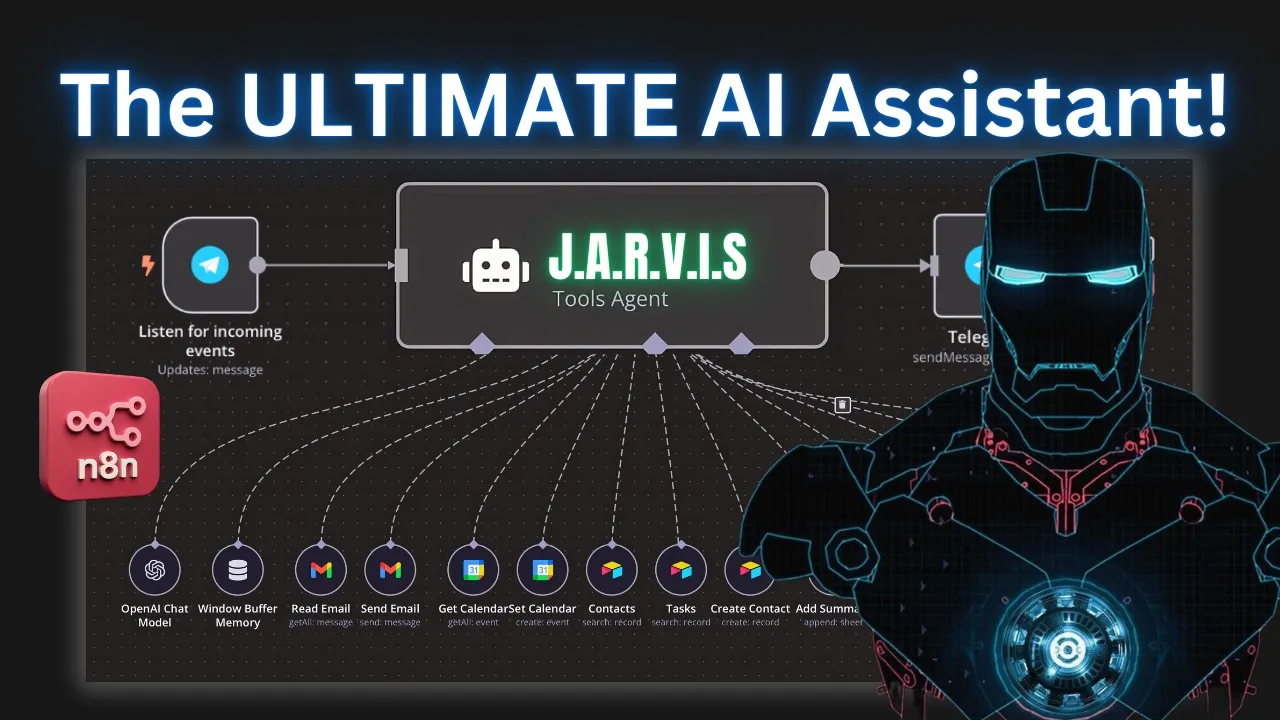
Clearly, your brand's visibility was not left to chance. So, I officially built Jarvis as my personal assistant, except this time it is updated. That's why it's called Jarvis 3.0. Uh, for those for those of you guys who have watched my previous videos, I did the Jarvis 1.0 IO a long time ago which looked something like this which is basically had all of these different you know calendar email and everything individually attached to the main agent and then obviously the voice was done through 11 Labs and then afterwards I did Jarvis 2.0 note which looks something like this where basically the difference was uh each of these different tasks like email management uh calendar management was shipped off as a separate workflow because that's what uh NAN required back then and each of these workflows that you're seeing right here was a separate um workflow that we had to create and then attach it using this when executed by another workflow but since and it then recently had this amazing update where you have the ability to add uh AI agent as a tool.
What ended up happening is now this version which is probably the cleanest version and the best version of Jarvis or any kind of personal assistant uh we will be we have attached everything separately as an AI agent. So that way this orchestration agent has the ability to decide which uh sub agent to use based on the query or based on the ask that's coming in here from our telegram. Obviously, I'm using Telegram, but this could be used with uh any other uh trigger as well.
So, you can have a web hook trigger. Right now, like I said, I'm using Telegram because it's a lot easier for me to handle because you can it it accepts text and voice message, but this could be done via a web hook or this could be uh you know called upon from a separate trigger as well. So, in this video, I'm going to go ahead and show you exactly how to build this thing. Uh I mean, obviously, this is not going to be a complete step-by-step tutorial because I've already done that.
And then resources are also available that I'm going to show how to access this. So that way you can just basically download this on your own uh workflow and you can twe make tweaks and then I'm also going to show you how you can add additional sub aents for other tasks as well. This is going to be the best version of the personal assistant Jarvis. Uh so make sure you stick around till the end so you can know exactly how to build this thing and then also I'm going to give you some more details on how you can utilize this and sell this to your clients whether it's for businesses or personal use.
All right, let's get started. All right, so I'm going to go ahead and explain uh what's going on inside different nodes and how the different prompting of this works inside each agent. Obviously, our telegram trigger is going to initiate and grab that information that's being sent via either a voice message or a text message. And based on that, this switch node is going to decide which route to ch uh take this to. Right?
So, if it's a voice message, it's going to automatically recognize that and send it to this top route where now we're downloading that voice file and we're using uh uh OpenAI's transcriber to be able to transcribe that message and we're sending it to our orchestration agent. If it's a text, same thing. This set node is going to transfer that text um to our orchestration agent. So, the orchestration agent, this is kind of the main agent that's going to decipher and understand where to send or where to grab the information. based on the query that's coming in.
It has uh entropic chat model. I'm giving it clots for sonnet 4 which you need to give it a really strong model. Uh so that way it knows exactly how to route and how to use the sub agent. So that's why I'm using clot but you can use GP5 or something like that as well. The memory obviously you want to give it a memory so that way it has uh a natural interaction with the with the person. I'm calculator I'm just giving this tool just in case somebody is asking or a user is asking it any kind of mathematical operation.
So that's what this is using for. So let's go ahead and take a look at inside the orchestration agent and see what the prompt um looks like because the prompt is very very important here. Obviously as far as the source for the prompt, we're going to use define below and I'm literally just dragging this and bringing it on over here, right? Because we're grabbing this JSON.ext because that's what's coming in from our previous notes there.
So the system prompt, this is where kind of the most important thing uh of this particular agent comes in. I always like to keep the prompts very very simple. I don't like making uh prompts too long or too complicated because that's what reduces hallucinations. So we're just giving this a role. Uh we're saying your role is to efficiently delegate user queries to the appropriate tool. Right? You should never compose emails, summarize contents or manually handle task.
Your only job is to determine the correct tool use. And here are the tools that it has available to. So each of these tools, the email agent, calendar agent, calculator, company knowledge, personal access, these are sub agents. So I'm identifying which tools it has access to and when to use that tool. For instance, for the email agent, I'm saying handles all email related tasks, sending, drafting, replying, others, all of that activity related to email.
Calendar agent obviously manages calendar events including scheduling and updating company knowledge retrieves information about the company and you can add more agents and essentially give this a task tool uh or information when to use that particular tool. So for example the email agent let's the calendar agent let's take a look at that right so each of these agents the email agent let's say the calendar agent these are sub agents the way to add this you're going to click on the plus sign in the tool here if you just like uh search AI agent now you can see this AI agent tool you have the ability to add a separate agent now as a tool and each of these sub agent has its own chat model and also it has its own memory and its own subtools basically Right.
So after you add that, you need to identify and give this agent information or that prompt on when to use its own sub tools that it's had available to. So for example, let's take a look at the email sub agent. So if I go to this email sub agent, as you can see right here, it has all of these different tools that's added to this like sending email, replying email, labels, creating draft, getting emails, and then also it has its own chat memory because we want to give it that brain, right?
So inside the email agent again prompting comes very very important. So you want to describe when the main agent or this orchestration agent is supposed to use this particular tool. So I'm saying use this tool for any email related activity. Very simple. Like I said I always like to uh keep the prompts uh as simple as possible. the prompt user. I'm just saying it defined by the model automatically because you want to be able to uh have the model automatically be defined based on whatever query that's coming in.
And then as far as the system message itself, I'm just giving it the role saying your role is to basically manage users emails professionally using the tools you have access to for sending emails. Just like you saw on the email right here, as you saw, this was the email that during the demo that I sent. It just said, "Hi, John. I'm sorry, but I can't attend the meeting tomorrow. I forgot I have doctor's appointment. Thanks Zubair.
Right. And the way it's uh using this is because I'm identifying or giving it that instruction that for sending email sign off as Zubair. So that's how you can see how granular you can get here with the prompts. And this particular sub agent now has access to all of these tools. Right? So it has access to send email, create draft, get emails, label emails. And I'm telling it when to use these particular tools. Right?
So I'm saying compose and send emails. Use the send email tool. To save an email as a drop upon request, use the create draft tool. to get emails, retrieve messages when needed, you you use the get emails tool, right? And then I'm at the bottom. I'm also giving it a current date and time. That's just always a good practice to do that. So now, as you can see, all of these sub um tools or all of these tools are available for this particular sub agent that is the email agent, the send email, reply labels, and all of that stuff inside each of these sub tools.
The great thing about Nen is that now you can I define everything I uh automatically by the model. So I'm literally just using that. I'm not typing any prompt here, any messages. I'm just clicking on this defined by model automatically and it will exactly know when to use this. And obviously you need to have your credentials attached. Same thing with the calendar agent. It's kind of the same type of operation. I'm identifying and given this uh description on when to use this tool.
And then inside the sub agent for calendar, same thing. I'm giving it a role so it understands when to use this particular sub aent, right? because I'm giving it a rule saying hey manage users calendar by creating retrieving updating deleting events using the tools you have access to and then same thing I'm identifying that this calendar sub agent has access to all of these tools like create event get event delete event update event and I'm giving it this instruction a quick short description of when to use these each tools for what purpose right so for example if I'm saying hey delete event uh tool should be used to delete an event get an event ID from the get events first so I'm giving it a quick instruction and then each of these particular uh tools or each of these particular tools that's identified inside the sub agent or tools that I'm attaching and that's very simple you just click on the plus button and for example if I look for calendar right Google calendar as calendar as a tool I can add this and that's exactly what I'm doing I'm I'm giving it separate tools for different purposes because based on whatever prompt I'm giving inside the sub agent I want to make sure that that matches all of the names inside the tool tools that it has access to and then same thing like I mentioned before all of these sub agents have access to a brain or a chat model which in my case I'm using open AI so that's how you can basically give these sub aents more tool and the orchestration it's kind of it gets layered right so the orchestration layer is in charge of kind of delegating based on the query that the user is asking which sub agent to use each sub agent has access to different tools that's related to that right so for example calendar agent has access to tools that are related to calendar events.
Email agent has access to tools that are related to emails and then instructions on when to use each of these tools based on the instruction that's coming in from the top layer there. Right? So for example in this one I also have a personal expense sub agent and here this is anything related to personal expense like credit card payments or personal expense uh history that you saw during the demo as I mentioned uh you know I asked the sub agent or the personal assistant basically hey how much did I spend on marketing last year so then the orchestration layer un uh agent understood that okay this is a question related to personal expense so it reached out to the personal expense sub agent and this personal expense sub agent has access to its own tools like a vector database where all and also a CRM where all of the credit card and all my expenses are sitting and it was able to retrieve that information pass it back to the orchestration layer and that's how the orchestration agent then responded with the correct tools and the way all of these different sub agent works is same thing it's waiting for instructions to come in from the orchestration agent it it grabs that information that's needed and sends it back to the top.
Then the orchestration agent has the ability to respond or have an output based on all of the information that's coming in from different sub aents as you can see right here. So that's what's happening. This is the output. Afterwards, we're sending this to two different routes. First, we're sending it directly to the telegram agent. So that way we receive the text. So if you see right here, this is we're getting the text that's coming in directly from the orchestration agent and it's sending it as a text.
Afterwards, we also want to So, as you saw during the demo, uh the Jarvis voice kind of gives me like a really quickwitted answer also. So, the way that's designed is I'm giving it a basic LLM chain. Now, this basic LLM chain, this is where we're identifying the personality of Jarvis, right? So, we're saying you're Jarvis, a sophisticated, quickwitted AI assistant from Iron Man, right? You have a refined British accent.
So I'm giving it a persona and then I'm saying that summarize the output from this orchestration agent, right? And respond in one short sentence, right? So that's what's happening here. I'm giving it an instruction. As you can see right here, this is the input that was coming in from the orchestration agents output. And it's summarizing it based on this prompt. And then it's giving me like a quick little uh um you know, as you can see right here, it says Q424, you generously invested 3,100 on marketing spread across YouTube, blah blah blah.
Um uh and then clearly your brand's visibility was not left to chance, right? That's kind of like it's using its humor. So this is where you can now update this prompt to whatever you like based on the character that you're identifying. And I've given it multiple examples because I wanted to really understand what the persona of Jarvis is and therefore respond accordingly. Then afterwards I'm sending this little sentence that the respond comes out of this basic LLM chains LLM chain which is basically the Jarvis's kind of response.
I'm sending this to 11 Labs to text to speech. Um and I'm basically saying all right so convert this little short sentence into a voice message. And the ID that you're seeing right here this is Jarvis's voice clone that I did on 11 Labs. And again I've done a step-by-step tutorial inside and I'll show you how to access that. Um, so basically I'm converting this text into speech and as you can see this data file is an audio file and then I'm sending that to my telegram.
So that's how you can see that in telegram. First I get the text message, right? This is kind of a more professional that the uh the orchestration agent outputs and then afterwards a quick um audio file that's coming in from the output of this uh basic LLM chain to text to speech using labs and then it's sending it to our telegram. So hopefully that makes sense. I know this is kind of a a bit of a complicated build. That's why you know if I did like a step-by-step tutorial on this this will take a long time.
If you are interested in learning how to do this step by step, um I'm going to put the link in the description. You can join the community. I've done a a couple of versions of this, not this specific Jarvis 3.0, but uh the the past um Jarvis 1 and Jarvis 2.0, we have done a live build, so you can see if you're interested in uh watching how to uh kind of attach the um Telegram and the 11 Labs and everything else. And then obviously all of the blueprints for all of these including this one is available in the bottom of the file.
So you can just download this and bring it over to your workflow and that way you can make your own tweaks and have add your own personal tweaks. And then also if you're interested in uh learning how to make money with AI, for example, if you want to sell this to a business or somebody else, you can uh check out our earn with NAN, which is basically a fiveweek uh day-to-day accountability program where we show you exactly how to monetize and use these uh skills and AI agents to be able to make a career or start your own AI agency.
So, make sure you join the community. I'll put the link in the description. Thanks for watching. Hopefully, you found it helpful. I'll see you on the next one.
The words are the caption track's own and nothing is reworded or re-transcribed. Paragraph breaks are placed between sentences so the text reads as prose.
Free tools for your own script: paste a draft and see where it stands before you record it.
Paste your draft and see where viewers are likely to drop off, with a rewrite for each weak line.
Paste the first 30 seconds of your own draft for a hook score and rewrites.
Check your draft against YouTube's advertiser-friendly guidelines before you record it.
Read this channel's public videos and transcripts, and download a writing brief for it.